ExakTime Alternative / Comparison

Truein vs ExakTime: Which Time Tracking Software Fits Your Crews?

Both track field time with GPS. ExakTime pairs a mobile app with optional rugged JobClock hardware and photo capture at clock-in. Truein verifies worker identity through AI face recognition on compatible phones and tablets, captures attendance offline, and uses AI TimeGuard to flag suspicious attendance activity for manager review.

Quick Answer

Is Truein a Good ExakTime Alternative?

Yes. Truein is an ExakTime alternative that verifies GPS-geofenced clock-ins with AI face recognition on any Android or iOS device, with no dedicated hardware, and adds offline capture, a centralized multi-site dashboard, AI TimeGuard review before payroll and Workforce Insights. ExakTime fits crews that want a rugged keytab clock for phone-free sites plus prevailing wage and certified payroll reports.

Truein

Where Truein Has an Edge for Multi-Site Crews

Three differences stand out: Truein verifies worker identity at clock-in, uses AI to flag suspicious attendance activity for review, and allows new sites to be deployed using existing compatible phones or tablets without waiting for dedicated hardware.
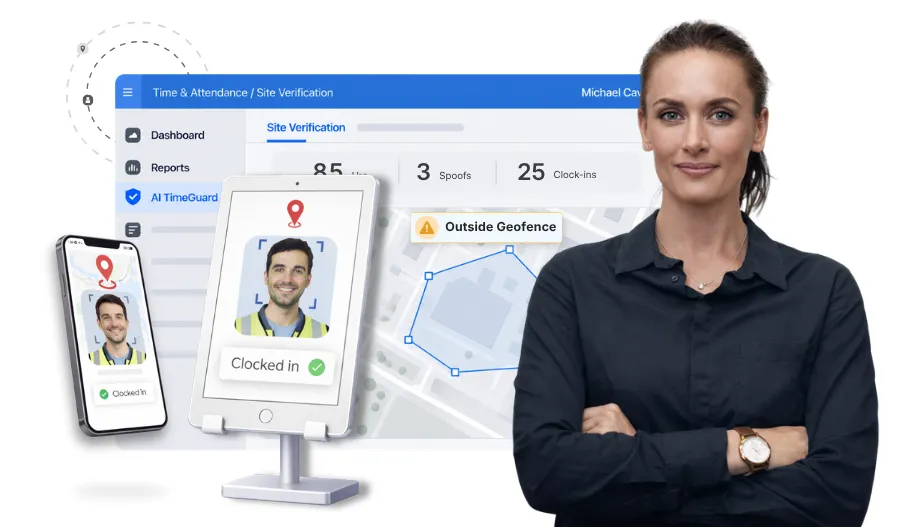
Truein face recognition clock-in on a tablet kiosk with a polygon geofence

Identity verified at the punch

Truein uses AI face recognition to match the worker against their registered profile during clock-in, while GPS geofencing checks the device’s reported location against the authorized site boundary. For offline attendance, User App punches are verified when connectivity returns, while kiosk mode with On-Device Recognition supports face verification offline. ExakTime’s app captures a photo for someone to check later; its JobClock records a keytab tap.

Explore face recognition
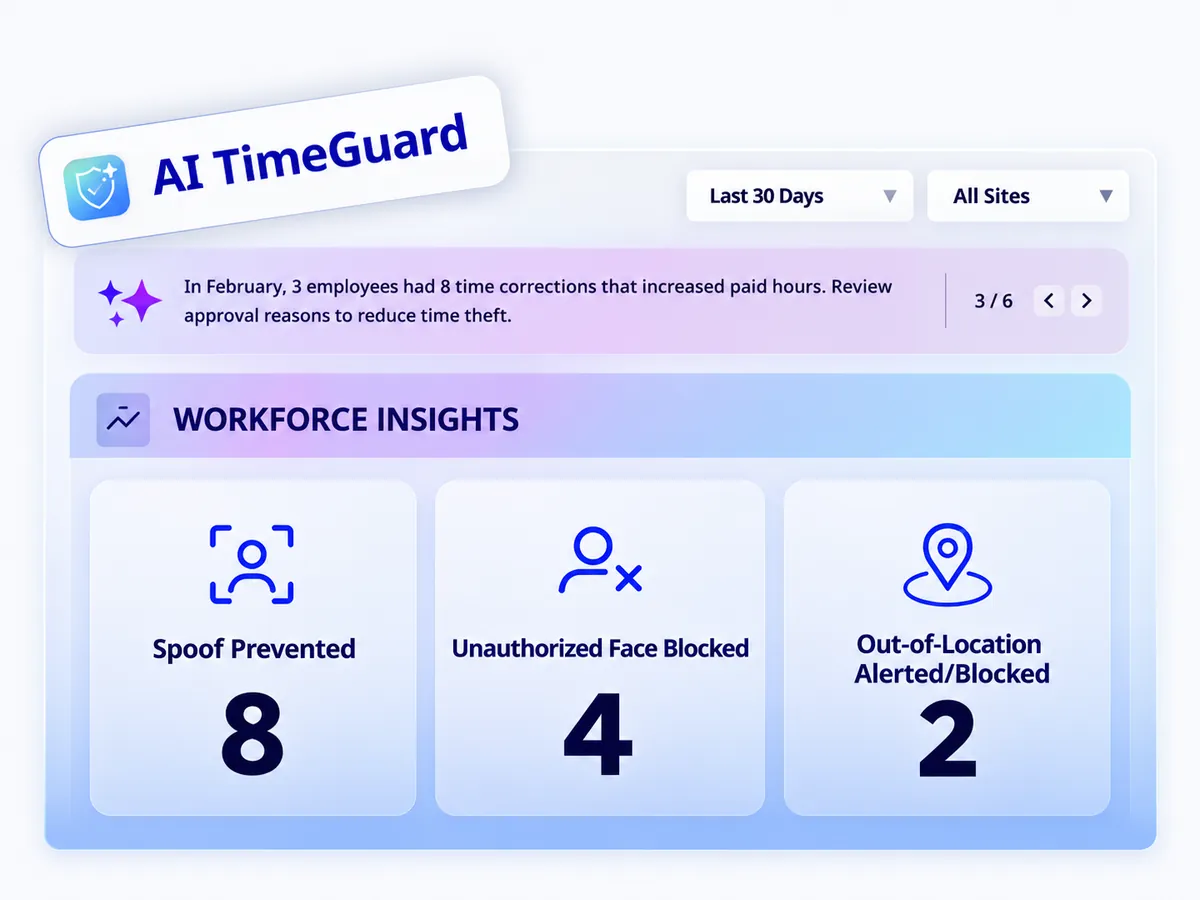
Truein AI TimeGuard dashboard showing suspicious attendance activity and clock-in anomalies across multiple sites.

Suspicious activity caught before payroll

AI TimeGuard helps flag suspicious clock-in activity for manager review. It highlights the findings; your team decides. It does not change timesheets automatically. ExakTime’s official site does not document an AI review step.

Explore AI TimeGuard
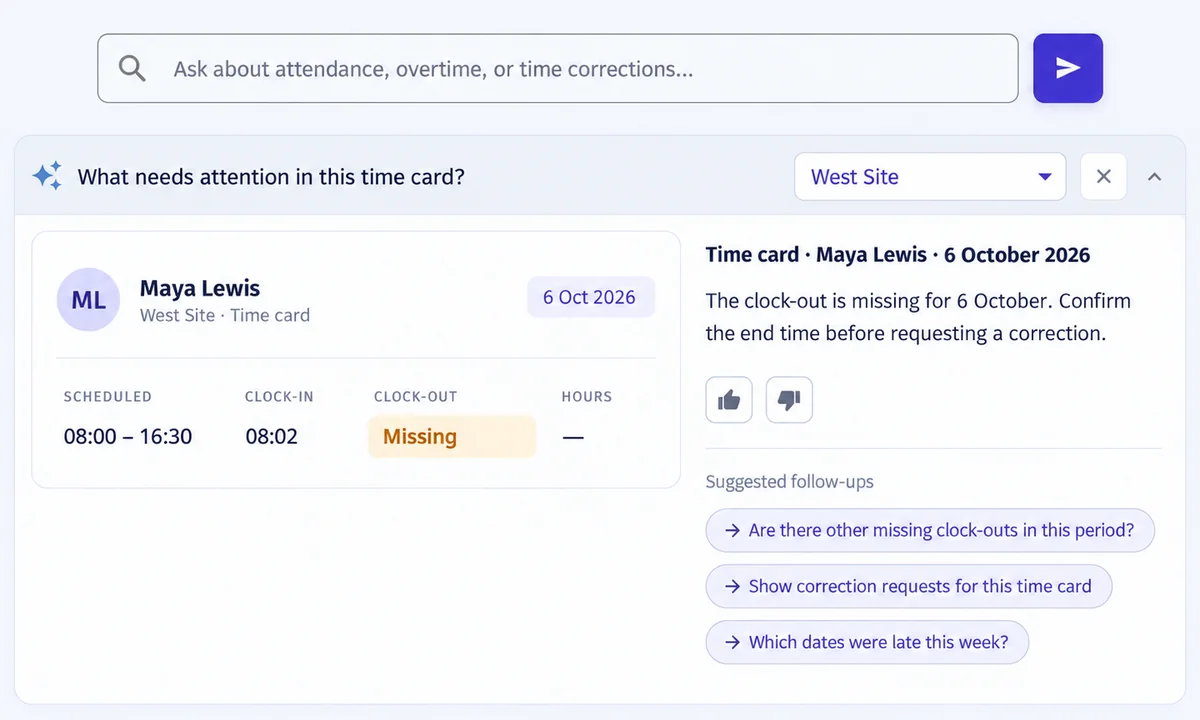
Truein time card beside a contextual Workforce Insights answer explaining a missing clock-out

Answers instead of report digging

Workforce Insights lets managers ask questions about the records on screen in plain language and surfaces issues with suggested next steps across every site. ExakTime offers 40+ standard reports to run and read.

Explore Workforce Insights
ExakTime

Where ExakTime Has an Edge

Phone-free rugged clock

The JobClock Hornet runs on battery for weeks, syncs over LTE, and takes a keytab tap from workers who do not carry phones on site.

Prevailing wage and certified payroll

Prevailing wage tracking and certified payroll reports are built in for federal and government contracting jobs.

Field forms and expenses

Safety reporting forms, injury sign-off, multimedia field notes, expense and equipment tracking sit alongside time tracking.

What Happens When You Actually Deploy Each Tool?

Truein starts the day the app is installed on a tablet or a worker’s phone. ExakTime starts when workers install the app and enter a PIN, or when a JobClock is mounted on site. The rest of the week follows from that.

A construction firm opening three sites in one month needs verified attendance from the first shift at each one, and any device shipping lead time turns straight into unverified payroll hours.

Real-world situationWith TrueinWith ExakTime
Workers spread across 20 sitesEvery site clocks in on a phone or tablet kiosk; one centralized dashboard shows all sites in real timeApp on each worker’s phone or a JobClock per site; Who’s Clocked In map across sites
A new site opens next weekInstall the app on a compatible tablet or worker phone, configure the site, and register workers to start capturing attendance without waiting for dedicated hardware to be shippedAdd the site in ExakTime Connect and have workers select it in the app, or ship and mount a JobClock
A site has no internet connectivityOffline punches are stored and auto-synced when connectivity returnsJobClock Hornet stores entries locally and syncs over LTE; mobile app offline behavior is not documented on the official site
A worker tries to clock in from outside the permitted siteGPS geofencing checks clock-in and clock-out locations against authorized site boundaries. Depending on the configured policy, out-of-location attempts can be blocked or allowed with an alert, with location details recorded against attendance entriesPerimeter control blocks clock in and out outside the geofence; GPS breadcrumbing tracks movement during the shift
Someone tries to punch in for a coworkerAI face recognition checks the worker against their registered profile during clock-in, while suspected photo or video spoofing can trigger administrator alerts after attendance data is uploadedPhoto ID Capture stores a picture at clock-in for a manager to review; a keytab tap on the JobClock has no identity check
Payroll week: hundreds of timesheets to approveAI TimeGuard flags suspicious clock-in activity for review before payroll; approvals and sign-off handle the restEmployee timecard sign-off, supervisor sign-in and sign-out, overtime reports
A manager asks who was late at which site this weekWorkforce Insights answers in plain language and surfaces issues with suggested next stepsRun one of 40+ standard reports
Federal job needs certified payrollPayroll-ready reports export to your payroll system; no certified payroll report namedOvertime and certified payroll reports, prevailing wage tracking

How Do Truein and ExakTime Compare Feature by Feature?

They overlap on GPS, geofencing, breaks and overtime. They differ on who verifies the punch, whether AI reviews it afterward, whether hardware is dedicated, and how the bill is built.

Feature
Truein
ExakTime
Dedicated hardware required
✓ None requiredNo dedicated attendance hardware required. Works on compatible Android and iOS phones and tablets.
◑ OptionalJobClock Hornet and LE sold separately
Identity verification at the punch
✓ AI face recognitionFor worker identity verification
◑ Photo ID CapturePhoto stored for review; keytab on JobClock
Kiosk mode on a shared device
✓ AvailableTouchless kiosk on any tablet
○ Not documentedJobClock serves the shared-device role
Clock-in from the worker’s own phone
✓ AvailableSelfie attendance with geofencing
✓ AvailablePIN plus GO and STOP buttons
Supervisor clock-in for the crew
✓ AvailableFrom the supervisor’s mobile phone
✓ AvailableSupervisor sign-in and sign-out
Offline punches
✓ AvailableAttendance is captured offline and automatically synced when connectivity returns. Face verification depends on the attendance mode.
◑ JobClock onlyMobile app offline not documented on official site
GPS geofencing
✓ AvailableChecks the device’s reported GPS location against configured site boundaries during clock-in and clock-out, with out-of-geofence attempts handled according to the configured attendance policy.
✓ AvailablePerimeter control, GPS breadcrumbing during shift
Feature
Truein
ExakTime
Breaks, overtime, rounding
✓ Available70+ customizable policies
✓ AvailableMeal break tracking, sign-off and notifications; overtime reports
Shift scheduling
✓ AvailableAdvanced plan
◑ Professional planSchedule and communicate job assignments
Time-off management
✓ AvailableAdd-on with approvals
◑ Professional planPTO administration
Contractor and agency-level attendance management
✓ AvailableAgency-specific policies and pay rates, with staff transfers between sites
○ Not documented
Prevailing wage and certified payroll reports
✕ Not availablePayroll-ready exports instead
✓ Available
Injury and break sign-off at shift end
✕ Not available
✓ Available
Multi-site dashboard
✓ AvailableCentralized control across all sites
✓ AvailableWho’s Clocked In map
Feature
Truein
ExakTime
Verification at the punch
✓ Face recognition plus geofence
◑ Photo capture plus geofence
Spoof detection after upload
✓ AvailableRuns after the punch is uploaded; admin alerts
○ Not documented
AI review before payroll
✓ AI TimeGuardFlags for manager review; does not change timesheets
○ Not documented
Plain-language questions on attendance data
✓ Workforce Insights
✕ Not available40+ standard reports
Approvals and sign-off
✓ Available
✓ AvailableEmployee timecard sign-off, custom sign-off forms
Feature
Truein
ExakTime
Job and cost code tracking
✓ AvailableJob-based time tracking, job scheduling
✓ AvailableCost code tracking
Safety reporting forms
✕ Not available
✓ Available
Expense and per diem tracking
✕ Not available
✓ Available
Equipment tracking
✕ Not available
✓ Available
Multimedia field notes and custom forms
✕ Not available
✓ Available
Feature
Truein
ExakTime
Published pricing
✓ Published$2.25 and $3.50 per user per month, billed annually
◑ PartlyEssential $9 per employee per month billed annually plus an unpublished base fee; other plans quote-only
Monthly base fee
✓ None
◑ Yes, amount not published
Free trial
✓ 14 days, no credit card
○ Not documented
Contract term
✓ Monthly or annual
◑ Annual billing on published plan
Integrations
✓ API and FTPSupports API and FTP-based integrations with payroll and HRMS systems, along with custom integration options.
◑ Pre-built, names not listedConstruction partner integrations on Professional
Markets
✓ US, GCC, India, worldwide
◑ USUS-based support
✓ Available◑ Partial / Limited○ Not documented publicly✕ Not available

Feature data from truein.com and exaktime.com (pricing and product pages), verified November 12, 2026. “Not documented publicly” means the vendor’s own website does not establish whether the capability exists; confirm in a demo. “Not available” marks capabilities the vendor confirms it does not offer.

How Do Users Rate Truein and ExakTime?

Scores exactly as published on each review platform. ExakTime’s Capterra listing moved to a new “Arcoro ExakTime” profile in 2026, which resets its review count; read the counts alongside the stars.

G2 Higher rated: Truein

Truein
102 reviews
4.8/5
ExakTime
No listing with reviews
–

Capterra Higher rated: Truein

Truein
42 reviews
4.8/5
Arcoro ExakTime
7 reviews
3.6/5

Google Play Higher rated: Truein

Truein
2.96K reviews
4.4/5
ExakTime Mobile
28 reviews
4.2/5

What Truein reviewers say

Praise

  • Ease of use and fast implementation
  • Reliable tracking for field and multi-site staff, including transfers
  • Responsive support and real-time reporting

Criticism

  • Reporting described as plain; some want more graphical dashboards
  • Requests for deeper customization
  • Not a payroll system: hours export to payroll software rather than being paid out inside Truein

What ExakTime reviewers say

Praise

  • GPS and location features for monitoring crews across jobsites
  • Cost code breakdown for job tracking
  • Simple GO and STOP clock-in for workers

Criticism

  • Pricing and the monthly base fee
  • Customer service response times

Ratings and themes from G2, Capterra and Google Play as published on November 12, 2026.

Hear From Our Customers

Which Tool Fits Your Crews?

Truein fits companies managing hourly crews across multiple locations that want identity verified at the punch, offline capture, one dashboard and AI review before payroll, without dedicated hardware. ExakTime fits US contractors who want a phone-free keytab clock and built-in prevailing wage and certified payroll reporting.

A manufacturing plant lead with rotating hourly staff across two shifts and three buildings needs the rules to follow the worker, not the gate, or every transfer becomes a payroll exception.

Truein Is a Strong Fit When

  • You run hourly crews across many sites and want face-verified, geofenced clock-ins on the phones and tablets you already have
  • You want suspicious activity flagged by AI TimeGuard before payroll and plain-language answers from Workforce Insights
  • You want integration with leading payroll and HRMS solutions like QuickBooks, ADP, Sage and Viewpoint, plus offline time tracking

ExakTime Is a Strong Fit When

  • Your sites ban phones or your crews will not carry them, and a rugged keytab clock is the practical answer
  • You run federal or government jobs that need prevailing wage tracking and certified payroll reports
  • You want safety forms, injury sign-off, expenses and equipment tracked in the same app as time

Detect Time Theft. Protect Payroll Accuracy.

Book A Demo
Compass Group logoOCS logoCBRE logoAmana logoSJ Conctracts logoWalker Engineering logoAir India logoAdani logoTata Projects logo

Should You Choose Truein or ExakTime?

Choose Truein if your hourly workforce moves between sites and you want face-verified, geofenced clock-ins captured offline, reviewed by AI TimeGuard before payroll, and visible in one centralized dashboard, with no dedicated hardware and no base fee. Choose ExakTime if a phone-free rugged clock and built-in prevailing wage reporting outweigh AI review and multi-site visibility. For companies managing multi-site field teams, Truein is the ExakTime alternative that starts the same day and bills by users, not devices.

How this comparison was compiled: product features and pricing come from each company’s official website, truein.com and exaktime.com. Ratings and review themes come from G2, Capterra and Google Play. All data verified on November 12, 2026. ExakTime, now sold as Arcoro Time, is a trademark of its owner and is not affiliated with Truein; its capabilities may change, so confirm current details with the vendor.

Frequently asked questions