










Built for Manpower Suppliers

Manpower Attendance System for Staffing and
Manpower Supply Companies

Blue triangular abstract vector graphic with varying shades and geometric shapes.

Truein records verified attendance for the staff you deploy across client sites, using face recognition and GPS geofencing on any phone or tablet. No dedicated hardware required anywhere.

  • Client-site geofencing with a configurable radius of 20 metres
  • One shared kiosk covers several clients on the same premises
  • Client-wise man-day and payable-hour reports for your billing
Book a Demo

Instant and Anywhere

Runs on Mobile/Tablet devices. Comes with Geofencing.

Multi-Sites & Centralized

Real-time view of multiple sites. Get transparency and centralized controls

70+ Customizable Policies

Policies as per Location or Staff category. Shift, Overtime, late marks, and more.

Payroll-ready Reports

Automated timesheets with final calculations for payroll processing.

Built for the Way Manpower Suppliers Actually Work

Your staff belong to you, but they work on someone else's premises. One worker may serve two clients in a week, crews change at short notice, and every hour you bill has to stand up when a client questions it. Truein ties each punch to a worker, a client site, and a date, so your attendance record holds from the gate to the invoice.

Problem & Solution

Fix Workforce Gaps with Real-Time Control

Staff Deployed at Sites You Do Not Control

Attendance marked from outside the client’s premises pushes hours onto the wrong site and inflates what you bill.

GPS geofencing per client site, floor, wing, or zone, with a configurable radius of 20 metres
Out-of-boundary punches can be allowed, alerted, sent for approval, or denied
Every exception is logged with an audit-ready record

Clients Disputing the Hours You Bill

Without a verified record, a disputed timesheet becomes a negotiation you usually lose.

Face verification at the punch ties it to the registered worker, not a shared card or ID
Man-day and payable-hour records held per client site and per staff category
Location, device, and time details are available behind every entry

Staff Moving Between Clients

Redeploying a worker should take minutes, and it usually takes a day of paperwork.

Change the base site to transfer a worker to a new client
Policies and configuration reassign automatically to the new site
A worker can hold access to more than one site where the contract needs it

Several Clients on One Premises

Buying a separate attendance device for each client facility on the same campus is money you do not need to spend.

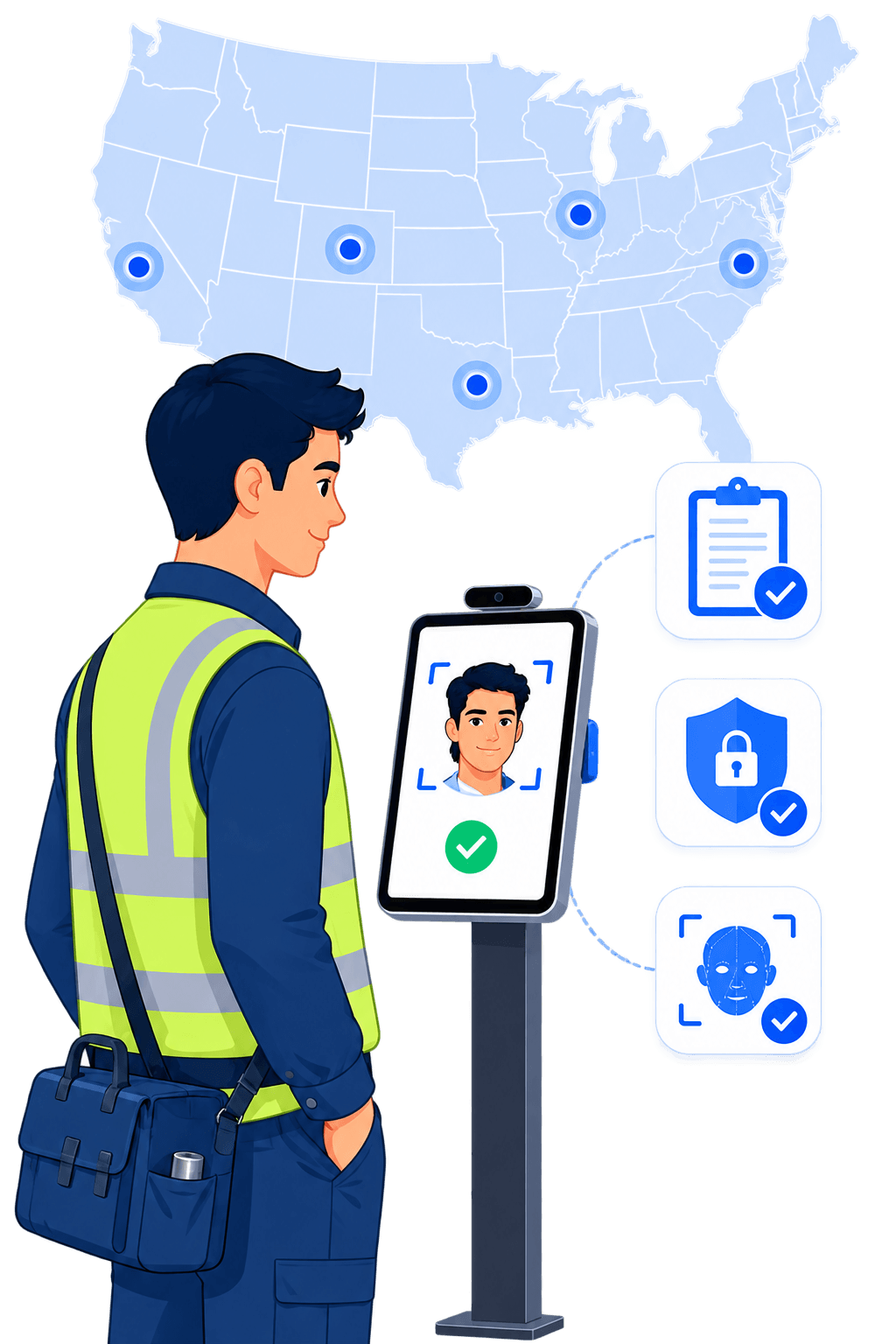
Cross-site mapping lets staff across several facilities check in at one shared kiosk
A single consistent check-in point for a shared premises
No duplicate devices, and no separate registration per client

Deployment Running on Registers and WhatsApp

Site registers and message threads leave gaps that only surface at month-end.

Unified day view across every client site from web or mobile
Filter attendance by client, site, and staff category
Live status for connected punches, with offline punches appearing once the device syncs

Manual Overtime Delaying Client Payments

Hours calculated by hand slow your invoice and open the door to wage disputes.

Shift-linked overtime and payable-hour rules applied automatically
Grace periods, late marks, and early-in controls are set once from policy
Payroll-ready exports with no manual recalculation

Benefits

What Makes Truein Different?

Fewer Disputed Invoices

Every billable hour is backed by a verified punch at a named client site, not by a register a client can question.

Faster Deployment

Replacement staff register with a selfie and start the same shift, with no re-onboarding needed at the client site.

Lower Hardware Spend

Any Android or iOS phone or tablet becomes an attendance capture point, and one shared kiosk can serve several clients.

One View Across Every Client

Attendance, headcount, and overtime by client and by site, from a single dashboard on web or mobile.

Less Manual Validation

AI TimeGuard flags unusual punch patterns and overtime spikes, so supervisors review exceptions instead of full timesheets.

What Is a Manpower Attendance System?

A manpower attendance system records the attendance of workers that a supply or staffing company deploys to its clients' premises. Each punch is tied to a worker, a client, a site, and a date, which is what separates it from a standard employee attendance system.

It is often searched as a biometric attendance system for manpower supply, and the biometric that survives an unsupervised client gate is the face, not a shared card or PIN.

The difference comes down to who the record has to satisfy. In a normal workplace, attendance exists to run payroll. For a manpower supplier, the same record does two jobs at once. It pays the worker, and it substantiates the invoice raised to the client. If the record is weak, the supplier absorbs the gap.

That is why a manpower attendance system needs identity verification at the moment of the punch, geofencing tied to each client location, reporting grouped by client, and a clean handoff into payroll.

How Is a Manpower Attendance System Different from a Standard Attendance System?

Dimension Standard employee attendance system Manpower attendance system
Where staff work On the employer's own premises On client premises the supplier does not control
Who the record serves Payroll Payroll and client billing
Headcount stability A stable roster Constant rotation and replacement
Site setup A fixed terminal per office A new client site live without procurement
Reporting axis By department By client, by site, by staff category
Identity risk Low, staff are known to each other Proxy punching at unsupervised client sites

Track Staff Across Every Client Location

See who is in and out at every client location from one dashboard. Filter by client, site, or staff category, review attendance history, manage your staff directory, and pull reports from the web or mobile. Status is live for connected punches, and punches captured offline appear in the dashboard once the device syncs.

Quick FAQ’s

Can we track staff at client sites we do not own?
Can one worker be deployed to more than one client?
Does it work if a client site has no internet?

One Shared Kiosk for Multiple Clients on One Premises

When you supply staff to several clients inside the same campus or building, cross-site mapping lets all of them check in at one shared kiosk. Fix a tablet on a stand and move it whenever the deployment changes. One consistent check-in point, and no second device to buy for the client next door.

Quick FAQ’s

Can several clients share one attendance device?
What if a worker moves between facilities during a shift?
Does the client need to install anything?

Transfer Staff Between Clients Without Re-Onboarding

Moving a worker to a new client should not mean registering them again. Change the base site, and Truein reassigns the policies and configuration that apply at the new location. Access can be extended to more than one site where a contract needs it, and you can adjust it at any time.

Quick FAQ’s

How long does a transfer take?
Do policies follow the worker?
Can a worker hold access to more than one site?

Client-Wise Man-Day and Payable-Hour Reporting

View attendance, overtime, payable hours, and headcount grouped by client or by site. Supervisors review flagged exceptions, then export payroll-ready reports in the format your finance and payroll teams need. Truein is not payroll software. It produces the verified time data your payroll and HRMS tools run on, through API or FTP sync.

Quick FAQ’s

Can we report hours by client?
Can supervisors review before we bill?
Does it integrate with our payroll or HRMS?

Keep Blacklisted Staff Off Every Client Site

A worker you removed from one client should not reappear at another. When someone reports to a site, Truein checks them against your records and flags a previously blacklisted worker. Staff absent beyond a set number of days can be deactivated automatically, which keeps your active headcount honest and protects your standing with clients.

Quick FAQ’s

How does blacklisting work across clients?

Can we auto-deactivate absent staff?

Is Govt. ID capture supported?

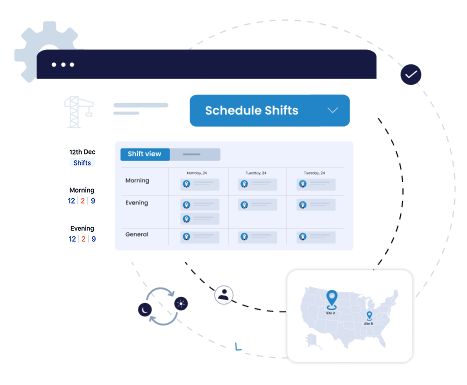
User interface showing a shift scheduling tool with options to schedule shifts for morning, evening, and general times across different dates, alongside a small map of the United States with location markers.

Plan Shifts and Weekly Offs Across Client Contracts

Create, assign, or bulk-update shifts for large crews spread across client contracts. Weekly off rotations, cross-day shifts, and client-specific shift rules are all configurable, so deployment matches what each contract says, and supervisors stop rebuilding the roster every week.

Quick FAQ’s

Can shift rules differ by client?
Are cross-day shifts supported?
Can we update shifts in bulk?
User interface showing a shift scheduling tool with options to schedule shifts for morning, evening, and general times across different dates, alongside a small map of the United States with location markers.

How Truein helped Manpower &
Staffing Industry Companies

Blue triangular abstract vector graphic with varying shades and geometric shapes.

Truein streamlined Compass Group’s time & attendance processes and increased transparency internally across multiple layers and with their customers.

Icon of a multi-story apartment building with several windows and a door.
1,200 Sites
Icon of three people representing a group or community.
40,000 Staff

One major challenge the Compass Group faced was attendance tracking of their staff working for multiple clients on the same work premises. Another challenge was frequent staff transfers. They were looking for accuracy in attendance capturing and centralized controls for their staff at multiple sites.

Truein streamlined their attendance processes. A single capturing device for staff working at multiple clients in the same premises brought transparency. Truein also simplified their staff transfer process. The foolproof attendance system helped prevent revenue leakages and shift planning improved staff productivity. Truein also offered them multiple-level hierarchy for attendance access at different levels.

Read More
Black right-pointing arrow icon.
Blue graphic of left double quotation marks on a white background.

Truein is robust, reliable, and works as promised. The team is very customer focused, responsive, and always willing to help. I have implemented Truein in my previous and current companies. They have the best and most cost-effective solution.

Compass logo
Piyush Dutt
CPO
Compass Group

Bring transparency and Control. Explore Truein for
your organization

Blue triangular abstract vector graphic with varying shades and geometric shapes.
Mobile time tracking with facial recognition clock-in

How to Choose an Attendance System for a Manpower Supply Company

What to check Why it matters for a manpower supplier What to look for
Where identity is verified A photo reviewed later does not stop a proxy punch at a client site with no supervisor present A face match that blocks the punch and prompts a retry
Client-site geofencing Hours logged away from the client site distort what you can bill Configurable radius of 20 metres, set per floor, wing, or zone
Multi-client handling One worker may serve more than one client in the same week Cross-site mapping, per-client policies, shared kiosks
Deployment speed A replacement worker cannot wait a day to be onboarded Registration in seconds, with no re-onboarding at the client site
Reporting axis You bill per client and you pay per worker, from the same record Man-day and payable-hour reports by client and by site
Offline capture Basements, remote locations, and low-signal client sites On-device capture with auto-sync, records flagged as 'captured offline'
Payroll handoff Manual reconciliation is where errors and payment delays start Payroll-ready exports plus API or FTP sync into your existing system

Truein suits companies deploying 100 or more contract, daily-wage, or agency staff across multiple client sites, where attendance integrity and client-wise accountability matter more than scheduling breadth. It is built for field, contract, and multi-site workforces, and it is not designed for desk-based office teams.

Do You Still Need a Biometric Machine at Every Client Site?

Face recognition is a biometric method, so Truein is a biometric attendance system. The difference is that it is software. Nothing has to be procured, shipped, wired, or mounted before your staff can start marking attendance.

Dedicated biometric terminal Truein
Hardware per client site A terminal procured, shipped, mounted, and wired Any Android or iOS phone or tablet
New client site setup Weeks Software setup is instant. A shared kiosk tablet is installed only where a site needs one
Multi-client visibility Per device, often synced manually One dashboard across every client and site
Location verification Fixed to the terminal's position GPS geofencing from a 20-metre minimum radius, set per floor, wing, or zone
Common failure mode Oily, dusty, or worn fingers cause read failures Face match works with masks, facial hair, hard hats, and changed hairstyles, at around 95 to 100 percent accuracy

If a client already runs fingerprint or IR hardware, Truein does not require removing it. Many suppliers keep the existing terminal at the main gate and run Truein for crews at satellite sites, remote locations, and client premises where installing another device is not practical.

Why Choose Truein for
‍Manpower Attendance Tracking?

Blue triangular abstract vector graphic with varying shades and geometric shapes.
Header image

Auto-Deactivate Inactive Staff

Automate shift scheduling, manage weekly off rotations, job mapping, and use analytics to make more informed business decisions.
Header image

Geofenced Clock In at Customer Sites

Boost HR efficiency with 70+ customizable policies that automate processes and enhance workforce productivity. Reduce late arrivals and minimize unplanned absenteeism.
Header image

Shift and Weekly Off Rostering

Automate shift scheduling, manage weekly off rotations, job mapping, and use analytics to make more informed business decisions.

Quick Onboarding

Frequently changing staff or need to supply staff at short notice? Truein helps onboard or add new staff instantly. The staff can onboard by showing their face on the kiosk or with a single selfie using their mobile. Onboarded staff can be immediately sent to multiple clients without the need for any re-onboarding at the client site.

Centralized Controls to Track Staff Across Client Sites

Centralized view enables tracking of your staff deployed at multiple client locations. Know who is in or out in real-time. The manpower tracking system reduces risk of reconciliation issues, brings transparency, and builds trust with clients. Get a real-time view of attendance status and history, download reports, manage staff directories, and more from the web dashboard or mobile app.

Avoid Delayed Payments

Accurate time calculations and analytics ensure error-free final payroll-ready reports. Avoids delayed payments from customers caused by manual approval processes. Customized OT settings enable payment of exact salaries.

Multiple Clients on the Same Premises? 
Get Shared Kiosks

Cross-site mapping enables laborers working across multiple facilities on the same premises to check in from a common kiosk, saving money on multiple attendance devices. It is especially useful in setups where attendance management software for the manpower staffing industry needs a single, consistent check-in point.

Avoid Hardware Spendings

Portable, lean, and scalable time & attendance solution. No hardware investment is required as Truein offers clock in through an app. Fix the mobile device on a flexible stand and move it to new locations whenever needed. Staff can easily clock in by showing their face on the kiosk, their mobile, or other staff mobile.

Easily Manage Staff Transfers

Simply change the base site to transfer the staff. System auto-assigns policies and configurations to the staff as per their new site. You can always change their access or policies. If needed, you can provide access to multiple sites to a particular staff member.

Quick Onboarding

Frequently changing staff or need to supply staff at short notice? Truein helps onboard or add new staff instantly. The staff can onboard by showing their face on the kiosk or with a single selfie using their mobile. Onboarded staff can be immediately sent to multiple clients without the need for any re-onboarding at the client site.

Centralized Controls to Track Staff Across Client Sites

Centralized view enables tracking of your staff deployed at multiple client locations. Know who is in or out in real-time. The manpower tracking system reduces risk of reconciliation issues, brings transparency, and builds trust with clients. Get a real-time view of attendance status and history, download reports, manage staff directories, and more from the web dashboard or mobile app.

Avoid Delayed Payments

Accurate time calculations and analytics ensure error-free final payroll-ready reports. Avoids delayed payments from customers caused by manual approval processes. Customized OT settings enable payment of exact salaries.

Multiple Clients on the Same Premises? 
Get Shared Kiosks

Cross-site mapping enables laborers working across multiple facilities on the same premises to check in from a common kiosk, saving money on multiple attendance devices. It is especially useful in setups where attendance management software for the manpower staffing industry needs a single, consistent check-in point.

Avoid Hardware Spendings

Portable, lean, and scalable time & attendance solution. No hardware investment is required as Truein offers clock in through an app. Fix the mobile device on a flexible stand and move it to new locations whenever needed. Staff can easily clock in by showing their face on the kiosk, their mobile, or other staff mobile.

Easily Manage Staff Transfers

Simply change the base site to transfer the staff. System auto-assigns policies and configurations to the staff as per their new site. You can always change their access or policies. If needed, you can provide access to multiple sites to a particular staff member.

Contract Labour Attendance and Compliance in India

For a manpower supply company in India, attendance is a record-keeping obligation as much as an operational one, and your client carries responsibility as principal employer for the workers on their premises. Both sides depend on the same attendance data.

What Truein gives you:

  • A digital muster roll. Attendance recorded per worker, per client site, replacing paper registers, and site-level Excel sheets.
  • Man-day and payable-hour records. Verified totals against the client, which is what billing and wage reconciliation are checked against.
  • Overtime and shift records. Configurable policies are applied per site, shift, and staff category, designed to support compliance with the working-hours rules that apply to you.
  • Document expiry tracking. Worker and contractor documents stored with expiry dates, with renewal alerts are raised in time.

On the legal framework. The Contract Labour (Regulation and Abolition) Act, 1970 has been consolidated into India's four Labour Codes, in force from 21 November 2025, with central rules notified in May 2026 and state rules still rolling out. Contract labour obligations now sit primarily under the Occupational Safety, Health and Working Conditions Code. Under the Code on Social Security, 2020, statutory social security, including provident fund and ESIC, is being extended to contract and fixed-term workers, not permanent staff alone.

‍On attendance and face data. Truein processes attendance data, including face registration and personal identifiers, on AWS infrastructure hosted in India. Truein is ISO 27001:2022 certified and SOC 2 Type II compliant, operates as Data Processor with the customer as Data Controller, and maintains a designated Data Protection Officer reachable at dpo@truein.com. Truein's data protection framework aligns with the core principles India's Digital Personal Data Protection Act establishes, including consent, data minimisation and breach notification, and Truein is structured to meet its obligations as the Act's rules come into force in phases.

  • Disclaimer: This section is for general informational purposes only and does not constitute legal advice. Biometric privacy laws vary by state and change over time; the information above reflects publicly available sources as of the article's publish date and may not reflect subsequent legal developments in your jurisdiction. Before deploying biometric attendance technology, consult a licensed attorney familiar with the applicable state and local requirements.

❝Truein is highly accurate, multipurpose, and user-friendly. that covers all the modules. It detects fake clock-ins & generates notifications.

Portrait of Sujit Pawar
Sujit Pawar
DGM, OCS Group

❝Truein is robust, reliable, and works as promised. I have implemented Truein in my previous and current companies. It's the best and most cost-effective solution.

Portrait of Piyush Datta from Compass Group
Piyush Dutt
CHRO, Compass Group

❝We are using Truein at our 22 sites for over 10000 staff. Truein has built-in customization options and gives multiple real-time reports. And it's a very user friendly product!

Portrait of Girish Nimbalkar
Girish Nimbalkar
AGM HR, SJ Contracts

❝Truein has solved our Time & Attendance challenges for our 210 different sites having 4000+ staff. Excellent product!

Portrait of Srinivas G from Tata 1MG
Srinivas G
Sr. HR Manager, Tata 1mg

❝Truein outshines all other time and attendance solutions. Its rich features, payroll ready timesheets and centralized controls put it in a class above all.

Portrait of Carlos Woodson
Carlos Woodson
Phoenix Transload Services

❝Truein is robust, reliable, and works as promised. I have implemented Truein in my previous and current companies. It's the best and most cost-effective solution.

Portrait of Piyush Datta from Compass Group
Piyush Dutt
CHRO, Compass Group

❝After a long search, we chose Truein for Time tracking of our temp workers. Excellent support and user-friendly solution to track and document employee hours.

Portrait of Nicolous Noble
Nicolous Noble
Payroll Administrator, Backerhaus Veit

❝Truein has strengthened the quality and accuracy of our Time & Attendance process. It has helped to ensure compliances and generate trust among end-users. Excellent product!

Portrait of Henry Carrillo
Henry Carrillo
Farm administrator, Unispice

❝Truein is robust, reliable, and works as promised. I have implemented Truein in my previous and current companies. It's the best and most cost-effective solution.

Portrait of Piyush Datta from Compass Group
Piyush Dutt
CHRO, Compass Group

❝Truein has helped Jumia a lot, not only in tracking attendance and work hours but also in measuring productivity and calculating the payout for external employees.

Portrait of Alaa Rasheedy (Alaa Hasan) from Jumia
Alaa Hassan
Head of Ops Excellence, Jumia

❝This face detection time & attendance software is very effective at our construction company. Full marks to Truein and their support team!

Portrait of Wajahat Khan
Wajahat Khan
Payroll Admin, Al Magamsi General Contracting

❝Pleased with Truein for its accuracy and ease of use in tracking the attendance of our staff. Truein team is always ready to assist us. Highly recommend it!

Portrait of Alaa Rasheedy (Alaa Hasan) from Jumia
Alaa hasan
Reyada
Get Started
Companies with contract staff have saved 37% of revenue leakages simply by switching to new age Face recognition Time & Attendance
Explore Truein for your organization
Thank you! Your submission has been received!
Oops! Something went wrong while submitting the form.
Thank you! Your submission has been received!
Oops! Something went wrong while submitting the form.

Frequently asked questionss

What is a manpower attendance system?

Downward arrow indicating a dropdown menu.
It is an attendance system for companies that deploy their own staff into client premises. Each punch is recorded against a worker, a client, a site, and a date, so the same record can support both payroll and client billing. It replaces the paper muster roll and site-level Excel sheets.

Can we track attendance at client sites we do not own?

Downward arrow indicating a dropdown menu.
Yes. Each client location is added as a site with its own geofence. Staff punch in on their own phone or at a shared tablet kiosk, so nothing has to be installed or approved at the client's premises for attendance to start.

Can one worker be deployed to more than one client?

Downward arrow indicating a dropdown menu.
Yes. A worker can have access to several sites, and cross-site mapping lets staff working across facilities on the same premises punch in from a single shared kiosk without registering again.

How do we prove billable hours to a client who disputes them?

Downward arrow indicating a dropdown menu.
Every entry traces back to a face-verified punch inside the client site geofence, with the time, location, and device recorded. Man-day and payable-hour reports can be pulled per client site, so the conversation moves from memory to record.

What happens at a client site with no internet?

Downward arrow indicating a dropdown menu.
Attendance is captured on the device and stored there, then synced automatically when connectivity returns. Offline records are flagged as ‘captured offline’ so they are easy to review. They appear in the dashboard after sync.

Do we need hardware at every client site?

Downward arrow indicating a dropdown menu.
No. Any standard Android or iOS smartphone or tablet works as an attendance capture point. Where a site prefers a fixed station, a tablet is installed once on a stand and can be moved when the deployment changes.

How quickly can a replacement worker start?

Downward arrow indicating a dropdown menu.
Face registration and profile creation take seconds, on the worker's own phone or at the kiosk. A replacement can be onboarded and start marking attendance in the same shift.

Is Truein easy to use for a lower-skilled workforce?

Downward arrow indicating a dropdown menu.
Yes. Staff mark attendance by showing their face at a kiosk or on a phone, with no card, code, or fingerprint involved. The flow was designed for crews who are not comfortable with software.

Is there a feature to track blacklisted staff?

Downward arrow indicating a dropdown menu.
Yes. When a worker reports to a site, Truein cross-checks your records and flags anyone previously blacklisted, so they cannot quietly rejoin through a different client.

Can we deactivate staff who have been absent for a long time?

Downward arrow indicating a dropdown menu.
Yes. Staff can be auto-deactivated after a set number of absent days, which helps when crews change often and you cannot be sure a worker will return. You can also deactivate manually.

Does Truein handle overtime and policy differences between clients?

Downward arrow indicating a dropdown menu.
Yes. Over 70 configurable policies cover overtime, breaks, late marks, half-days, holidays, and weekly offs, and they can be applied by location, staff category, or shift. These are configurable tools, and they are designed to support compliance with local labour rules rather than guarantee it.

Does Truein replace our payroll software or HRMS?

Downward arrow indicating a dropdown menu.
No. Truein produces verified time data and payroll-ready reports, and syncs with payroll and HRMS platforms through API or FTP. It is a time and attendance platform, not a payroll or HR system.

How is a manpower attendance system priced?

Downward arrow indicating a dropdown menu.
Truein bills per active user with a fixed base fee, so cost scales with the headcount you deploy rather than with the number of client sites or devices. You can put a shared kiosk at every client without paying per device. See the pricing page for current rates by region.