



AI anomaly detection in time tracking helps identify unusual activity that deserves a closer look. For clock-in integrity, the relevant questions concern identity, location authenticity and the sequence of events around a punch.
The output should help a manager understand why a record needs attention and which evidence to examine. An anomaly alone does not establish time theft.
This distinction matters for hourly and multi-site workforces. A change in site assignment, a replacement phone or an approved shared kiosk can make an ordinary clock-in look unusual when the operating context is missing.
What an anomaly means in clock-in activity
An anomaly is an event or pattern that differs from an expected condition or matches a defined concern. The expected condition might come from configured site permissions, identity checks, approved devices or the relationship between events.
For example, a location reading may fall outside a worker's assigned site, or a sequence of attempts may warrant review because of the verification outcomes around it. Repeated activity can raise a different question from a single isolated event.
The useful question is whether the available evidence supports further investigation. An unusual event can reflect misuse, a technical problem or a legitimate arrangement the system has not accounted for.

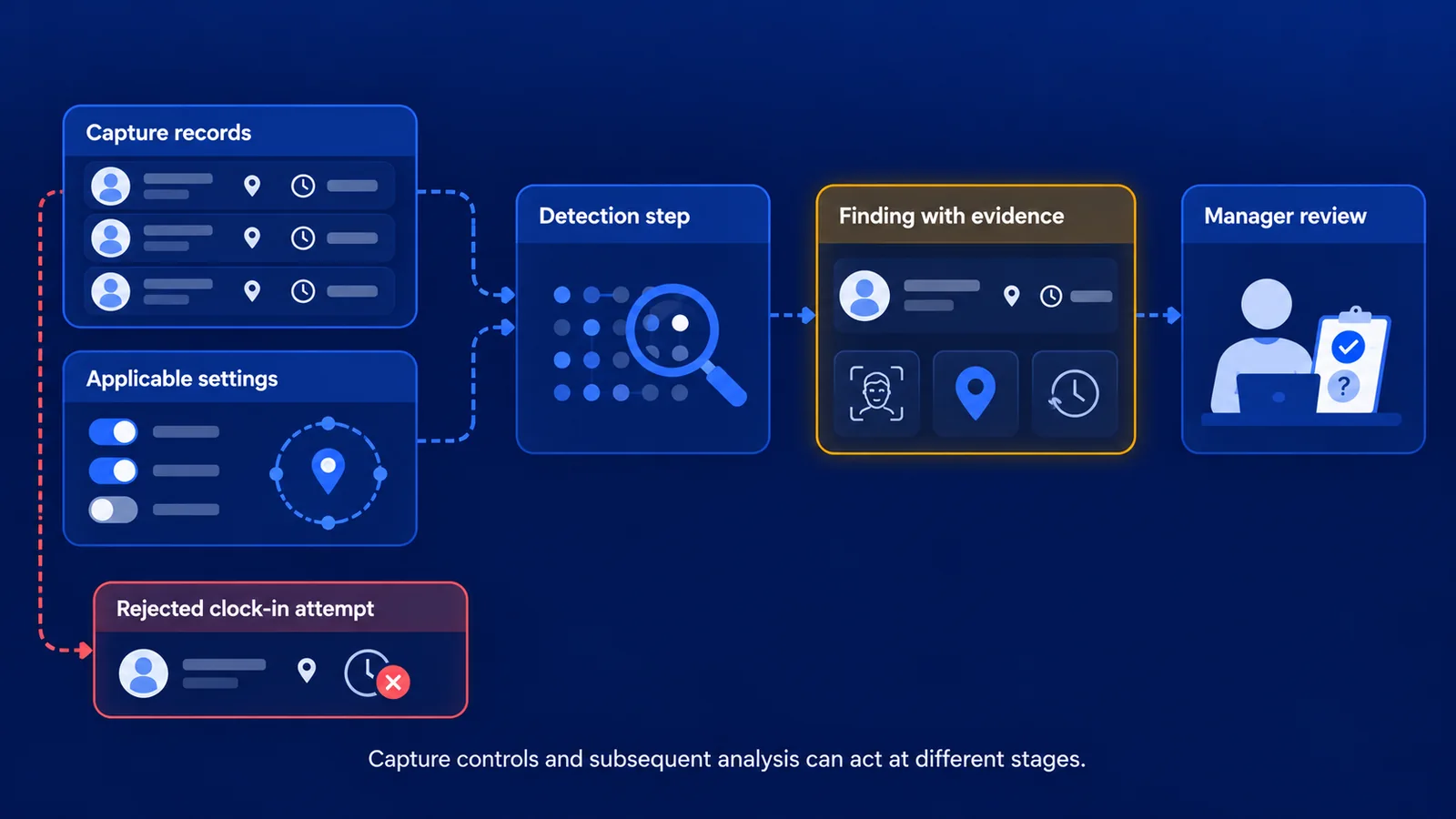
Capture controls and analysis address different stages
Capture controls apply when a worker attempts to clock in. Face verification checks identity against the enrolled worker. Geofencing checks location against configured boundaries. Depending on the settings, a failed check can lead to rejection or another configured outcome.
Subsequent analysis examines recorded activity. It can help identify concerns that require more context than one clock-in provides, including relevant history or relationships between events.
The timing matters. A product that flags a record afterward has provided detection. A control that rejects an attempt has taken preventive action. Teams should understand which outcome applies to each capability they use.
How a detection workflow can work
Detection systems differ in their methods and available data. A useful workflow generally starts with the original clock-in and attempted clock-in records, then evaluates them against the checks that apply.
Configured rules can establish specific conditions, such as whether a location falls outside an authorized boundary. Pattern analysis can examine relationships or recurrence where the system supports them. AI can help explain findings and summarize relevant context for a reviewer.
These functions should be described accurately. An AI label does not establish that a system learns each worker's behavior, evaluates every possible signal or adapts automatically. Ask what the product actually checks and what the AI contributes to the result.
Which signals can be relevant
The following categories describe possible inputs to a clock-in integrity workflow. Availability depends on the product, configuration and retained records.
These categories help frame a review. They should not be treated as a universal checklist of capabilities that every AI time tracking product provides.
Why context changes the finding
Consider a worker whose account appears on a different device. That could be an approved phone replacement. It could also be normal use of a shared kiosk. The device change alone tells the reviewer very little about intent.
Now consider whether the system has the relevant authorization, event history and identity outcomes. Additional evidence may explain the event or establish a stronger reason to investigate. The same principle applies to location changes and unusual timing.
Historical configuration matters too. A site boundary changed today should not be treated as if it applied to a clock-in last month. Reviewers need the settings and permissions relevant to the period being examined.
What a useful finding should contain
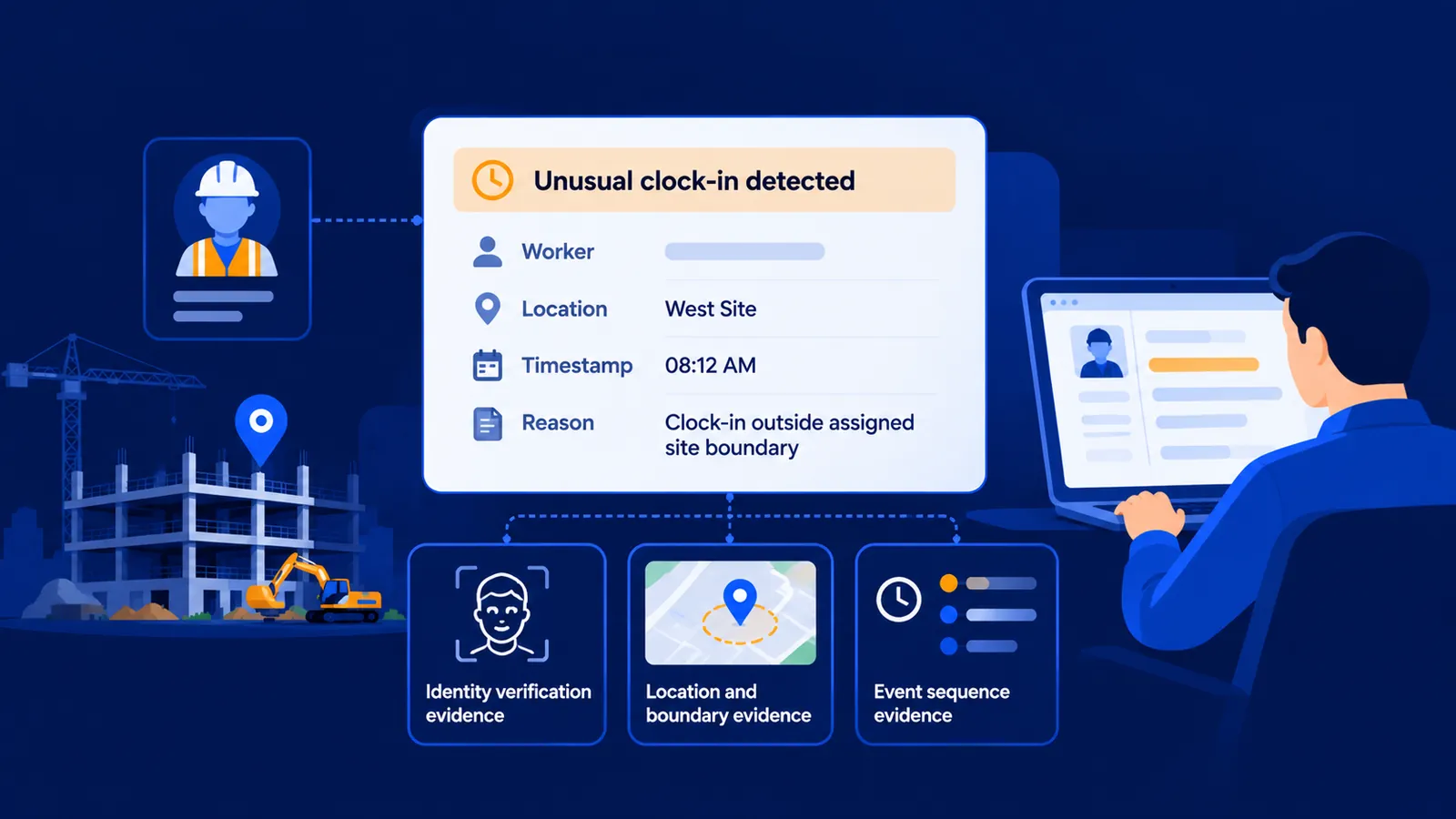
A useful finding identifies the worker or event, explains the reason for attention and points to the available evidence. It should make the review question specific enough to act on.
For example, an explanation that names the relevant location, timestamp and applicable boundary is more useful than a generic high-risk label. If several events are related, the reviewer should be able to follow their sequence.
Data limitations belong alongside the result. If rejected attempts were not retained or location accuracy is unavailable, the system cannot assess the concern in the same way. Missing evidence should be visible rather than silently interpreted as a clean result.
Keep configuration coverage separate from incident findings
A protection configuration assessment describes which controls are enabled and whom they cover. An incident finding describes activity observed in the records. These are different measures.
A site can have few findings because it has little suspicious activity, because controls are effective or because the relevant evidence is unavailable. An enabled control may also cover only a subset of workers.
Ask about coverage before interpreting a low alert count or a reassuring setup label. The result is meaningful only in relation to the workers, clock-in methods and records that were actually assessed.

How managers should use the result
Review the source records, check the operating context and seek clarification where needed. Record whether the event is explained, remains unresolved or represents confirmed misuse following the organization's review process.
Avoid treating an alert as an automatic basis for changing time records or taking action against a worker. The detection system supports investigation; an authorized reviewer is responsible for the decision.
For a practical process across locations, read how to detect time theft across multiple job sites.
How Truein AI TimeGuard fits into time tracking
Truein combines face verification and GPS geofencing with AI TimeGuard to help protect clock-in integrity. TimeGuard helps surface suspicious clock-in activity so managers have a clearer starting point for reviewing potential time theft.
Configured controls and subsequent detection serve different purposes, and the available checks depend on the account and current release. Managers should review the relevant evidence before deciding what a flagged event means.
See how Truein AI TimeGuard supports clock-in integrity and ask for a demonstration using the clock-in methods relevant to your workforce.
Frequently Asked Questions
Is anomaly detection the same as fraud detection?
Anomaly detection identifies unusual events or patterns. Some may warrant a time-theft investigation, but a finding alone does not establish fraud or intent.
Does AI anomaly detection always happen in real time?
No. Some controls act during capture, while other checks run afterward or when analysis is requested. Ask when each check runs and what action it can take.
Does every AI time tracking system learn individual worker behavior?
No. Products can combine configured rules, pattern analysis and AI-assisted explanations in different ways. The label alone does not establish adaptive learning.
Can anomaly detection replace face verification or geofencing?
Detection and capture controls address different questions. Subsequent analysis can support review, while identity and location controls help verify the event when it is captured. Evaluate how the capabilities work together.
