


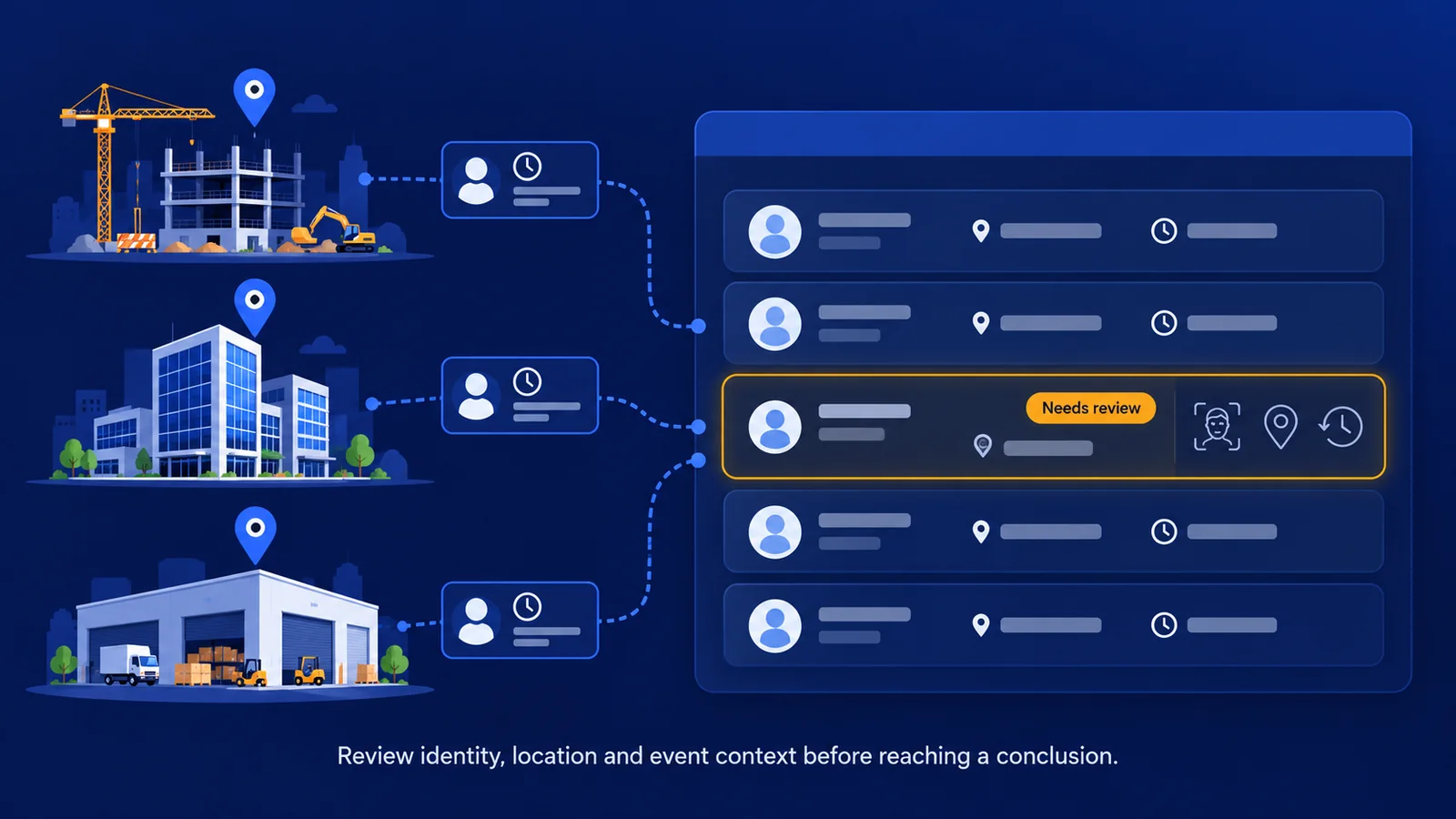

A worker appears in Monday's site records. The clock-in time looks normal, and the weekly total raises no questions. A supervisor later asks whether that worker was actually at the assigned location.
The timesheet total cannot answer that question. The team needs to examine how the clock-in was captured, which checks applied and what the surrounding records show.
Detecting potential time theft across multiple job sites starts with the integrity of individual clock-ins. Identity checks, location information and relevant event history provide a more useful starting point than reviewing total hours alone.
Start with the clock-in record
Time theft can involve falsified records of when or where someone attended work. Buddy punching, where one person clocks in for another, is one example.
Other concerns can involve an unauthorized off-site clock-in or activity that appears inconsistent with the worker's permitted clock-in method. The exact concern depends on the system, configuration and evidence available.
An unusual record is not automatically falsified. A worker may have been reassigned, used an approved kiosk or experienced a location-reading problem. The purpose of detection is to identify what needs investigation and assemble enough context for a fair decision.
Establish which controls actually applied
Before looking for suspicious patterns, understand how each site captures time. A personal phone and a fixed shared kiosk create different records and have different operating assumptions.
For each clock-in method, establish whether identity is verified, whether a location restriction applies, what happens when a check fails, and whether rejected attempts are retained. Check which workers are covered and which have authorized exemptions.
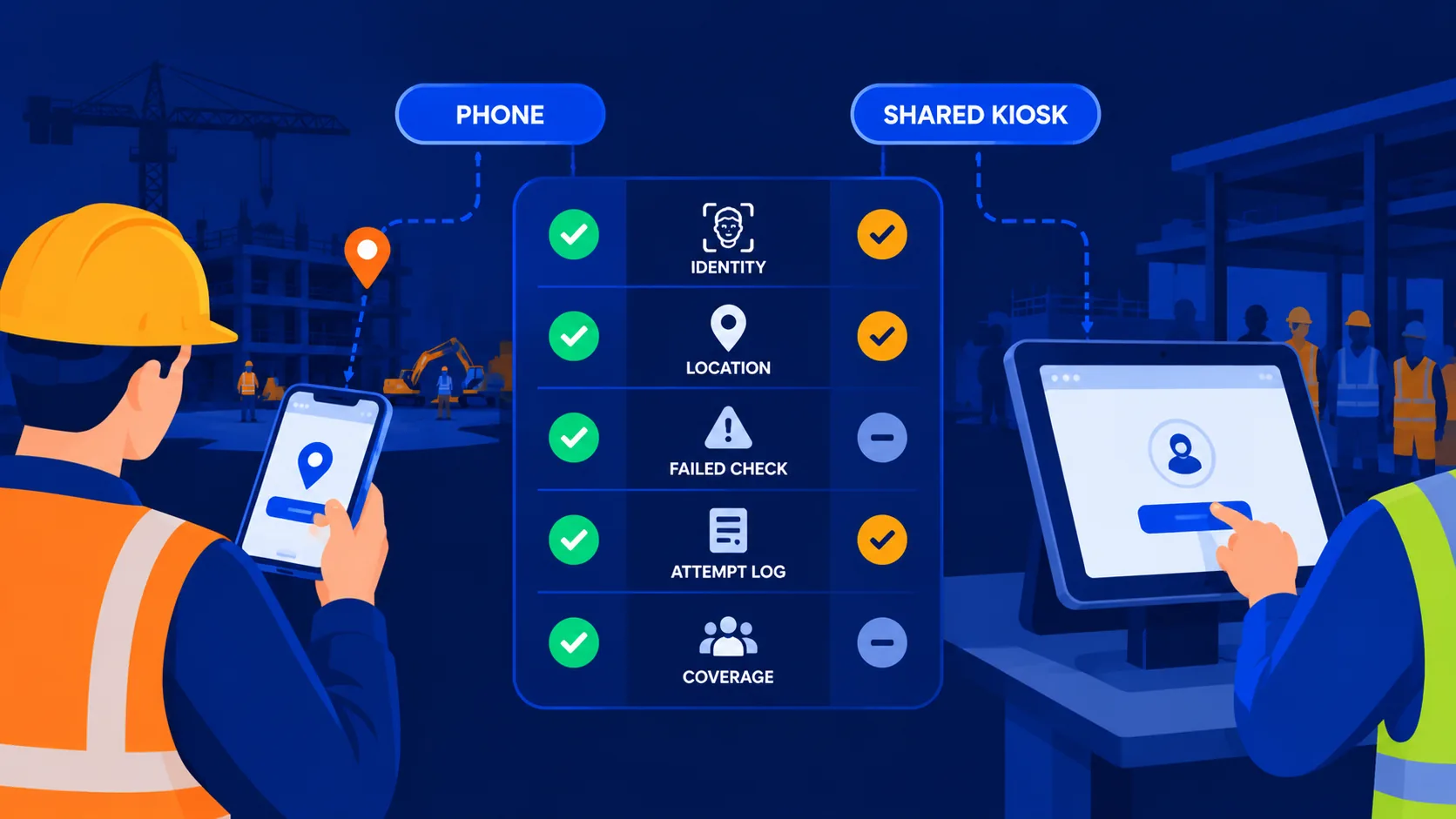
A control enabled somewhere in the account may cover only part of the workforce. If location restrictions apply to one site but not another, the same event can have a different meaning at each location. Review the settings that applied when the clock-in occurred.
Review signals with their possible explanations
The examples below illustrate investigation questions. They are not proof of misconduct or a list of features available in every time tracking system.
Several signals together may justify closer review, but context still matters. A device change by itself is a weak basis for an accusation. Its significance depends on what changed, what was permitted and what else happened around the clock-in.
Use a consistent review process
Start with one worker and the relevant sequence of events. Keep related attempts together so the reviewer can understand what happened without reconstructing the case from scattered records.
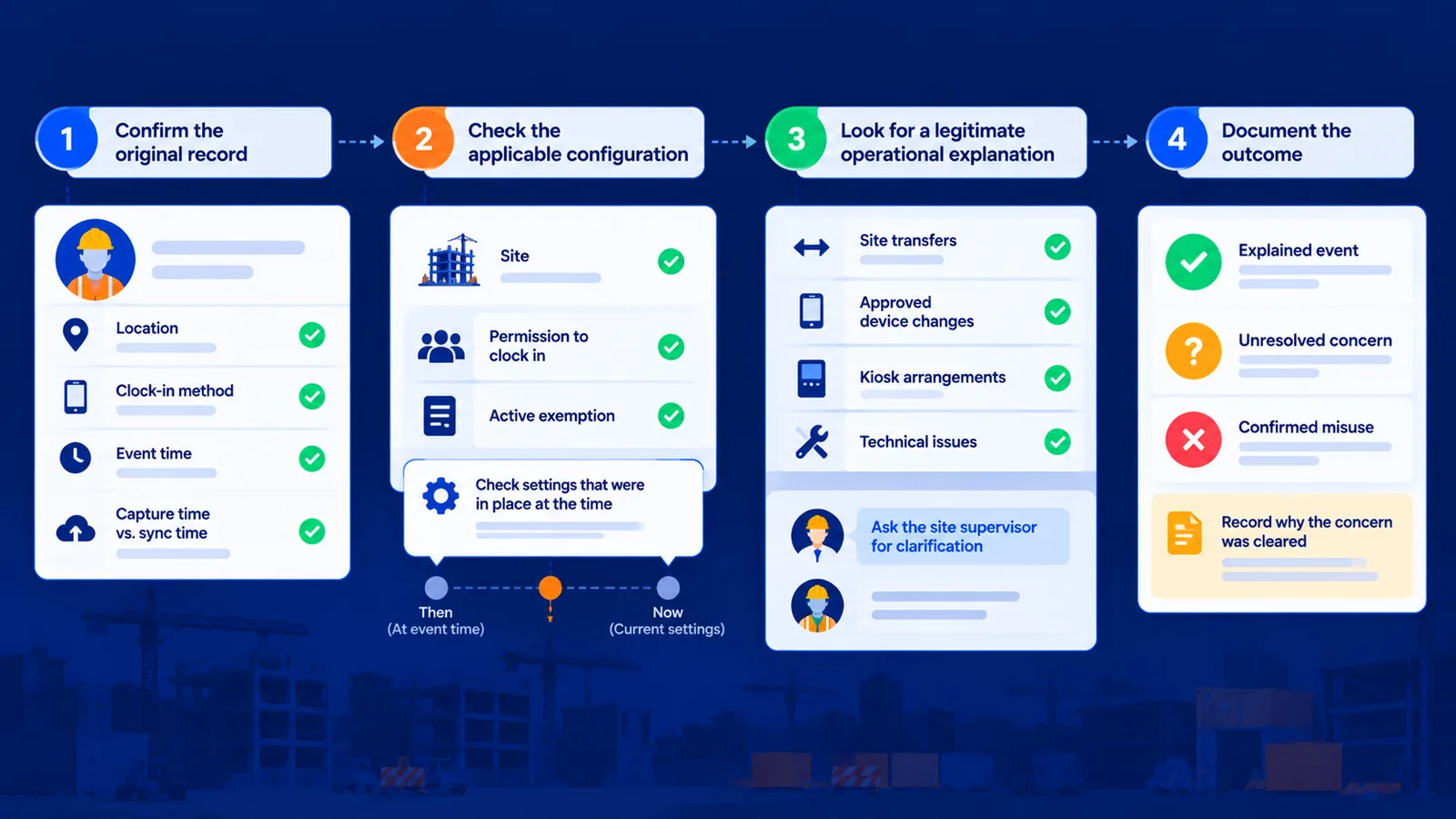
First, confirm the original record. Check the worker, location, clock-in method and event time. Where the system retains it, compare the time of capture with the time the record synchronized. A late upload can otherwise look like unusual timing.
Next, check the applicable configuration. Was the site correct? Did that worker have permission to clock in there? Was an exemption active? Current settings may differ from those in place when the event happened.
Then look for a legitimate operational explanation. Review site transfers, approved device changes, kiosk arrangements and relevant technical issues. Ask the site supervisor or worker for clarification when needed.
Finally, document the outcome. Distinguish an explained event from an unresolved concern and a confirmed misuse case. Recording why a concern was cleared helps the team avoid repeatedly investigating the same legitimate arrangement.
Keep blocked attempts separate from accepted records
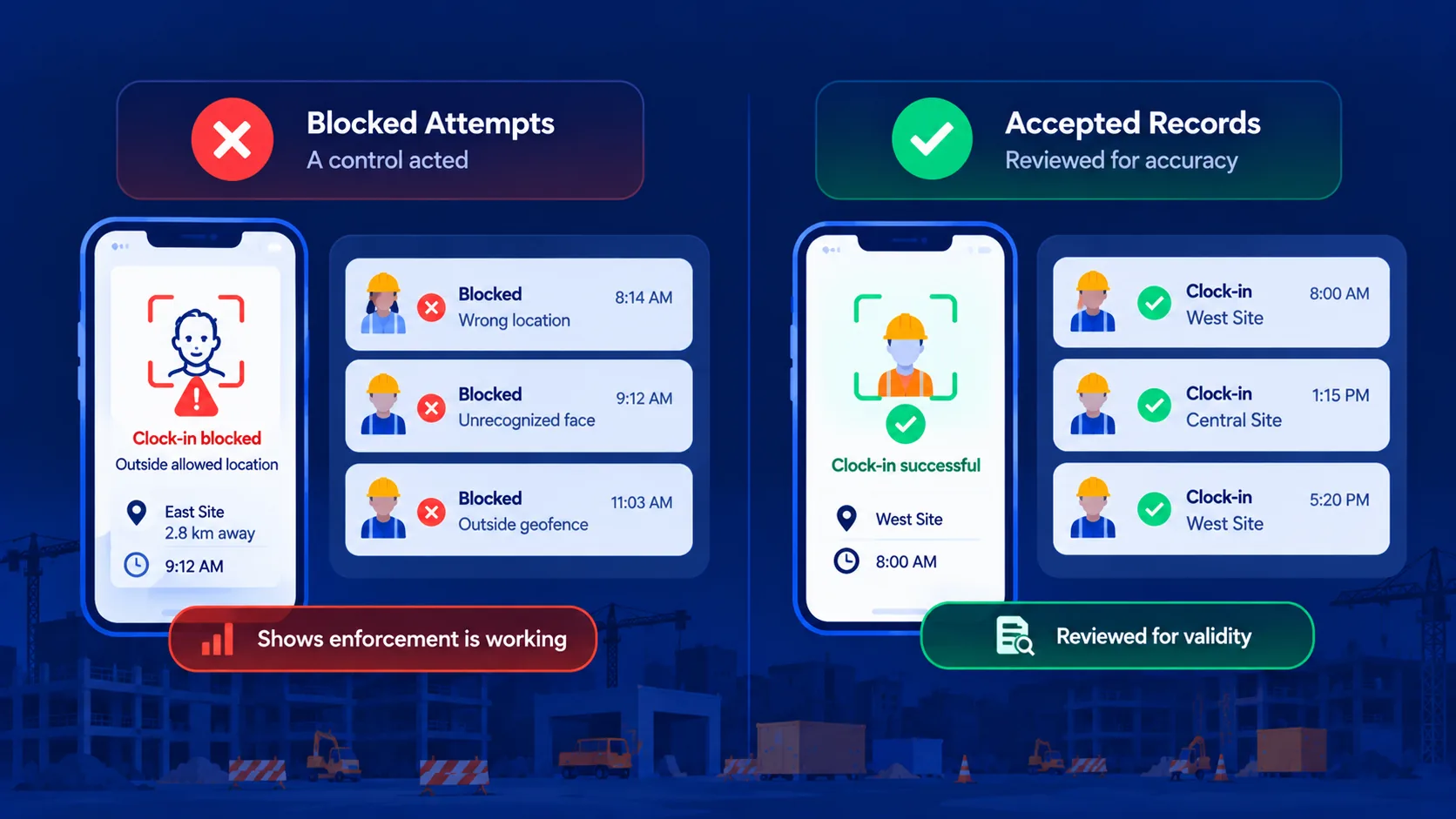
A rejected attempt shows that a control acted. It does not automatically mean inaccurate hours reached a timesheet. A successful clock-in that later raises a concern presents a different question: should the record be accepted after review?
Keep these outcomes separate in reporting. Combining rejected attempts with unresolved findings can make the problem look larger than the evidence supports. It can also hide the cases that still require attention.
The distinction is especially useful when comparing sites. A site with many blocked attempts may have effective enforcement, while another may have little visibility because relevant checks or logs are absent.
Automate detection while keeping decisions accountable
Manual review becomes difficult when relevant activity is spread across workers, dates and locations. Software can help identify records that match defined concerns and bring them to a manager's attention.
Evaluate the usefulness of that output. Can the reviewer see why an event was flagged? Is the relevant source record available? Does the system account for approved operational changes? Does it show when evidence is missing?
The number of alerts is a poor measure of usefulness by itself. Findings should help a manager decide what to examine next. Read how AI anomaly detection in time tracking works for a closer look at the detection and review process.
Where Truein AI TimeGuard fits
Truein combines face verification and GPS geofencing with AI TimeGuard to support clock-in integrity across multi-site workforces. Configured capture controls help reject unauthorized attempts, while TimeGuard helps surface suspicious clock-in activity for review.
The available checks depend on the clock-in method, release and account configuration. A flag is a starting point for investigation, and managers remain responsible for reviewing the relevant evidence.
Explore Truein AI TimeGuard for potential time theft detection to see how it fits alongside identity and location controls.
Improve protection based on what reviews reveal
Use review outcomes to identify recurring configuration or operating problems. A concern may reveal a genuine misuse attempt, a boundary that needs correction, an enrollment problem or an unclear exception process.
Address the cause and check whether the issue recurs. The aim is to give supervisors fewer unresolved questions about clock-in records while keeping legitimate work arrangements easy to explain.
Frequently Asked Questions
Can normal-looking timesheets still contain suspicious clock-ins?
Yes. A normal total does not establish who made each clock-in or where it happened. Examine capture records and relevant context when there is a reason for concern.
Is a GPS location outside the boundary proof of time theft?
No. Review GPS accuracy, site assignments, exemptions and the settings that applied at the time. An unusual location is a signal to investigate.
Should every flagged event become a separate investigation?
Related events are usually easier to understand together. Group the attempts and records that form one episode, then decide whether it needs further review.
Can face verification establish that every recorded hour was worked?
No. Face verification helps establish identity at the moment of capture. It does not prove continuous presence or work performed throughout the shift.
