


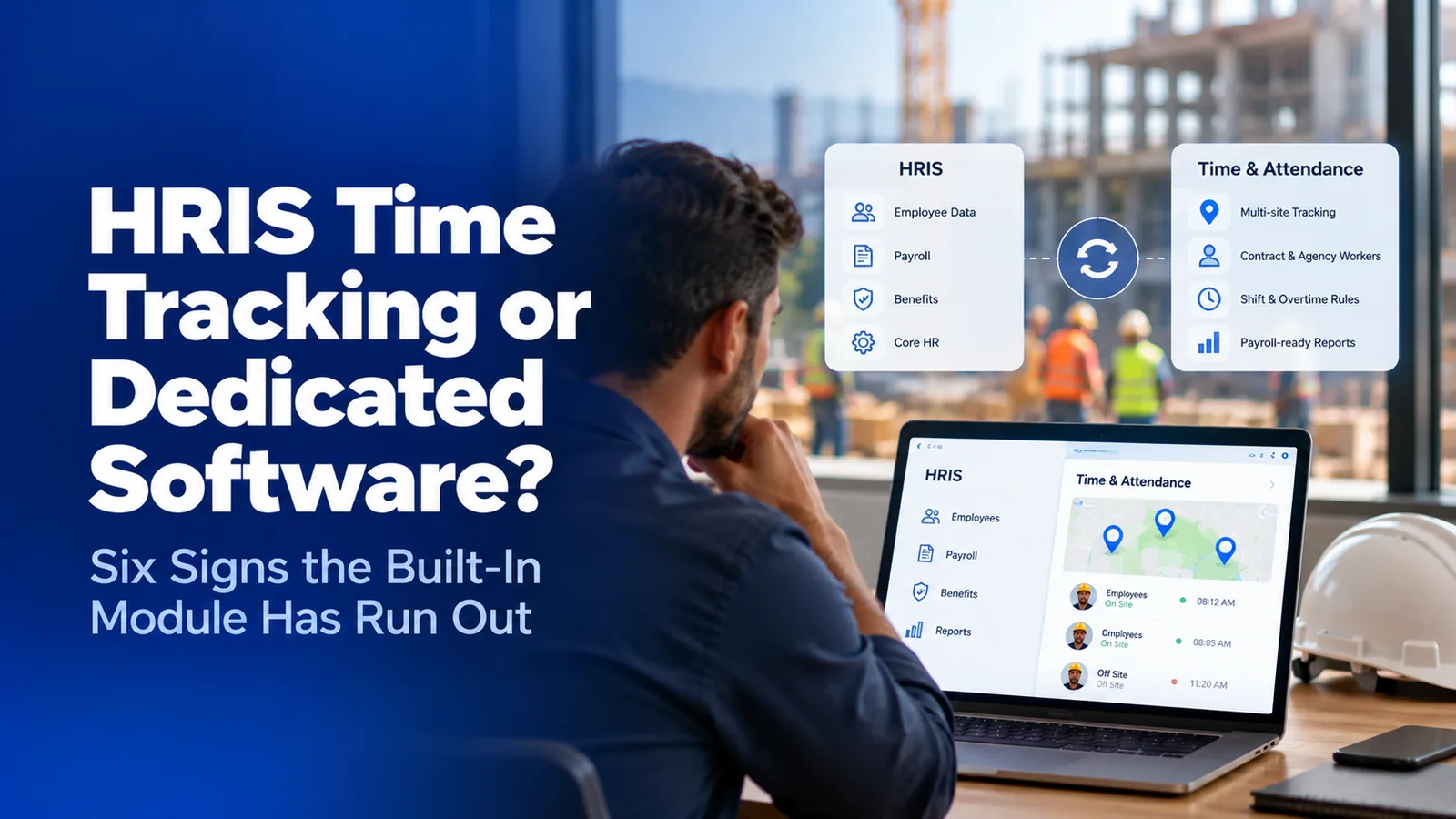

Should you use HRIS time tracking or dedicated software?
Use your HRIS time module when everyone who clocks in is your own employee at a few fixed locations. Add dedicated time and attendance software when you track agency or subcontractor workers, run sites with different rules, need proof of who punched, or work where signal drops. The HRIS stays the system of record either way.
- What an HRIS time module does well, and where it was never designed to go
- Six signs your workforce has outgrown the built-in module
- How a dedicated time and attendance layer runs next to your HRIS without replacing it
- What a second system costs you, and when it is not worth it
Most companies inherit their time tracking. They bought an HRIS for payroll, benefits, and employee records, and it came with a time module that was good enough on day one. The question of HRIS time tracking or dedicated software only comes up later, usually after a payroll run where the hours did not match what supervisors saw on site.
The answer is not about which tool has more features. It is about the shape of your workforce. This guide is for HR, payroll, and operations leads at US companies running hourly crews across sites, and it gives a test you can run against your own workforce in ten minutes.
HRIS time tracking or dedicated software: which do you need?
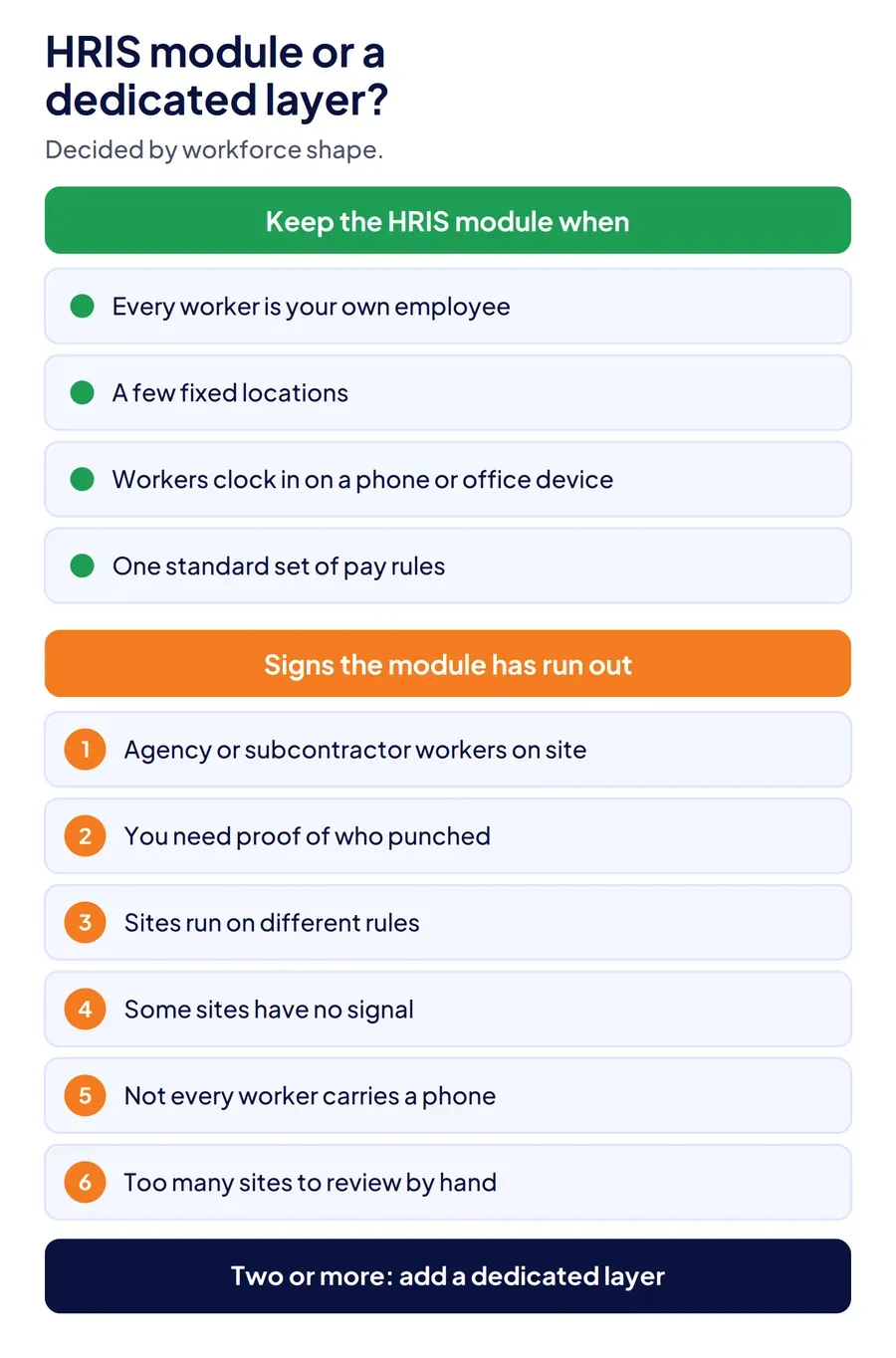
Keep the HRIS time module if your hourly workers are your own employees, work at a small number of fixed locations, and can clock in on a phone or an office device. Add dedicated time and attendance software when any two of the six signs below are true, because each one marks a point where the module was not designed to go.
The HRIS does not go away in either case. It stays the system of record for employees, pay rates, benefits, and payroll. The only decision is whether the punch, and the rules applied to it, live inside the HRIS or in a layer built for them.
What does an HRIS time module do well?
An HRIS time module does one thing very well: it keeps hours, pay, and employee records in a single system with no integration to maintain. Hours flow straight to payroll, PTO balances sit next to timesheets, and approvals use the same manager hierarchy as everything else in the HRIS.
For an office, a single warehouse, or a retail team where every worker is an employee and the clock-in happens on a known device, HRIS attendance tracking is usually enough. Most HRIS platforms now include mobile clock-in, basic geofencing, overtime calculation, and timesheet approval. If that describes your workforce, a second system adds cost without solving a problem you have.
Where does the built-in HRIS time module run out?
The module runs out where the workforce stops looking like an employee directory. These six signs are the usual breaking points, and each is a design limit rather than a missing feature.
| What you need | Built-in HRIS module, typically | Dedicated time and attendance layer |
|---|---|---|
| Track people who are not your employees | Only workers with an employee record in the HRIS | Agency, staffing, and subcontractor crews tracked alongside employees |
| Prove who punched | PIN, password, or GPS stamp on a phone | Face match on every punch, on personal phones and shared devices |
| Run many sites with their own rules | One rule set with limited per-location exceptions | Geofence, shift, overtime, and break rules per site and worker category |
| Clock in where there is no signal | Needs a connection to record the punch | Captured on the device with its original time, synced later |
| Clock in workers without phones | Limited kiosk options | Shared tablet kiosk and supervisor-assisted clock-in |
| Review exceptions across sites | Manual timesheet review | Flagged anomalies across every site before payroll |
1. You track people who are not your employees
An HRIS is built around the employee record. Agency temps, staffing firm crews, and subcontractor workers are employed by someone else, so they usually have no record in your HRIS and cannot clock in to it. Their hours arrive as an invoice. It is the first place an HRMS attendance system breaks for contract crews. If a meaningful share of the people on your sites work for someone else, the HRIS cannot see them, and that is the most common reason companies add a contract labor attendance layer.
2. You need proof of who punched, not just that someone did
A PIN proves someone knew the code. A GPS stamp proves a phone was on site. Neither proves which person was holding it. When buddy punching or shared credentials show up in your payroll variance, the pattern behind most timesheet fraud, the fix is identity verification at the moment of the punch, which most HRIS modules do not perform on every clock-in method.
3. Your sites run on different rules
A union site with a different overtime threshold, a client contract with its own break rules, a state with daily overtime: HRIS time modules handle a standard rule set well and exceptions badly. Once payroll keeps a spreadsheet of "except at site 7" adjustments, the rules have outgrown the module.
4. Some sites have no signal
Basements, rural job sites, warehouses with dead zones, and remote facilities break any clock-in that needs a live connection. A dedicated layer captures the punch on the device and keeps its original timestamp when it syncs. The offline attendance guide covers what has to hold for those punches to be trusted.
5. Not every worker carries a phone
Personal-phone clock-in assumes every worker has a smartphone and is willing to use it. Many frontline crews do not. A shared tablet at the gate, or a supervisor clocking in a crew on their own device, has to produce the same verified record as a personal-phone punch.
6. Exceptions are spread across too many sites to review by hand
At three sites, a payroll manager can read every timesheet. At thirty, they cannot. A dedicated layer flags the punches worth checking, such as impossible travel between sites or repeated edits, so review time goes to exceptions instead of rows.
The rule of thumb: one sign is a workaround, two or more is a second system. Most companies with agency labor or more than a handful of sites hit at least two.
How does a dedicated time layer work next to your HRIS?
A dedicated time and attendance layer sits between the workforce and the HRIS. It captures and verifies the punch, applies site rules, and sends payroll-ready hours to the HRIS or payroll system. The HRIS keeps doing what it is built for: employee records, pay rates, benefits, PTO policy, and running payroll. If those hours also feed job costing in an ERP, the layer has to carry jobs and cost codes too, which is what time tracking with ERP integration depends on.
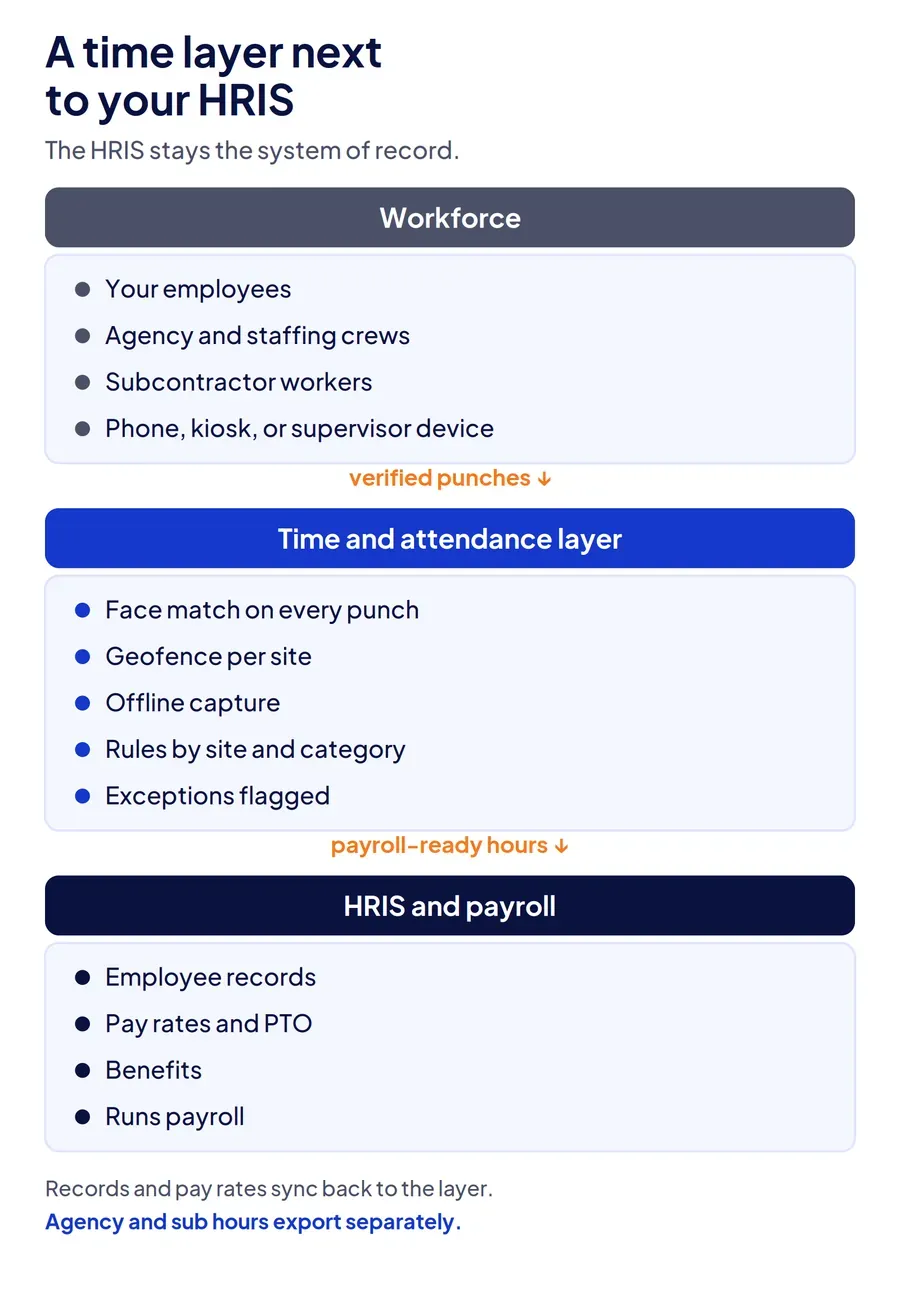
Three design choices decide whether the two systems work cleanly together:
- One direction of truth for each field. Employee records and pay rates flow from the HRIS to the time layer. Verified hours flow back. Nobody edits the same field in both places.
- Non-employees stay in the time layer. Agency and subcontractor hours are exported separately for invoice reconciliation, so they never enter your payroll.
- Sync by API where you can, file transfer where you must. API sync keeps records current in near real time; scheduled file transfer works for older payroll systems.
Under the FLSA, the employer still needs accurate records of hours worked each day and each week for non-exempt employees. A time layer does not change who owns that obligation. It changes how reliable the record is when someone asks for it.
What does running a second system cost?
A second system costs a subscription, an integration to maintain, and one more place for an admin to look. Those costs are real, and for a single-site workforce of your own employees they usually outweigh the benefit.
The cost of not adding one is quieter: payroll corrections every cycle, agency invoices paid without a record to check them against, and supervisors approving hours they did not see. Each of those is a form of payroll leakage, and most payroll audits are not built to catch it. If you cannot tell how much of last month's payroll was corrected after the fact, measure that first. It is the number that decides this question.
How does Truein work as the time layer next to an HRIS?
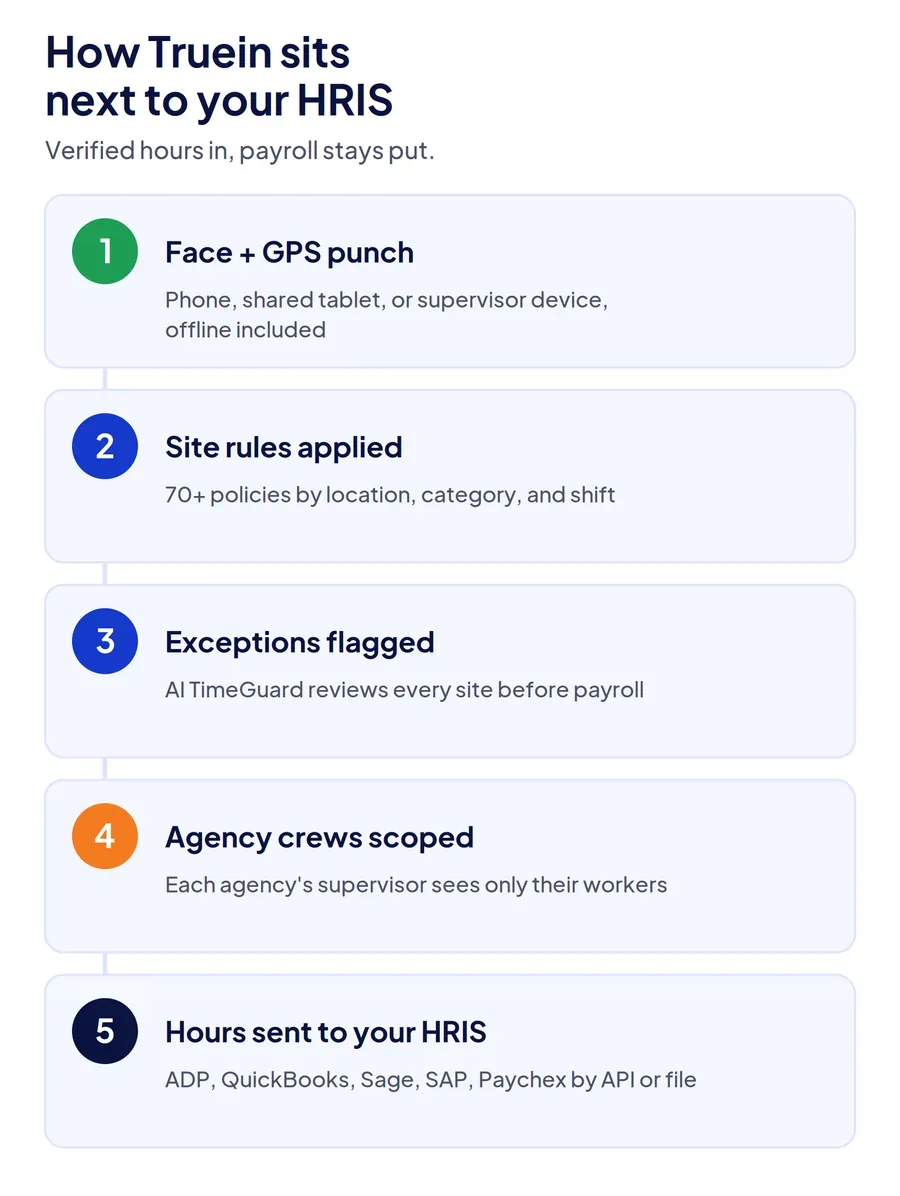
Truein is built to be the verified layer between the workforce and the HRIS. Every punch carries a face match and a GPS geofence check, on a personal phone, a shared tablet, or a supervisor's device, and punches at sites with no signal are captured on the device with their original time. Agency and subcontractor crews run on the same account with scoped supervisor views, and more than 70 configurable policies apply overtime, break, and shift rules by location, worker category, and shift.
Verified hours go to the systems you already run through API or file-based sync, including ADP, QuickBooks, Sage, Xero, SAP, and Paychex, and AI TimeGuard flags anomalies across sites before payroll. The time and attendance system page shows the full setup.
Where it stops: Truein is not an HRIS and does not run payroll, so it adds a system rather than replacing one. If every worker is your own employee at one location, your HRIS module is likely the better choice.
Conclusion
HRIS time tracking or dedicated software is a question about workforce shape, not features. If your hourly workers are your own employees at a few fixed sites, keep the module and spend the money elsewhere. If you track people who are not on your payroll, run sites with their own rules, need proof of who punched, or work without signal, two or more of those signs mean the module has run out. Keep the HRIS as the system of record and put a verified time layer in front of it.
Frequently Asked Questions
Does an HRIS track employee time and attendance?
Most do. Mid-market platforms such as ADP Workforce Now, Paychex Flex, Paylocity, Paycom, Rippling, and BambooHR offer time tracking that feeds their own payroll. Coverage varies by plan, and the modules are built around employees on your payroll, so they rarely cover agency or subcontractor workers.
Which HRIS combines payroll and time tracking?
Payroll-first HRIS platforms combine both most tightly, because their time modules write straight into their own payroll engine. ADP, Paychex, Paylocity, and Paycom are common examples. Check whether time tracking is included in your plan or sold as an add-on, and whether it supports the clock-in methods your workers can actually use.
What is the best HRIS for tracking employee attendance?
For an office or single-site team of employees, the best choice is usually the HRIS you already run, because hours and payroll stay in one system. For multi-site, frontline, or contract-heavy workforces, the more useful question is which time and attendance layer integrates with your HRIS, since attendance is where the module tends to run out.
Can dedicated time and attendance software integrate with an HRIS?
Yes. Dedicated tools typically pull employee records from the HRIS and send verified hours back through an API or scheduled file transfer. Set one direction of truth for each field so records are not edited in two places.
Do I need separate time tracking for contract or agency workers?
Usually, yes. Agency and subcontractor workers are employed by another company, so they rarely have a record in your HRIS. Tracking them in a time and attendance layer lets you verify their hours and reconcile each agency invoice against punches instead of a total.
Is HRIS time tracking cheaper than dedicated software?
Often, because it is included or sold as a low-cost add-on. The total cost changes once you count payroll corrections, unverified agency invoices, and manual timesheet review. If those costs are small, the built-in module is the cheaper choice; if they recur every pay period, a dedicated layer usually pays for itself.
