


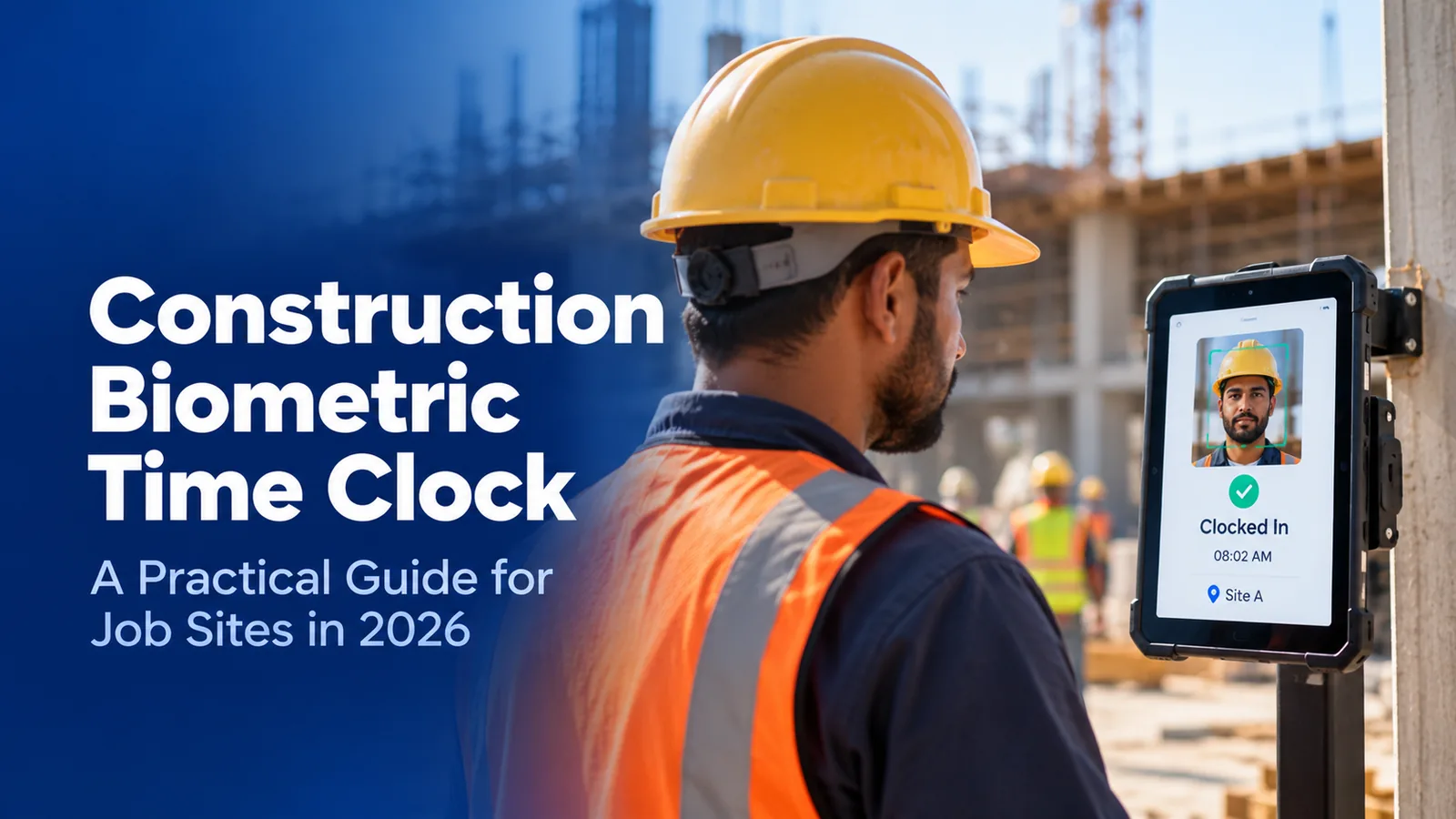

What is the best biometric time clock for construction?
For construction, face recognition is the most reliable biometric because it works through gloves, dust, and worn skin and needs no contact. Fingerprint clocks fail most often on working hands. Whichever trait you choose, states such as Illinois, Texas, and Colorado require written notice and consent before the first scan, so the policy has to be in place before the clock goes up.
- Which biometric traits hold up on a job site and which fail on gloved, dusty, or worn hands
- What Illinois, Texas, Colorado, and New York require before you scan a worker
- How to enroll subcontractors and temps without creating consent and retention gaps
- Where face recognition fails on site, and how to set it up so it does not
Most contractors buy a construction biometric time clock to stop buddy punching, and most of them get that part right. Then two things go wrong that nobody priced in. The fingerprint reader rejects a third of the crew by the second week, and the company discovers it has been collecting biometric data in Illinois without the written consent the state requires.
This guide is for ops heads, payroll managers, and safety leads at US contractors running crews across job sites. It covers which biometric trait survives site conditions, what the law requires before the first scan, and how to roll a biometric clock out to subcontractors without leaving a liability behind.
What is a construction biometric time clock?
A construction biometric time clock verifies a worker's identity at clock-in using a physical trait, usually a fingerprint or face, instead of a card, PIN, or fob that can be shared. The trait is matched against a template captured at enrollment, and the punch is accepted only if the match passes. On a job site it is usually paired with a GPS geofence so the record shows who punched and where.
Three decisions sit behind every purchase, and buyers usually make only the third one consciously:
- Which trait. Fingerprint, face, palm vein, iris, or hand geometry. This decides how often the clock rejects a real worker.
- What the law requires. In several states, collecting a biometric template is regulated on its own, separate from wage and hour rules.
- Which device. A gate terminal, a shared tablet, or the worker's phone. The portable time clock comparison for construction covers the hardware side, so this guide stays on the first two.
Which biometric works on a construction site?
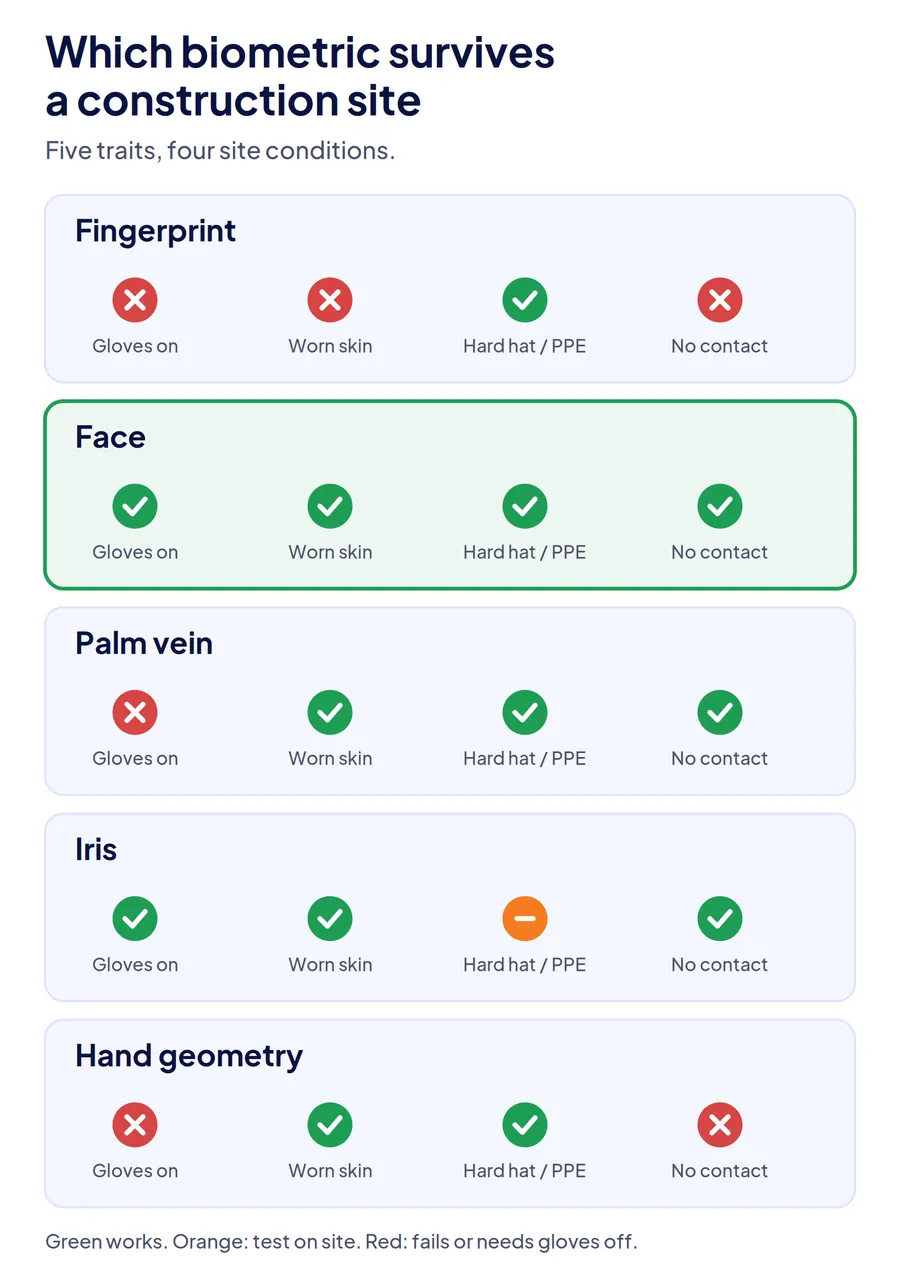
Face recognition is the most dependable biometric on a construction site, because every condition that breaks a fingerprint read, from gloves and dust to cement-worn skin, leaves the face untouched. Palm vein and iris work well in controlled entrances but are rarely sold in field-ready form. Hand geometry is accurate enough for access but adds little over a card.
| Trait | Gloves and dirty hands | Worn or damaged skin | Hard hats and PPE | Contact required |
|---|---|---|---|---|
| Fingerprint | Fails: gloves must come off, dirt blocks the read | Fails often: masons, drywall, and concrete crews | Not affected | Yes, shared surface |
| Face | Works | Works | Works with hard hats; masks and glare need a good capture | No |
| Palm vein | Gloves must come off | Usually works | Not affected | Contactless on most readers |
| Iris | Works | Works | Safety glasses can interfere | No |
| Hand geometry | Gloves must come off | Works | Not affected | Yes, shared surface |
Fingerprint: cheap to buy, expensive to run
Fingerprint terminals are the oldest and cheapest biometric clocks, which is why so many sites start with one. The failure is predictable. Concrete, drywall, and masonry work wears the ridges a sensor reads, cold and wet hands read poorly, and every worker has to remove a glove at the gate. A crew of 80 where one in five needs three tries at 6:45 a.m. turns a two-minute line into ten, and the foreman starts waving people through. The disadvantages of fingerprint attendance systems covers the read-failure problem in more depth.
Face: the default for site crews
Face recognition needs no contact, works with gloves on, and is not affected by what the work does to hands. Its failure points are capture quality, not the worker: an enrollment photo taken in poor light, or a device mounted facing into the low morning sun, causes retries. Both are fixed at setup. Liveness detection, which separates a live face from a photo held to the camera, is the feature to check, because a face clock without it can be fooled with a phone screen.
Palm vein, iris, and hand geometry
Palm vein and iris readers are accurate and contactless, but they are mostly built for building access, not for a trailer door with no power. Iris readers also struggle with tinted safety glasses. Hand geometry is common in older plants and proves less than the other traits, since hand shape is not unique enough to stop a determined proxy. For most contractors these are worth considering only at a permanent, powered gate. How those readers fit alongside badges, turnstiles, and phone check-ins is covered in our job site access control guide.
What do US biometric privacy laws require before you scan?
Biometric time clock laws exist in several states, which regulate the collection of biometric identifiers directly, and an employer that scans a worker's face or fingerprint for a time clock is collecting one. The common thread is notice, consent, a retention schedule, and deletion when the purpose ends. Requirements differ in detail and enforcement, so the policy has to match the states where your crews actually work.
| State | What it requires | Who enforces it |
|---|---|---|
| Illinois (BIPA) | Written notice, written release before collection, public retention and destruction policy, no sale of biometric data | Private right of action: up to $1,000 per negligent and $5,000 per reckless or intentional violation, limited to one recovery per person since August 2024 |
| Texas (CUBI) | Notice and consent before capture, no sale, destruction within a reasonable time after the purpose ends | State Attorney General |
| Colorado (HB24-1130) | Consent and a written policy with a retention schedule and incident protocol; limits on why an employer can require biometric consent | Attorney General and district attorneys, effective July 1, 2025 |
| New York (Labor Law 201-a) | Employers may not require fingerprinting as a condition of employment | State labor authorities |
Illinois is the one that moves money. BIPA lets workers sue directly. In 2023 the Illinois Supreme Court held that every scan was a separate violation, and White Castle estimated its own exposure from time clock scans at more than $17 billion. Illinois responded with Senate Bill 2979, which counts repeated scans of the same person once. That caps exposure at one recovery per worker: for a 300-person crew without written releases, between $300,000 and $1.5 million depending on whether the violation is found negligent or reckless.
Colorado now covers employees. The Colorado HB24-1130 amendment took effect July 1, 2025 and added consent and written-policy requirements for biometric identifiers, including specific limits on when an employer can require consent as a condition of employment.
New York treats fingerprints differently from faces. Labor Law 201-a bars employers from requiring fingerprinting as a condition of employment. A voluntary fingerprint clock is permitted, but a crew that can opt out needs a second clock-in method anyway, which is one more reason contractors with New York sites choose face recognition.
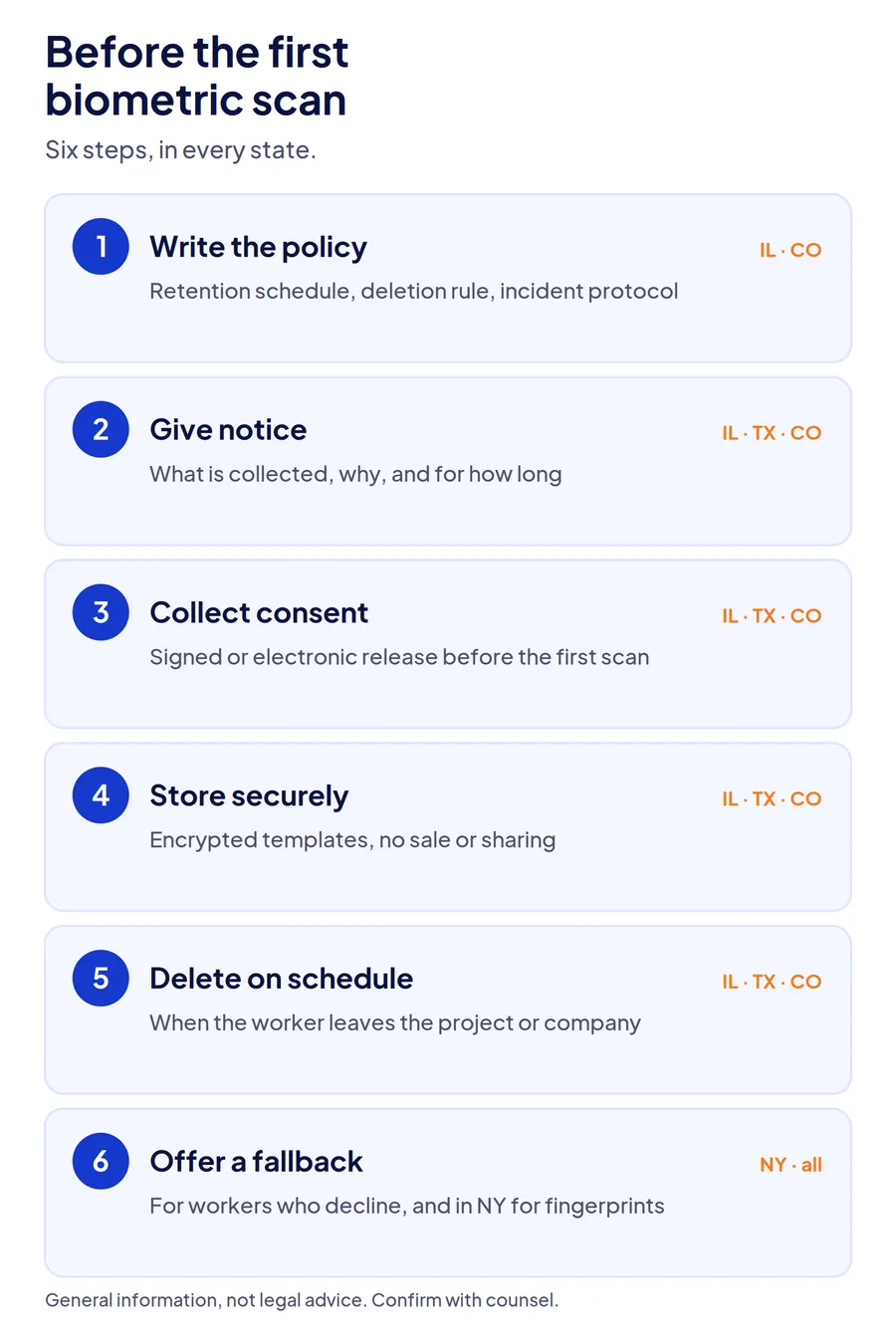
The practical sequence before the first scan, in every state: publish a written biometric policy with a retention schedule, give each worker written notice of what is collected and why, collect a signed or electronic release, store templates encrypted, and delete them when the worker leaves the project or the company. Doing this in every state, not only the strict ones, is cheaper than tracking which crews crossed which state line.
Disclaimer: This section is general information, not legal advice. State biometric laws change and their application to employee data varies. Confirm your policy with employment counsel before rollout.
How do you roll out biometric clocks to subcontractors and temps?
Enroll subcontractor and agency workers on the same clock as direct labor, collect their consent at enrollment, and set deletion to trigger when they leave the project rather than when their employer's contract ends. The legal and practical gaps in a biometric rollout almost always sit with workers who are not on your payroll.
Three questions to settle before the first sub crew arrives:
Who collects the consent? If the general contractor runs the clock, the general contractor is collecting the biometric data, even for workers employed by a sub or a labor broker. The release should come from the worker to the entity operating the clock, at the gate, on day one, not from a clause buried in the subcontract.
When is the data deleted? A sub crew that finishes the framing in March may never return. Set deletion to run when a worker has no clock-ins for a defined period or when the sub's scope closes, whichever comes first, and keep a log that it happened. An enrolled face template from a worker who left eight months ago is the record that turns into a lawsuit.
What about workers who decline? Some will. Offer a supervisor-witnessed clock-in as the alternative and record it as such. A worker who declines biometric enrollment still has to be paid for verified hours, and a fallback with no verification at all reopens the buddy punching the clock was bought to close.
A general contractor with four subs and a labor broker on one Illinois site can have 150 new enrollments in a month. Handling consent and deletion at the clock, rather than in five separate subcontract files, is the difference between a process and a liability.
How does Truein handle biometric clock-ins on construction sites?
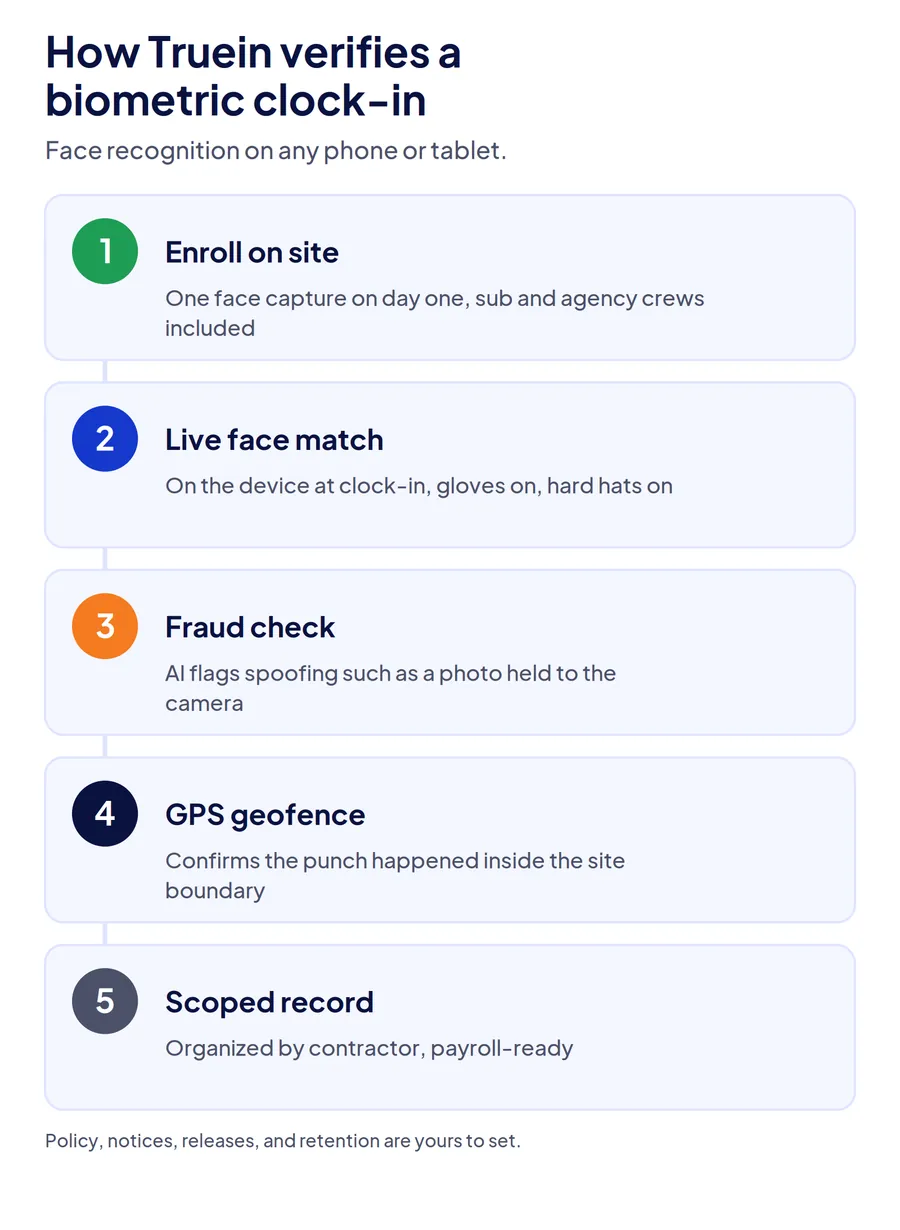
Truein uses face recognition as its biometric, run on any Android or iOS phone or shared tablet, so the same verification works at a gate kiosk, on a supervisor's phone, and on a worker's own device without a dedicated terminal at each site. The face match runs on the device at the moment of clock-in, with AI fraud detection to flag spoofing attempts such as a photo held to the camera, and a GPS geofence confirms the punch happened on site.
Recognition runs at around 95 to 100 percent accuracy, including with hard hats, masks, facial hair, and changed hairstyles, and nobody removes a glove. Workers enroll with a single on-site capture, so a sub crew arriving on Tuesday clocks in verified on Tuesday.
Subcontractor and agency crews run under the same account, with each sub's supervisor seeing only their own workers, which keeps enrollment, consent records, and deletion organized by contractor rather than scattered across subcontract files. Truein is ISO 27001:2022 certified and SOC 2 Type II compliant.
Two honest limits. Truein verifies identity and records the punch, but the written biometric policy, worker notices, releases, and retention schedule your state requires are yours to set, and counsel should approve them before rollout. And face recognition depends on capture quality: enroll workers in even light and mount gate tablets out of direct low sun, or you will see retries. The construction time tracking software page shows the site setup, and the guide to choosing a face recognition attendance system for construction sites covers gate throughput and capture placement.
Conclusion
A construction biometric time clock pays for itself only if it reads the crew you actually have and only if the data it collects is covered before the first scan. Face recognition clears the first test on gloved, dusty, worn hands where fingerprint readers fail. The second test is paperwork: a written policy, notice, consent, and a deletion rule that follows subcontract workers off the project. Get both right, and the clock does what it was bought for without creating the next problem.
Frequently Asked Questions
Are biometric time clocks legal for construction companies in the US?
Yes, in every state, but several regulate how biometric data is collected. Illinois, Texas, and Colorado require notice and consent before collection, and Illinois lets workers sue directly over violations. New York bars employers from requiring fingerprints as a condition of employment. Publish a written policy, collect releases, and confirm your setup with employment counsel before the first scan.
Do fingerprint time clocks work for construction workers?
Often poorly. Gloves have to come off, dirt and cement block the sensor, and trades like masonry, drywall, and concrete wear down the ridges the reader needs. Expect a share of any crew to need repeated attempts, which slows the gate and pushes foremen toward manual overrides. Face recognition avoids all three problems because nothing touches the reader.
Does face recognition work with hard hats and safety glasses?
Hard hats are not a problem for a well-built face recognition system, and most handle masks and facial hair as well. Tinted safety glasses and strong backlighting are the conditions to test, along with the quality of the enrollment photo. Run a short pilot at your busiest gate before rolling out across sites.
What does BIPA require for a time clock?
Before collecting a fingerprint or face template in Illinois, an employer must give written notice of what is collected, why, and for how long, obtain a written release, and publish a retention and destruction policy. Since the August 2024 amendment, repeated scans of the same worker count as one violation, but each worker without a release is still a separate claim.
What happens to a worker's biometric data when they leave the job?
It should be deleted on a schedule set in your written policy, typically when the purpose for collecting it ends. For subcontract and temporary workers, set deletion to trigger when they stop clocking in for a defined period or when the sub's scope closes, and keep a record that it was done.
Can a biometric time clock prevent buddy punching completely?
It closes the common method, one worker clocking in for another, because the trait has to match the enrolled worker. It does not stop a worker from clocking in and then leaving the site, and a clock without liveness detection can be fooled with a photo. Pair the biometric check with a GPS geofence and a record of how long workers stayed on site.
