


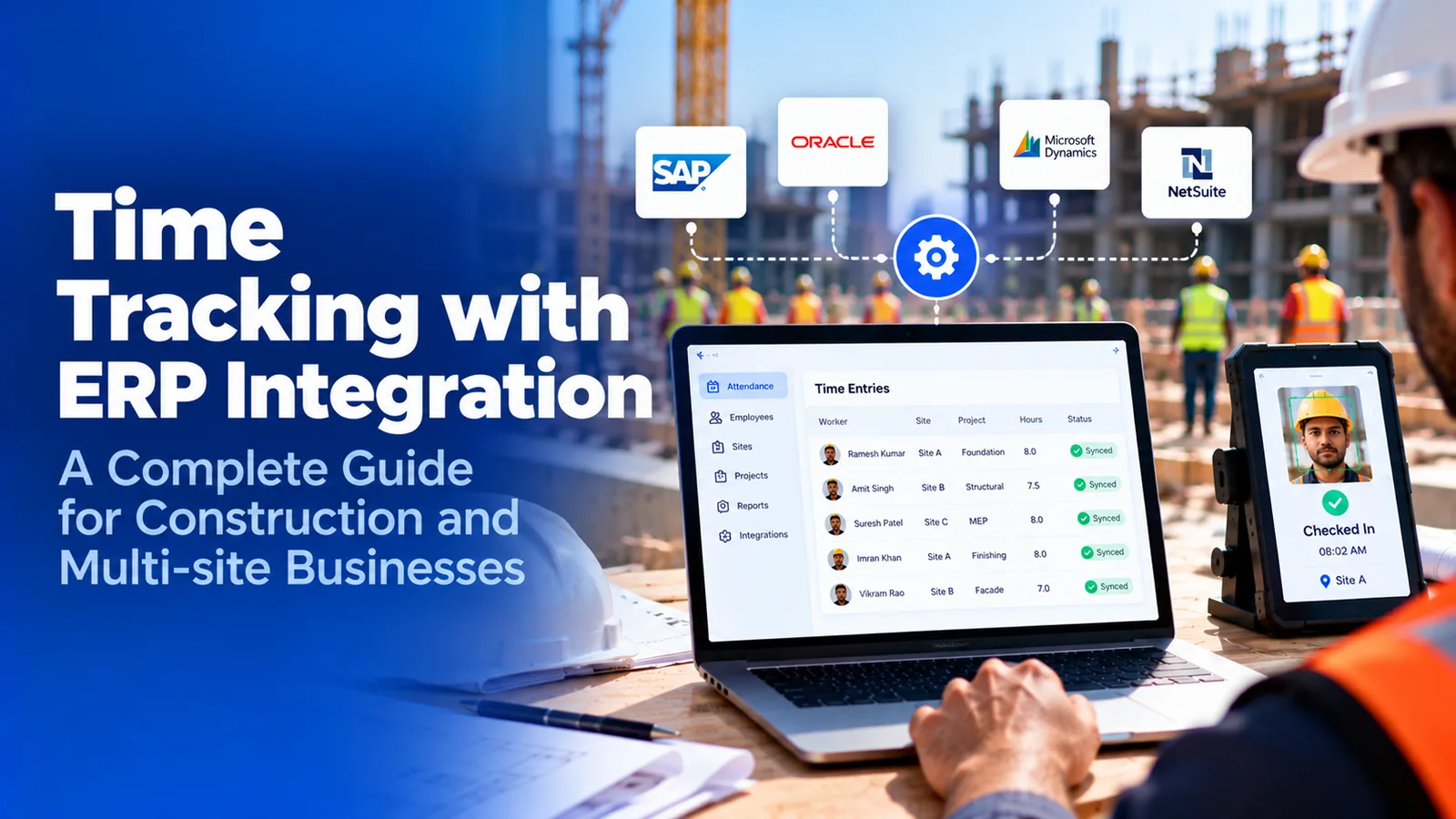

What is time tracking with ERP integration?
Time tracking with ERP integration connects the system that records when and where people work to the ERP that costs, pays, and bills that work. Approved hours flow into job cost, payroll, and billing without re-keying. The integration moves data accurately, but it cannot check it, so the ERP is only as right as the punches it receives.
- What moves between a time system and an ERP, in each direction
- How the ERP turns one approved hour into job cost, payroll, and billing entries
- Why integration speeds up bad labor data instead of fixing it
- What a verified attendance feed has to carry before the ERP posts it
- A six-step setup sequence for multi-site and contract crews
Most ERP projects treat labor hours as the easy part. The chart of accounts takes months, the job cost structure takes weeks, and the time feed gets one line in the integration plan: hours in, nightly. Then the first month closes and a project controller finds a job carrying 300 hours nobody can explain.
Time tracking with ERP integration solves the re-keying problem. It does not solve the truth problem. This guide is for controllers, ops heads, and payroll leads at US companies running crews across job sites. It explains what the integration moves, what the ERP does with each hour, and what the time data has to prove before the ERP posts it.
What is time tracking with ERP integration?
Time tracking with ERP integration is a two-way connection between the system that captures work hours and the enterprise resource planning system that uses them. The ERP sends reference data down, so workers can only clock to things that exist. The time system sends approved hours back up, tagged so the ERP knows where to post them.
| Direction | What moves | Why it matters |
|---|---|---|
| ERP to time system | Employee and crew lists, active jobs, phases, cost codes, cost centers | Workers can only clock to valid jobs, so hours never arrive with a code the ERP rejects |
| ERP to time system | Pay classes and union or prevailing wage classifications | The right rate attaches to each hour later, without a clerk guessing |
| Time system to ERP | Approved hours by worker, date, job, phase, and cost code | Labor posts to the job ledger without re-keying |
| Time system to ERP | Overtime and premium splits, approval status, edit history | Payroll and job cost see the same hours, and auditors can trace them |
The difference from HR-side integration matters. An HRIS cares whether a person was paid correctly. An ERP also cares where every hour belongs, because each one becomes a cost on a job. If you are still deciding whether to keep time tracking in the HRIS or run a dedicated tool, that question is covered separately. This guide assumes the hours are headed for job costing.
What does an ERP do with labor hours once they arrive?
It turns each approved hour into money in several places at once. That is what makes the time feed the most consequential integration in the stack: one wrong hour is wrong in four ledgers.
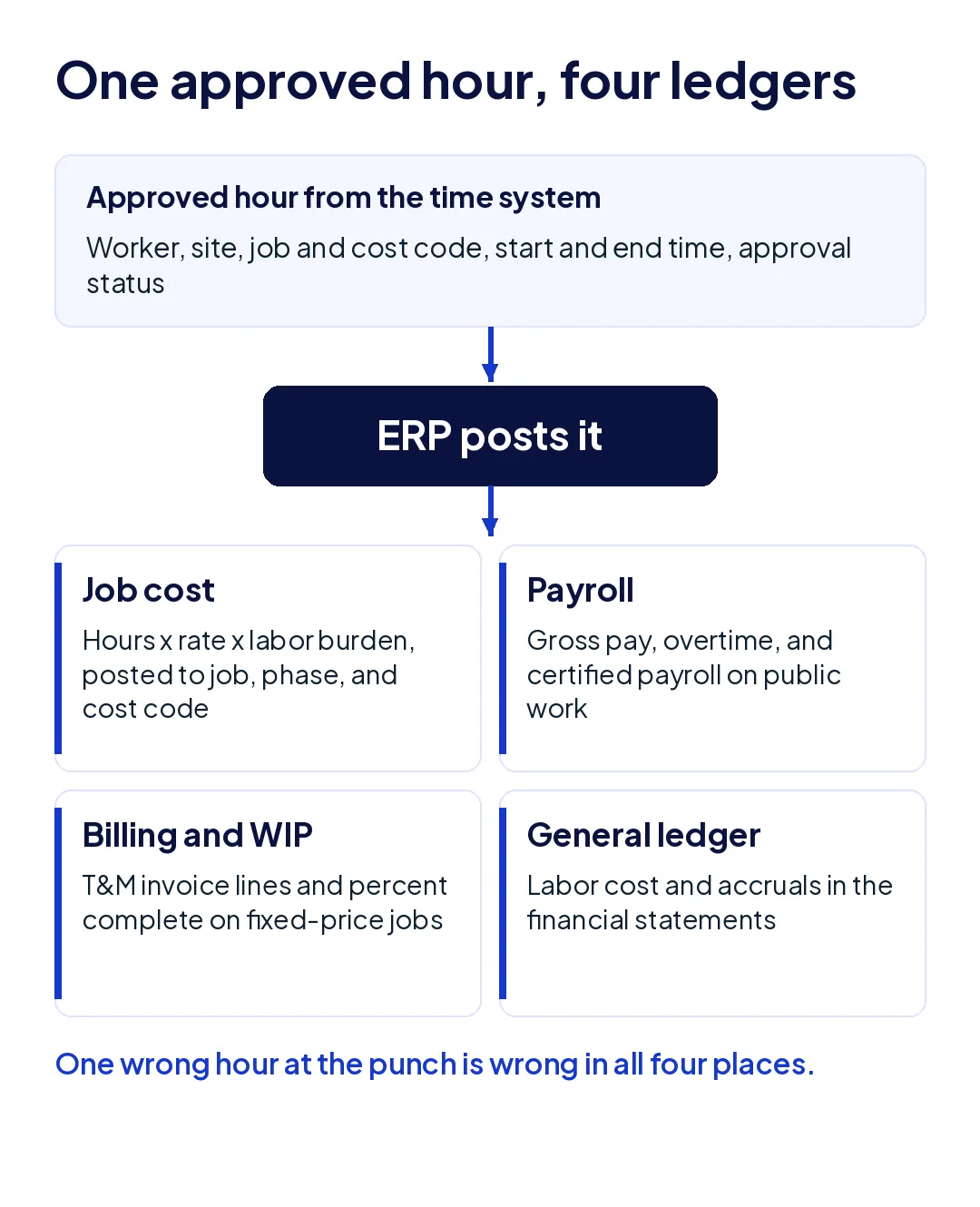
Job cost
The hour is multiplied by the worker's rate plus labor burden, meaning payroll taxes, insurance, and benefits, and posted to the job, phase, and cost code. This is where estimates get tested against reality, and where the next bid gets its numbers.
Payroll
The same hour feeds gross pay and overtime. On public work it also feeds certified payroll, where the record is the deliverable.
Billing and WIP
On time-and-materials work, the hour becomes an invoice line. On fixed-price work it moves percent complete, which drives revenue recognition and the work-in-progress schedule your bonding company reads.
General ledger
Labor cost and accruals roll into the financial statements. It is the ledger the bank reads, and the one nobody on site ever sees.
A mechanical contractor posting labor nightly from five active projects closes the month with one job showing piping labor 18% over budget. The crew had split its days between two jobs, the cost code was set once at clock-in, and every afternoon hour landed on the morning job. The ERP posted all of it exactly as received.
Why doesn't ERP integration fix inaccurate labor hours?
Because an ERP validates format, not truth. When a labor record arrives, the integration checks that the employee ID is active, the job is open, the cost code belongs to the job, and the hours add up. It cannot check whether the worker was on site, whether they worked that job, or whether 7:00 was the real start time.
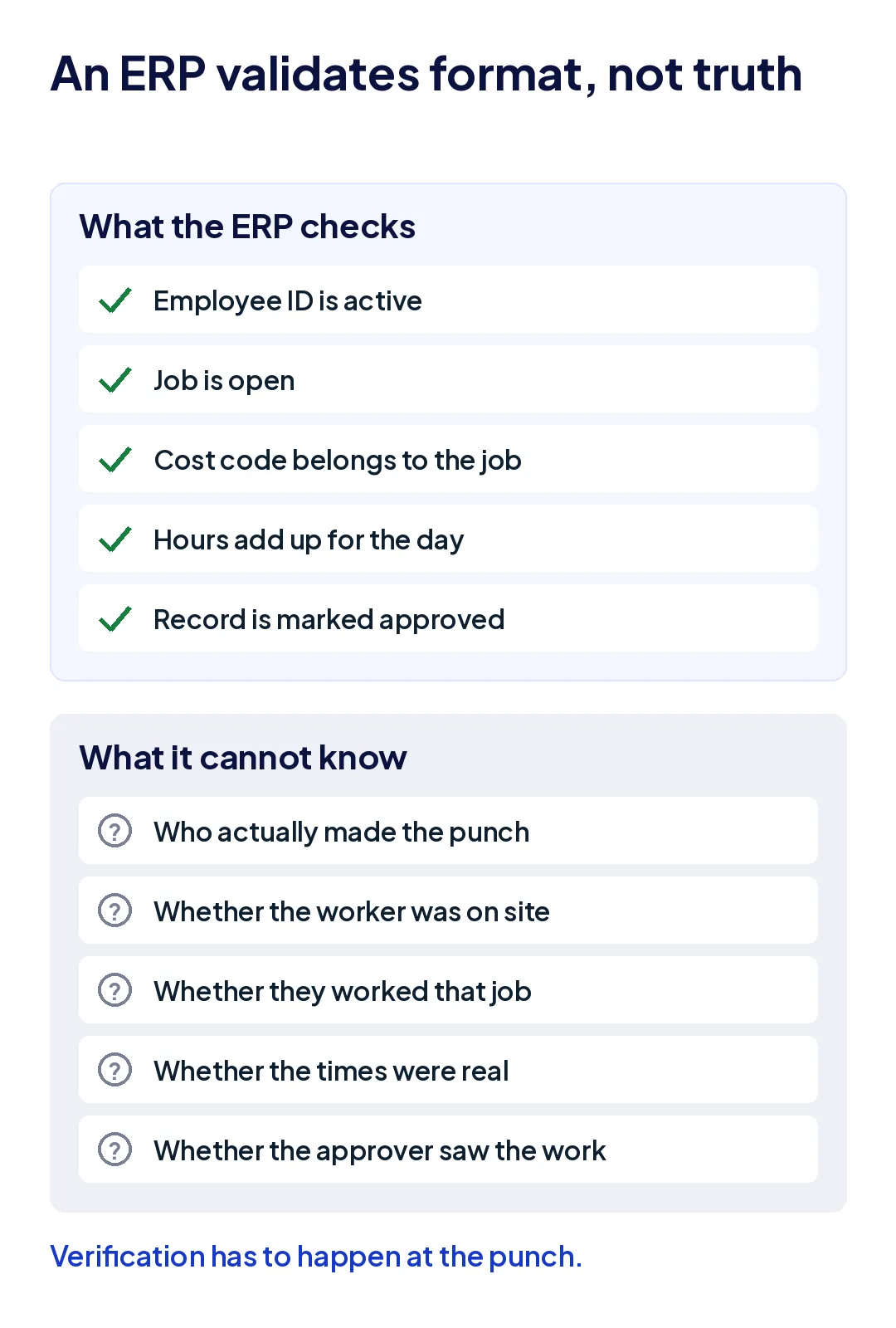
Integration removes one error, re-keying, and speeds up every other one. Before the integration, the clerk typing timesheets into the ERP was an accidental checkpoint who sometimes noticed a crew of six claiming 70 hours in a day. After it, nobody looks. The ERP posts what arrives, every night, at scale. The same pattern explains why payroll audits miss most payroll leakage.
An ERP needs a verified attendance feed, not just a connected one. Everything else in this guide follows from that.
Which time tracking errors does an ERP integration amplify?
Four errors pass straight through any connector, and each one does more damage inside an ERP than inside a payroll system.
The wrong person on the punch
A phone handed across a fence or a shared PIN produces a record with a valid ID, a valid job, and a valid code. Payroll overpays one shift. The ERP also adds that shift to the job's actual cost, so the next estimate for similar work carries labor nobody performed.
Right hours, wrong job or cost code
Payroll never catches this one, because the worker is paid correctly. In the ERP it moves cost from one job to another, so one looks over budget and the other looks efficient. The guide to the five errors behind inaccurate labor hours ranks this as the most damaging error per project for exactly that reason.
Times written down after the fact
Reconstructed punches round to the hour and half hour. In job cost they show up as suspiciously stable labor-per-unit figures, which feel reliable and are not.
Edits after the hours have posted
Once hours post to the job ledger, a correction in the time system has to reach the ERP as an adjusting entry, not a silent overwrite. If the integration only sends new records, the two systems drift apart, and month-end reconciliation turns into a manual project. Timing makes all four worse: a feed that runs once per pay period gives project managers job cost up to two weeks behind the work, which is too late to move a crew.
Why do multi-site and contract crews strain ERP labor posting most?
An ERP expects every hour to come from an employee working one job at a time. Multi-site and contract workforces break both assumptions.
- Crews move between sites mid-shift. Cost code accuracy then depends on the punch moving with the crew, not on what was selected at 6:30 in the morning.
- Subcontractor and agency workers are not in the ERP's payroll. Their labor reaches the job as a vendor invoice total, which the ERP posts as one cost with no hours behind it.
- Supervisors approve crews they did not see. One superintendent covering four sites signs off on hours from three of them by trust.
A facility services company running cleaning and maintenance crews across 40 client buildings bills each client from ERP job cost. When a floating crew covers three buildings in one shift but clocks in once, two clients are billed for nothing and one is billed for everything, and the variance only appears when a client disputes an invoice.
For contract labor, the fix is to give those workers punches too, tagged to the job, so the vendor invoice can be checked against verified hours before the ERP posts it.
What should a verified attendance feed into an ERP include?
Six fields, each proven at the moment of the punch rather than reviewed afterward.
| Field | What it proves | How it is verified |
|---|---|---|
| Worker identity | The enrolled worker made the punch | Face match on every clock-in method |
| Site | The punch happened at the job location | GPS geofence for each site |
| Job, phase, and cost code | Hours land where they were worked | Codes limited to jobs active at that site, changed at the punch |
| Original timestamp | Start and end times are real | Captured on the device and kept through offline sync |
| Approval and edit trail | Who changed what, and why | Original punch kept beside every edit |
| Worker type and cost center | Direct, agency, and subcontractor labor post correctly | Set on the worker record and carried on every punch |
If a time system can produce these six fields, the ERP's own validation becomes meaningful, because it is checking codes on records that were already true. If it cannot, the integration is a faster way to post estimates.
How do you set up time tracking with ERP integration?
Work through six decisions in this order. Most integration problems that show up after go-live trace back to skipping the first two.
- Decide which system owns each field. The ERP owns jobs, cost codes, pay rates, and burden. The time system owns punches, identity, location, and edits. Never let both edit the same field.
- Push jobs and cost codes down daily, filtered by site. A worker at one site should only see the jobs active there, which removes most wrong-code punches before they happen.
- Set two sync cadences. Send hours to job cost daily so project managers act on this week's labor, and send them to payroll at the pay-period cutoff, after approval.
- Decide how contract labor posts. Agency and subcontractor hours usually post to the job as vendor cost, not payroll, so tag those workers by company and reconcile invoices against their punches.
- Run one pay period in parallel. Compare hours by job between the old process and the integrated feed. Each difference points to a code, rule, or approval that still needs work.
- Lock posted periods. After hours post, corrections travel as adjusting entries with the original kept, so the ERP and the time system never disagree silently.
Under the FLSA, employers must keep accurate records of hours worked each day and each workweek for non-exempt workers. The edit trail in step six is a compliance record as well as an accounting control, which is why it belongs in the integration design and not in a spreadsheet.
How does Truein feed verified hours into an ERP?
Truein sits in front of the ERP as the verified capture layer. Every punch carries a face match and a GPS geofence check, on a personal phone, a shared tablet at the gate, or a supervisor's device. Punches at sites with no signal are captured on the device and keep their original time when they sync.
With job time tracking, workers pick a job code at clock-in from a list limited to their site, jobs can be geofenced to approved sites, and jobs map to cost centers. Supervisors can split hours across jobs with approvals, and budget hours per job flag overruns while the work is still happening. Agency and subcontractor crews run on the same account, so their hours exist as punches before the vendor invoice arrives.
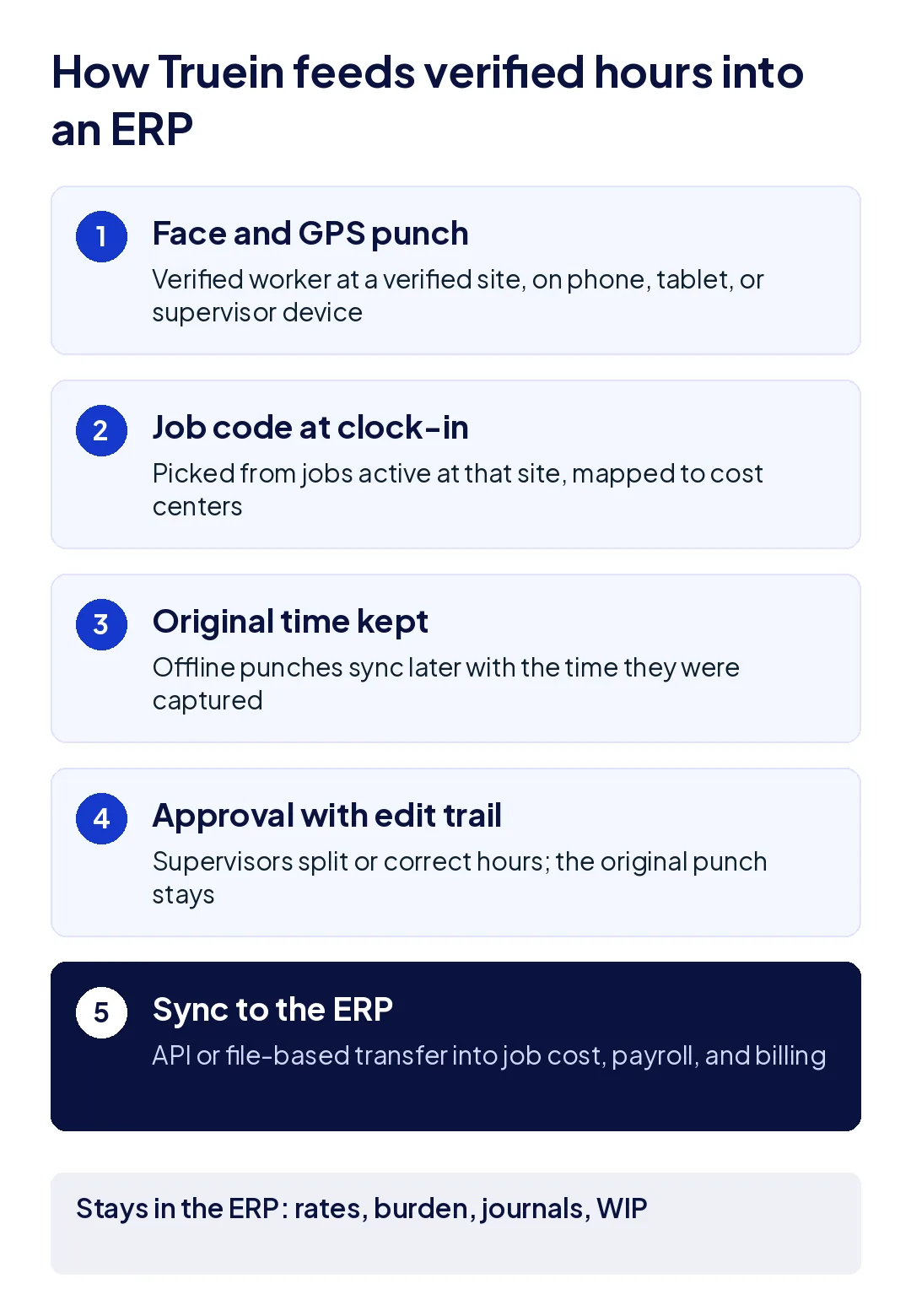
Approved hours and employee records sync through API or file-based (FTP) integrations. The integration list includes SAP, Oracle, Microsoft Dynamics 365, Sage, Odoo, and Viewpoint, with custom integrations for in-house systems. Truein serves 500+ customers across 10,000+ locations and 500,000+ workers.
Where it stops: Truein is not an ERP. It does not calculate labor burden, post journal entries, or produce WIP schedules. Rates, costing, and accounting stay in the ERP, which is where they belong.
Conclusion
Time tracking with ERP integration is worth doing, because re-keying labor hours is slow and error-prone. But the connector is the smallest part of the job. The ERP will post every hour it receives into job cost, payroll, billing, and the ledger, and it has no way to know whether the hour was real.
Verify identity, site, job, and time at the punch, keep the edit trail through to posting, and the numbers in your ERP start to mean what your project controllers already assume they mean.
Frequently Asked Questions
What is time tracking with ERP integration?
It is a connection between a time tracking system and an ERP in which the ERP sends employees, jobs, and cost codes down to the time system, and approved hours flow back into job cost, payroll, and billing without manual entry. It removes re-keying, but the ERP still posts whatever hours it receives.
Does an ERP have its own time tracking module?
Many do. Most ERP time modules are built around timesheets entered by employees or supervisors, which suits office and project staff. Field crews, multi-site work, and contract labor usually need capture that verifies identity and location at the punch, which is why companies often pair the ERP with a dedicated attendance system.
How often should time data sync to an ERP?
Daily for job costing, so project managers see current labor against budget, and at the pay-period cutoff for payroll, after approval. A once-per-period sync leaves job cost reports up to two weeks behind the work.
How do you post subcontractor labor hours to an ERP?
Subcontractor hours usually post to the job as vendor cost through accounts payable, not through payroll. Tracking those workers on the same clock-in system, tagged by company and job, lets you check each sub's invoice against verified punches before approving it.
What data should a time system send to an ERP?
At minimum: worker ID, date, job, phase or cost code, regular and overtime hours, and approval status. For field crews, add the site, the original punch times, and the edit history, so job cost can be traced back to verified records.
Can time tracking software integrate with SAP or Oracle?
Yes. Many time systems integrate with SAP, Oracle, Microsoft Dynamics 365, Sage, and other ERPs through APIs or scheduled file transfers. Ask which fields are mapped, how corrections reach the ERP after posting, and whether hours carry a job and cost code from the punch.
