

Key Takeaways
- Define scope, deadlines, and approval authority for every contractor before work starts, not after the first conflict.
- Run one master schedule across every contractor and site instead of separate calendars per vendor.
- Standardize communication with fixed channels and a set weekly check-in, so updates stop living in one supervisor's phone.
- Track attendance, task completion, and compliance documents against the same metrics for every contractor on the job.
- Set five measurable KPIs and review them on a fixed cadence instead of judging performance by gut feel.
- Build one compliance checklist that travels with every contractor, not a separate process per vendor.
- Treat contractor agencies as their own management layer. Managing three agencies is a different problem than managing three individuals.
Three contractors are on the same site this week: an electrical crew finishing rough-in, an HVAC team installing ductwork, and a drywall crew waiting on both of them to clear before they can close up.
At 4 p.m., the site manager finds out the drywall crew has been standing around for two days because nobody scheduled the inspection that was supposed to happen after electrical finished. The information existed. It just lived in one supervisor's phone instead of anywhere the manager could see it.
That is not a communication failure in the way most advice treats it. Most guidance on managing multiple contractors stacks more meetings, more forms, and more detailed scopes of work on top of the actual gap, which is that nobody had a live, verified answer to a simple question: who is on this site right now, and did they finish what they were assigned.
Contracts do not fix that. Weekly check-ins do not fix that either, since a weekly meeting is still 6 days behind whatever went wrong on Tuesday.
This article covers seven tips for managing multiple contractors, and every one of them assumes you have already closed that visibility gap first. It starts there, then moves through scope, scheduling, communication, tracking, performance, compliance, and the agency layer that most contractor-management advice skips entirely.
Multi-Contractor Management Fails at the Visibility Gap, Not the Contract
Good contractor management comes down to five outcomes:
- Clear accountability for every task
- On-time work
- Controlled labor costs
- Consistent quality across crews
- Compliance with the policies your business is on the hook for.
Miss any one of them and the other four get harder, because a missed deadline on one contractor's scope cascades into cost overruns and quality shortcuts on the next one.
Most contractor coordination breaks down not because the plan was wrong, but because no one could verify, in real-time, which contractor was actually on which site.
A scope of work tells you what someone agreed to do. It does not tell you whether they showed up, how many hours they logged against that scope, or whether the person who clocked in was actually the person qualified to do the work.
That distinction matters more as headcount grows.
A 2024 McKinsey & Company macro-analysis underscores a severe efficiency crisis, revealing that global construction productivity grew at a stagnant 0.4% annually over two decades, a lag largely driven by fragmented project coordination and unintegrated technology.
On the ground, this operational friction is incredibly costly: according to FMI Corporation’s 2024 Labor Productivity Study, field-level inefficiencies and misaligned jobsite execution bleed an estimated $30 billion to $40 billion in lost profits annually from labor-intensive contractors.
For individual projects, these daily coordination failures compound rapidly; operational delay audits show that a single critical-path disruption forces mid-sized contractors to absorb hundreds to thousands of dollars a day in idle labor, extended equipment rentals, and compounding logistics overhead.
None of that comes from a missing clause in a contract. It comes from nobody having a current answer to where the work actually stands.
The seven tips below fix that in order: define ownership first, then schedule, then communicate, then track, then measure, then stay compliant, and finally, treat contractor agencies as a distinct layer of the problem rather than folding them into "individual contractors."
Tip 1: Define Scope, Ownership, and Approval Authority Before Work Starts

Ambiguity about who owns what is the single most common reason multi-contractor projects run into disputes and rework.
Every contractor needs a written scope, a deadline, a named reporting manager, and a clear line of dependency on other contractors' work, before the first day on-site.
This is not the same as a general contract. A scope of work at this level answers a narrower question: for this specific site, this specific week, who is doing what, who signs off on it, and what happens if it is late.
When three contractors are working phases of the same job, an ambiguous handoff between electrical and drywall is exactly what stalled the site in the opening example.
A simple responsibility matrix solves most of this before it becomes a problem:
A matrix like this takes minutes to build and answers, at a glance, exactly what stalled in the earlier scene: Contractor C is blocked, and the block is visible before it costs two full days.
Overlapping scopes are the most common reason two contractors both assume the other one owns a task, and neither does it. If two rows in your matrix list the same task under different owners, fix that before work begins, not after it is missed.
Who Should Sign Off on Changes Mid-Project
Scope creep is the second half of this problem. Once work starts, someone will ask for a change, and without a named approver, that request either stalls the whole job waiting for a decision or gets approved informally by whoever happens to be on-site that day.
Set one approval hierarchy tied to cost and schedule impact, and put it in writing before the first change request shows up.
A five-thousand-dollar change and a two-hundred-dollar change should not require the same sign-off chain, and everyone on-site should know that before they ask.
Tip 2: Put Every Contractor on One Master Schedule, Not Separate Calendars
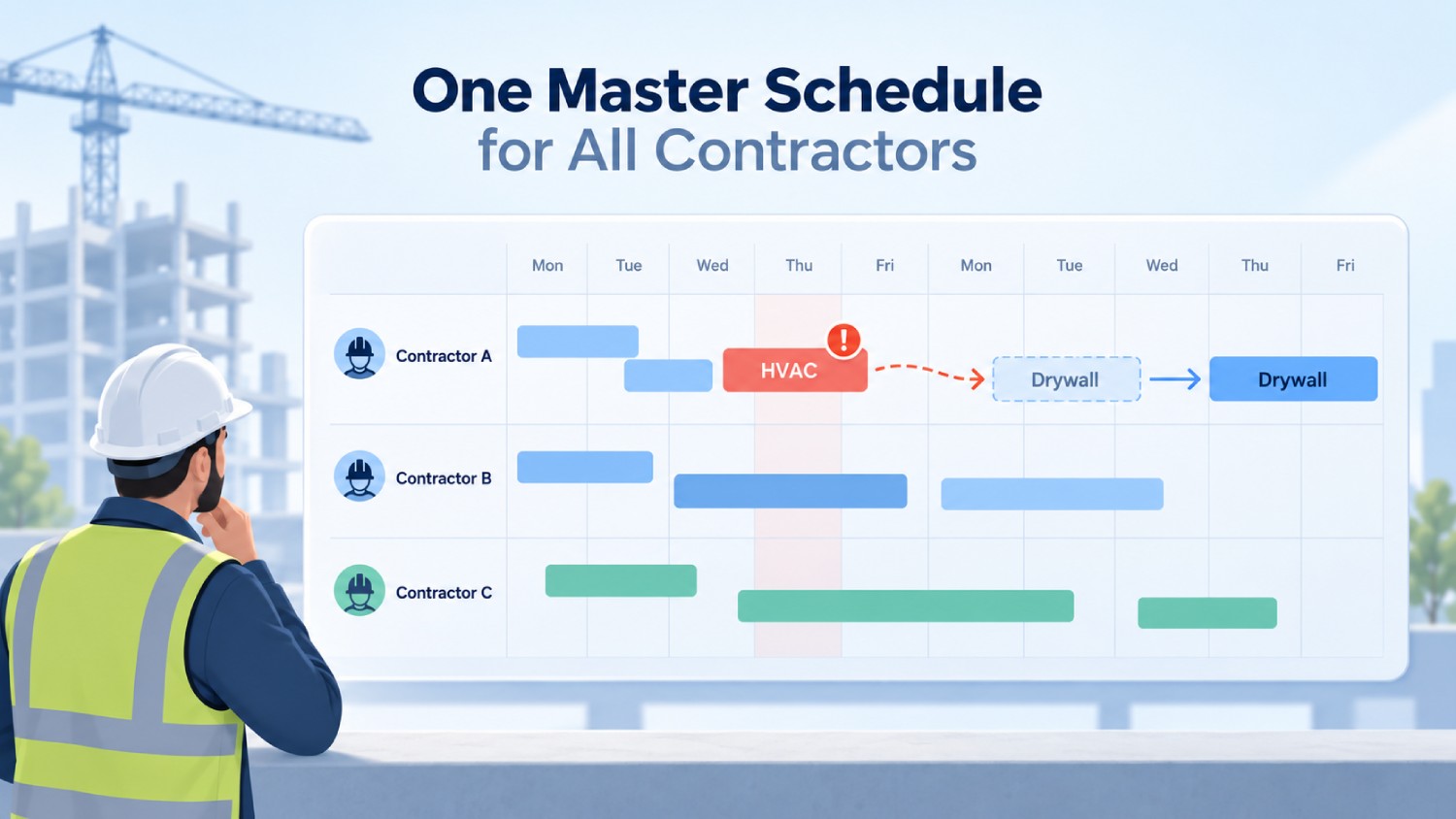
If each contractor is tracking their own timeline, nobody can see how a delay in one crew's work affects the others until it already has.
A single master schedule showing every contractor's tasks, dependencies, and milestones is what turns isolated delays into visible, manageable ones.
Here is what that looks like in practice. If Contractor B's HVAC ductwork slips two days, and Contractor C's drywall depends on HVAC inspection, then Contractor C's start date moves automatically, and so does the final walkthrough that depends on drywall.
On a shared calendar, that ripple is visible the moment the HVAC delay happens. On three separate calendars, it is discovered when Contractor C shows up to a site that is not ready.
Job costing (tracking labor and material costs against a specific project or task rather than the business as a whole) depends on this same shared timeline, since costs tied to a slipped schedule are the ones that quietly eat margin without anyone noticing until the invoice.
A rolling schedule that shows dependencies across contractors is the difference between finding out about a delay today and finding out about it when the next contractor shows up to a site that is not ready.
Tip 3: Standardize Communication Instead of Running It Through Side Channels
Scattered texts, calls, and one-off emails are why status updates die in a single supervisor's phone. It is not usually a lack of goodwill. It is the absence of one system everyone actually uses.
Pick one communication system with defined channels for daily updates, urgent issues, document sharing, and approvals, and set a fixed weekly check-in on top of it. Daily operational chatter does not need a meeting. Weekly progress across every contractor does.
That structure does two things at once. It gives field supervisors a fast channel for the "we are blocked, need a decision now" moments, and it gives the office a predictable weekly point to catch the slower-moving issues before they compound.
- One channel for daily operational updates (a shared app or channel)
- A separate, clearly marked channel for urgent, block-the-work issues
- A shared space for documents, so nobody is hunting for the latest version of a drawing or a permit
- A fixed weekly check-in, same day and time, across every active contractor
So what does this actually change day-to-day? It means a supervisor's 4 p.m. discovery in the opening scene would have shown up as a flagged blocker that morning, in a channel someone was actually watching.
Tip 4: Track Attendance and Task Completion the Same Way for Every Contractor

Scope and schedule set the plan. Tracking is what tells you whether reality is matching it, and it is the tip most contractor-management advice treats as an afterthought rather than the mechanism that makes everything else provable.
How Do I Actually Know Who's On-Site and What They Finished?
This is the question every other tip on this list depends on. Tracking multiple contractors means recording attendance and hours, monitoring task completion against the plan, comparing actual progress to deadlines, flagging exceptions, and reviewing performance on a set schedule, and doing all five the same way for every contractor.
Most generic advice on this topic stops at "track performance regularly," which is not the same as having a verified record of who clocked in, where, and for how long. That distinction is exactly what stalled the drywall crew in the opening scene: a schedule existed, but nothing confirmed whether the prior step had actually been completed by a verified person on-site.
This is where identity-verified attendance tracking, sometimes called a contractor time clock app or touchless clock-in system, earns its place as the mechanism that makes every other tip provable. A photo taken at clock-in and reviewed later documents who might have been on-site.
Verifying identity at the moment of the clock-in, using face recognition paired with GPS, confirms who actually was, before the shift even starts. This is the core function of purpose-built contractor time tracking software: it replaces a paper sign-in sheet or a shared badge reader with a clock-in method tied to one specific, verified person.
Geofencing time clocks extend that further, restricting clock-in to a virtual boundary around the job site, so a punch from three miles away cannot register.
Two safeguards are at work here, and treating them as one is a common mistake. Face matching blocks an unauthorized clock-in on-site, at the moment. An AI-powered anomaly detection layer runs parallelly, flagging suspicious patterns, like clock-ins that do not match a worker's usual site or timing, which can surface after the clock-in depending on how the account is configured. Both matter. Neither replaces the other.
Buddy punching (when one worker clocks in on behalf of someone else) is a form of time theft that photo-based review rarely catches, because a photo confirms a face was present, not that the same face clocked in for every shift. Verified identity at the moment of clock-in closes that gap in a way after-the-fact photo review cannot.
Not every site has reliable signal, and that is where offline capture matters. Offline clock-in stores the punch on the device and syncs automatically once connectivity returns, so a dead signal at a remote site does not mean a missing record.
An offline clock-in still shows up on the dashboard only after it syncs, not the instant it happens, so offline capture is a resilience feature, not a substitute for real-time visibility on connected sites.
Buddy punching and other forms of unverified attendance commonly inflate payroll by an estimated 1.5 to 5 percent before anyone catches it, based on HiveDesk’s 2026 Buddy Punching Cost analysis. On a crew running $40,000 a week in contractor labor, that is $600 to $2,000 leaking out every week, unnoticed until someone runs an audit.
Decision rule: If you cannot answer, right now, exactly which contractors are on-site today without calling a supervisor to check, your tracking system is not doing its job, regardless of how detailed your contracts are.
Tip 5: Set Measurable KPIs and Review Them on a Fixed Cadence
Judging contractor performance by feel means the loudest problem gets attention and the quiet ones compound.
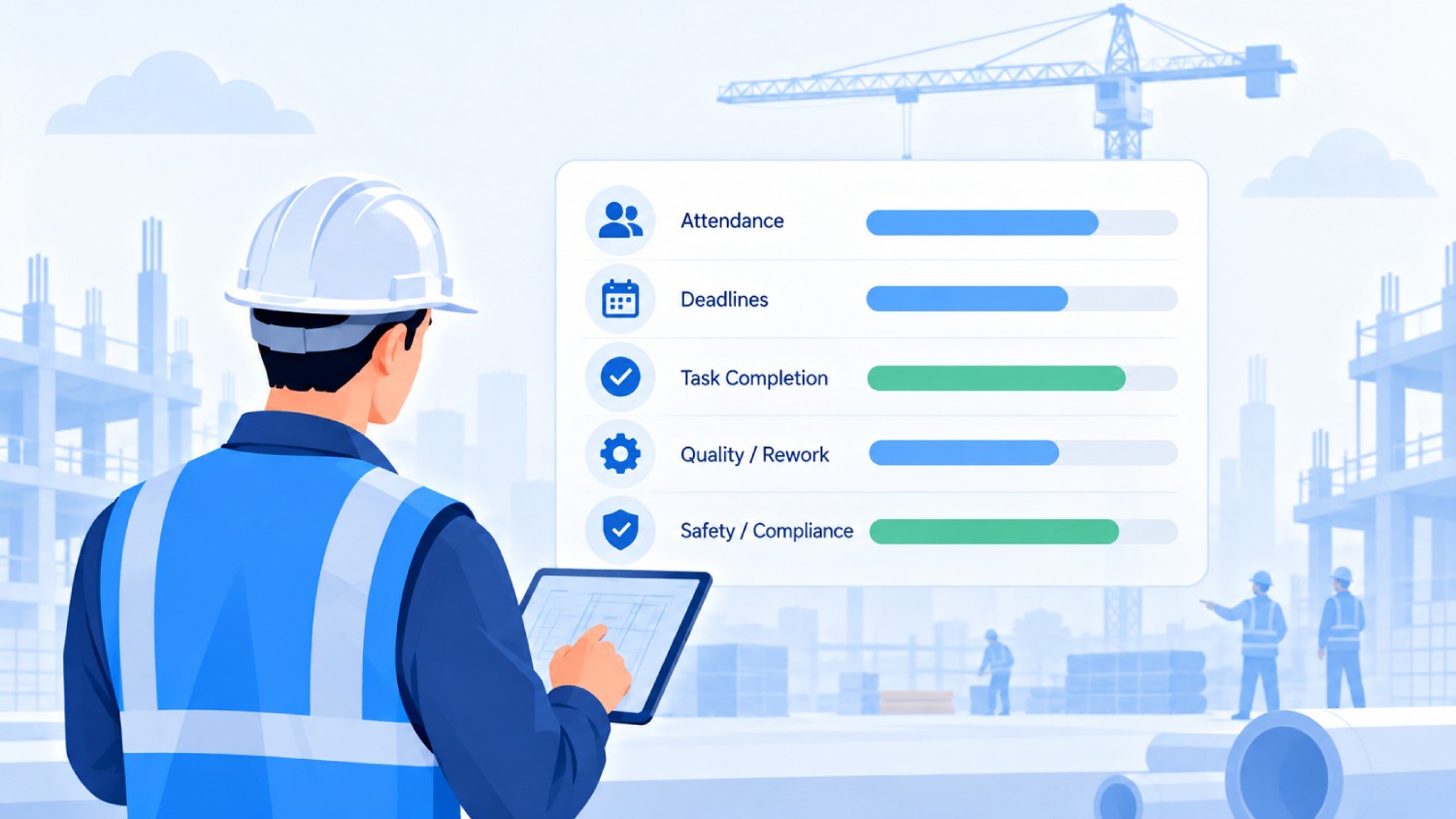
Five measurable KPIs cover most of what matters: attendance and availability, deadline adherence, task completion rate, quality or rework rate, and safety or compliance incidents.
Attendance and availability only work as a KPI if the underlying clock-in data is trustworthy. A timesheet built from memory or a supervisor's estimate cannot support a KPI review; verified time and attendance data, tied to a specific worker at a specific site, is what makes the other four KPIs measurable instead of anecdotal.
Each one needs a review rhythm that matches how fast it can go wrong. Attendance and active operational work deserve daily checks, since a missed shift today affects tomorrow's schedule immediately.
Ongoing project milestones fit a weekly review. Longer-term contractor relationships, the kind that span months, are better served by a monthly performance review that looks at trends instead of single incidents.
The mistake most managers make here is comparing contractors who are not actually comparable. Compare contractors doing similar work against the same KPIs over the same time period, not a specialty electrician against a general laborer on raw output alone.
Different scopes, different site conditions, and different project complexity all change what a fair number looks like.
Tip 6: Build One Compliance Checklist That Travels With Every Contractor
Compliance gaps rarely show up as one dramatic failure. They show up as an expired insurance certificate nobody caught, a safety training record that lapsed six months ago, or a worker on-site without the access clearance they were supposed to have.
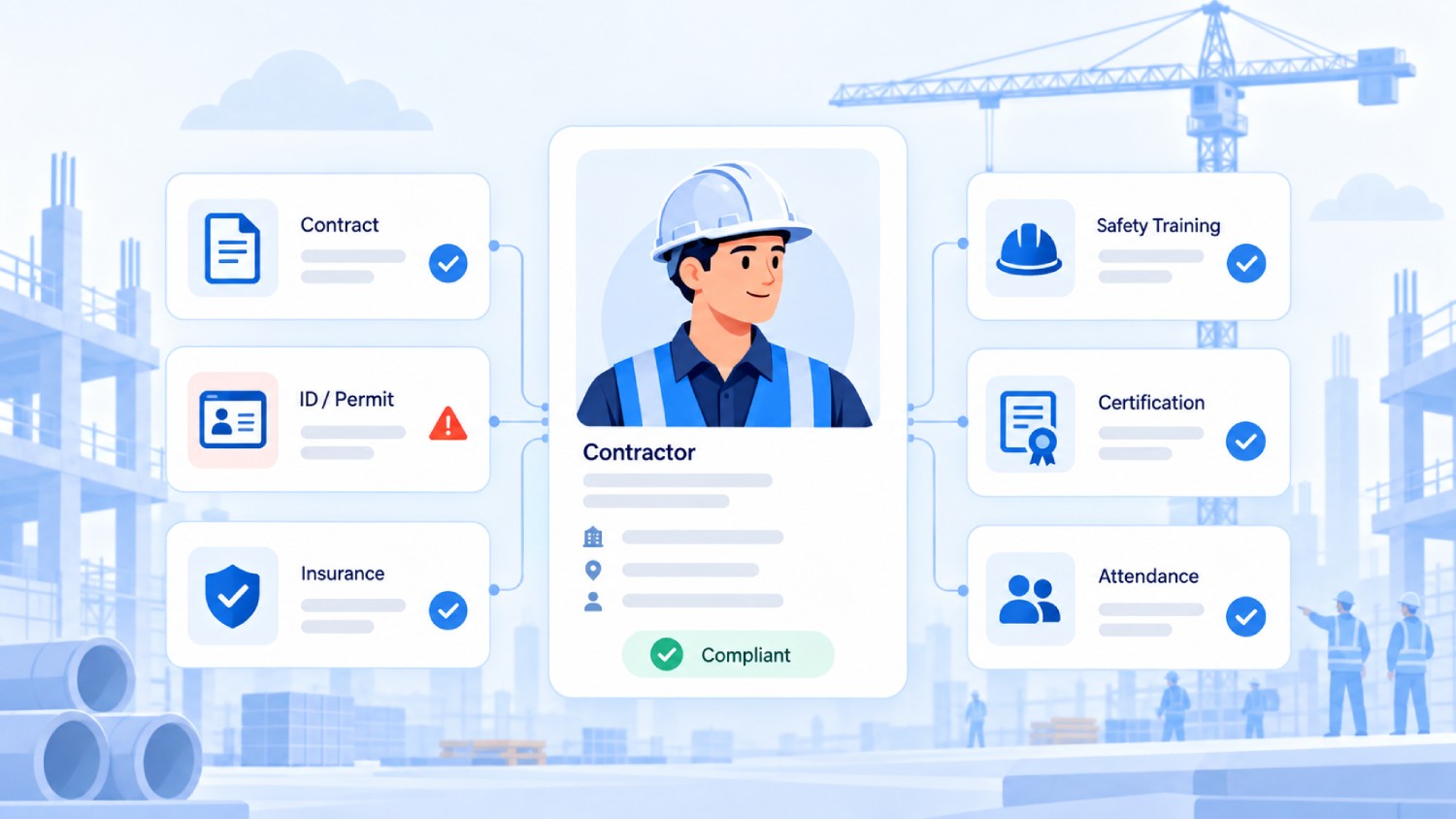
One standing checklist, applied to every contractor the same way, catches most of this before it becomes a liability.
That checklist should cover valid contracts, IDs or permits where applicable, current insurance with an up-to-date Certificate of Insurance (COI) on file, completed safety training, authorized site access, required certifications, attendance records, and documented sign-off on your company's policies.
Insurance is the item most likely to quietly lapse: a COI captured at onboarding can expire six or twelve months into a project without anyone noticing until a claim exposes the gap, so it needs its own expiration-tracking step, not just a one-time check box.
Nothing on that list is optional for one contractor and required for another, because inconsistency here is exactly what lets gaps slide through unnoticed.
Coordinating multiple employers on the same worksite is also an OSHA concern, not just an internal process question. Federal guidance on multi-employer worksites holds that host employers and contractors share responsibility for identifying and communicating hazards to every crew working the site, which is part of why a shared safety briefing and a shared hazard log matter as much as a shared schedule.
For a deeper look at keeping that consistent across locations, see managing contractor compliance across multiple sites.
If your work involves collecting biometric data for attendance, the compliance picture shifted meaningfully in the past few years.
Since January 1, 2023, the employee exemption under California's CCPA and its amendment, the CPRA, expired, which means California employees now have full rights, including notice, access, and deletion rights, over biometric data collected at work.
Texas and Washington have their own biometric consent statutes (CUBI and RCW 19.375, respectively), both enforced by the state attorney general rather than through private lawsuits.
Illinois is the outlier: its Biometric Information Privacy Act lets individuals sue directly, which is why any biometric rollout touching Illinois sites deserves particular care around written consent.
Colorado joined this list in 2025: HB 24-1130 requires employee consent before biometric identifiers are collected for employment use, along with a written retention and deletion policy, though enforcement runs through the state Attorney General rather than private lawsuits, closer to Texas and Washington than to Illinois.
None of this makes biometric attendance risky to use. It means consent-first enrollment, where workers are informed and agree before any face data is captured, is the standard that keeps a company on the right side of every state that has a relevant law on the books, California included.
Disclaimer: This section is for general informational purposes only and is not legal advice. Workplace safety and biometric privacy requirements vary by state and change over time, so confirm current requirements with a licensed attorney familiar with your jurisdiction before finalizing a compliance process.
Tip 7: Treat Contractor Agencies as Their Own Layer, Not a Stack of Individuals
Most advice on managing multiple contractors quietly assumes you are managing individuals, one scope of work and one relationship at a time.
That assumption breaks the moment you are pulling crew members from three different contractor agencies onto the same site, because the problem is no longer just "track this person's hours." It is "track this agency's headcount, this agency's document expirations, and this agency's billing, separately from the other two agencies working the same job."
When multiple agencies supply crew members to the same site, the manager's real problem is separating each agency's staff, hours, and compliance records from the others, while still seeing the full site picture in one place.
Without that separation, overlapping headcount and overbilling are almost impossible to catch, because nobody has a clean line between "Agency A's 12 crew members" and "Agency B's 9 crew members" when they are all clocking in at the same gate.
Truein maps multiple contractor agencies to specific sites under one account, applies per-agency headcount caps, and gives each agency's own supervisor a scoped dashboard limited to their own staff, separate from your company's employee data and separate from the other agencies on-site.
Agency-specific pay rates, policies, and document expiry tracking run alongside that same structure. This gives you the visibility and controls to spot and prevent overlap and overbilling. It does not mean overlapping headcount is caught automatically in every configuration, so a manager still needs to look at the dashboard, not just trust that the system will flag it unprompted.
Decision rule: If more than one contractor supplies crew members to the same site, treat agency-level headcount and document tracking as a separate requirement from individual contractor tracking, not a feature you can bolt on later once the first billing dispute happens.
What Software Actually Needs to Do to Manage Multiple Contractors
Not every tool built for "contractor management" solves the same problem, and picking the wrong category is how companies end up stacking three disconnected apps instead of using one that fits.
The gap that matters most for multi-contractor work is the one spreadsheets and general project tools share: neither one verifies that the hours logged match the person who actually worked them. That is a narrower job than project management, and it is the job purpose-built time and attendance software, also called contractor time tracking software or a job-site attendance system, is built to do.
How Truein Helps You Manage Contractors Across Every Site
Truein is an AI-powered time tracking software and contractor time clock app for hourly and multi-site workforces that verifies identity at clock-in using face recognition and GPS, on any Android or iOS device, with no dedicated hardware required.
It functions as subcontractor time tracking software, a job-site clock-in app, and a workforce management platform in one system, built specifically for construction, field service, and facility management companies that manage multiple contractors, subcontractors, and contractor agencies across scattered job sites.
It is not project management software and does not replace the scope-of-work and scheduling process covered above. It solves the specific problem those tips depend on: knowing, with verification, who was actually on-site.
Face recognition at clock-in is built for field conditions, staying accurate around 95 to 100 percent even with hard hats, facial hair, masks, and changed hairstyles. Paired with GPS geofencing, a clock-in only registers when the worker is physically inside the boundary set for that site, configurable down to a 20-meter radius for a specific floor, wing, or zone.
For the contractor-agency problem covered in Tip 7, this is where the platform's structure matters most. Multiple agencies can sit under one account, each with its own headcount cap, its own scoped supervisor view, and its own document expiry tracking, so a facility management company running crews from three staffing vendors can see the whole site without losing the ability to separate one agency's records from another's.
AI TimeGuard, Truein's built-in anomaly detection layer, runs continuously in the background across every connected site, flagging unusual clock-in patterns, timesheet corrections, and overtime spikes for a manager to review before payroll runs.
This is the layer that catches what identity verification alone cannot: a legitimate clock-in followed by an unusual pattern, like a worker's hours suddenly spiking on a specific job or a timesheet edited well after the shift ended. It does not guarantee every fraudulent entry is caught. It gives a manager a shorter list of exceptions to check instead of an entire timesheet to scan line-by-line.
Verified attendance data flows into payroll-ready reports that plug into ADP, QuickBooks, Sage, Paychex, and Xero, so payroll teams stop rebuilding contractor hours from scratch every cycle. It does not process payroll itself and is not a substitute for a full HRMS. It produces the clean, verified attendance data those systems need.
Construction firms like Walker Engineering and facility service companies like Hallmark Housekeeping Services use this approach to verify attendance across dispersed sites and contractor crews.
Across its full customer base, the platform serves more than 500 clients in 25 countries and over 10,000 locations, with a 4.8 out of 5 rating on G2 and 4.8 out of 5 on Capterra as of the most recent published review counts.
The company is headquartered in India and runs a dedicated U.S. office in New Jersey, with U.S.-based account executives who work with enterprise customers on implementation and strategic reviews, so a U.S. company adopting it is not depending on support from a different time zone for day-to-day issues.
Frequently Asked Questions
1. How many contractors can one manager realistically handle?
There is no fixed ratio, since the right number depends on more than headcount. A manager overseeing straightforward, independent scopes across two sites can handle far more contractors than one coordinating tightly dependent trades across ten sites with high safety risk.
Weigh work complexity, number of sites, how independently each contractor operates, safety risk, reporting frequency, and whether software or a person is doing the tracking. When any of those variables goes up, the realistic headcount per manager goes down.
2. What's the difference between managing individual contractors and managing contractor agencies?
Managing an individual contractor means tracking one relationship: one scope, one schedule, one set of hours. Managing a contractor agency means tracking a group of workers supplied by a third party, where headcount, document expirations, and billing all need to stay separated from your own staff and from any other agency on the same site.
A tool built only for individual tracking will not show you whether one agency's headcount cap has been hit or another's insurance just lapsed, because it was never built to separate agencies in the first place.
Multi-agency contractor tracking software like Truein solves this by giving each contractor or sub-contractor, its own scoped view under one account, so agency-level headcount, document expiry, and billing stay separated from each other and from your own direct staff, without losing the single-site view a manager needs.
3. How do I know if a contractor missed a shift and nobody caught it?
Set a standing exception process: record the miss as soon as it is flagged, identify which downstream tasks depend on that work, notify the responsible supervisor immediately, reassign anything time-sensitive, document why it happened, and track whether it repeats.
A single missed shift is a scheduling problem. A pattern from the same contractor is a performance problem, and the only way to tell the difference is a record that shows both.
4. What should a contractor dashboard actually show me?
At minimum, a useful dashboard shows active contractors across every site, who is present or absent today, hours worked, overdue tasks, upcoming deadlines, overtime accumulating, compliance documents approaching expiration, and unresolved exceptions.
If a dashboard cannot answer "who is on-site right now" in under ten seconds, it is a reporting tool, not a management tool, and the two are not the same thing.
5. How do I track contractor hours without micromanaging them?
Tracking outcomes is not the same as controlling every activity, and confusing the two is what turns oversight into micromanagement.
Define deliverables, deadlines, and quality standards up front, set fixed reporting checkpoints, and step in only when an agreed threshold gets missed, not before. A contractor who knows what "on track" looks like rarely feels watched. One with no clear checkpoint who gets a check-in call every afternoon usually does.
6. When do spreadsheets stop being enough for managing multiple contractors?
Five signs show up right before a company outgrows spreadsheets: duplicate records across different file versions, attendance reconciliation that takes days instead of hours, missed document expirations caught only during an audit, different managers keeping separate copies of the same tracker, and no way to see contractor status across sites without calling around.
If two or more of those are already happening, the spreadsheet is not saving time anymore. It is hiding the cost of not having a shared, real-time system.
Closing Thoughts
Every tip in this list works because it feeds the same underlying need: one accurate, current picture of who is working where, doing what, and whether their paperwork is actually in order.
Fix that visibility gap first, and scope definition, scheduling, communication, and compliance all get measurably easier to hold together, because they stop being separate processes fighting for the same missing information.
The pattern is consistent across construction, facility management, and cleaning crews alike. Teams that struggle with multiple contractors are rarely missing meetings or paperwork. They are missing a verified, real-time answer to a question their process assumes someone already knows.
If your team is already doing most of what is covered here and problems are still surfacing a day late, the gap usually is not the process. It is not having a live, verified view of attendance and site presence across every contractor and every agency working for you.
A guided walkthrough of how Truein handles multi-site, multi-agency attendance is a reasonable next step if that gap sounds familiar.