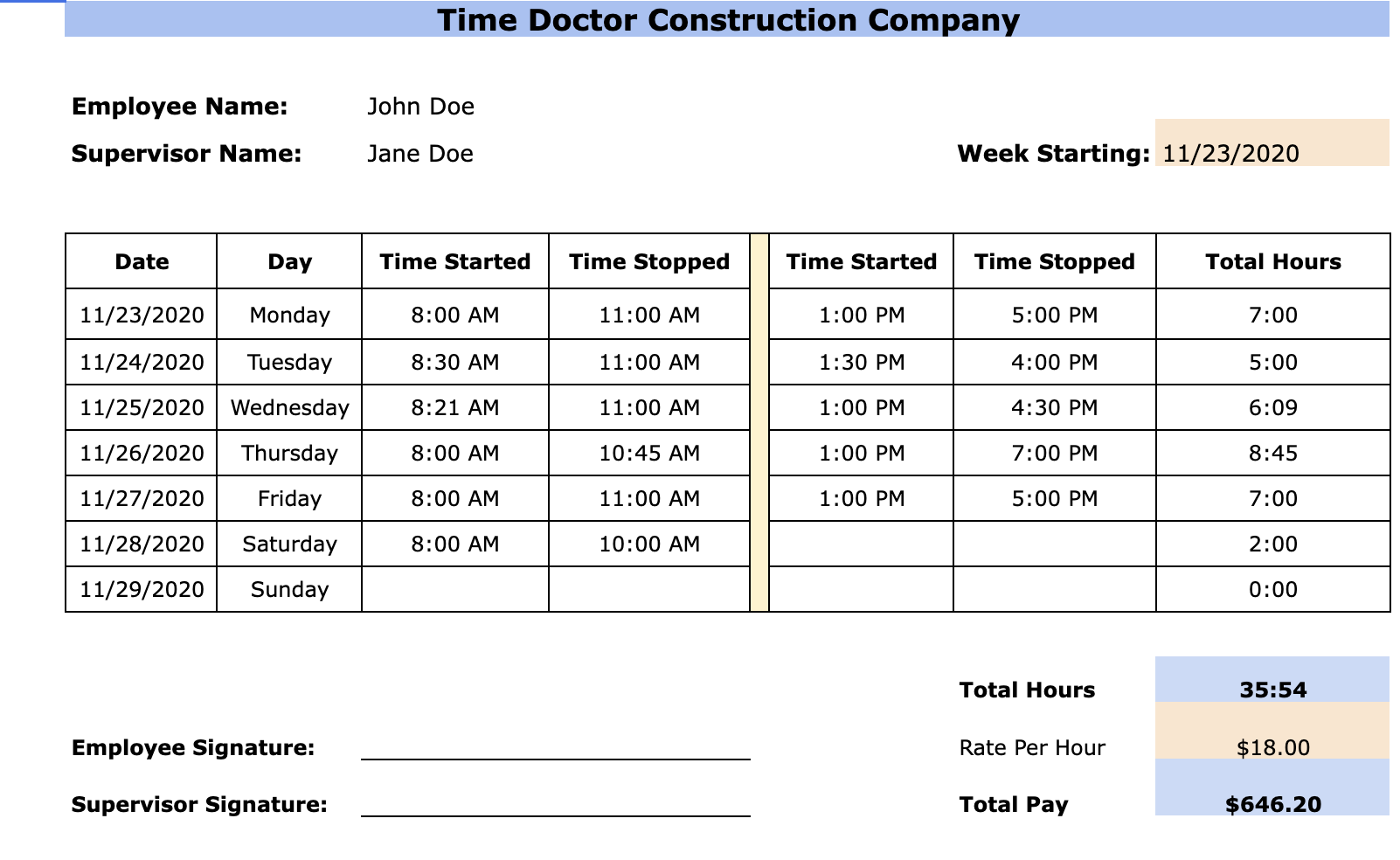
In every industry, employee time tracking is a norm. It is a way to decide the workforce’s productivity and ensure that employees are paid accurately for their work. However, employee time tracking is difficult in the construction industry as workers are spread across construction sites.
In the construction industry, workforce management is complicated as not all workers can be trusted to show up for work or honestly record their attendance. Contractors and supervisors use construction timesheet templates to manage how workers spend their time at the job.
This guide details everything about the construction timesheet template and its benefits and drawbacks. We will also explore how to automate construction timesheet keeping.
A construction timesheet or time card is a manual timesheet used for recording the working time of hourly crews and construction employees to calculate the number of hours worked and payroll. A construction timesheet template records the task performed, employees punching time, and billing costs. In U.S. construction the words timesheet and time card mean the same document, so a crew time card and a construction timesheet template describe the same record of hours against a job.
Timesheets have been used in the construction industry for decades. These are excellent tools for tracking time, work, and payroll in any industry. The flexibility in the schedules is unique to construction crews. Crew timesheets are one of the best ways of employee time tracking in the construction industry.
While you can download a construction timesheet template free online, it is essential to understand how to use a construction timesheet for maximum productivity. But before that, let’s understand how a construction timesheet template is unique from traditional timesheets.
First, construction timesheets record the start and end times for every activity instead of an exact number of work hours.
Second, the work structure of a construction timesheet template is highly customizable, because the nature of construction work does not fit the fixed task list a traditional project timesheet assumes.
Third, the construction timesheets use construction cost codes instead of actual task names as in traditional timesheets. A cost code links each block of hours to a specific scope of work, which is what lets you compare bid hours against actual hours once the job closes. We have covered the wider practice in our guide to how construction job costing works.
Another distinguishing factor is that a construction timesheet template is made around work and billing rates. As in the construction industry, profitability is the key metric instead of productivity; it is why construction timesheets are built to calculate costs and profits.
Why do you need a construction timesheet?
Construction timesheets provide a structure for a largely unorganized onsite workforce in the construction industry. Although construction workers deem timesheets as tedious and a way for their owners to micromanage them, in reality, construction timesheets can help expedite the payment process and ensure construction workers are paid accurately.
Since many companies also use weekly crew timesheets to recognize hard workers, they serve as a performance review tool as well. Some companies also opt for construction time tracking software. Here are the main reasons you need a construction timesheet template.
1. To track the hourly pay of employees
Employee time tracking provides transparency throughout the construction business, and a project can be managed much more efficiently. When workers are honest and record their work time accurately, owners and managers can view how many hours they worked, more accurately.
It provides valuable data to track employees’ hourly pay and precisely how much to pay them. The data is also helpful in giving feedback to the workers on their performance and helping them improve.
2. For tracking historical work log
Using construction timesheet templates, owners and site managers can track the historical work log, giving them a better idea of the actual cost of a job. It allows them to be much more efficient in forecasting the estimates of future jobs. A historical work log also helps to understand the nature of the job if it’s similar to an old project.
It helps reduce overall profit losses due to underbidding on future projects and assists in securing future jobs by avoiding overbidding. Timesheets are valuable resources for construction business management.
3. To be compliant with the government laws
In the construction industry, workers are often exploited by long work hours without pay. Construction timesheets give you the hour-by-hour record that wage and hour compliance depends on. You can ensure that you are paying labor accurately for their work hours. Additionally, construction labor scheduling software is designed to support compliance with shift and overtime rules across sites.
It also supports overtime rule compliance and makes it visible when workers are being pushed beyond their shifts. Compliance is necessary for a business because it enables them to be on the law’s good side and create a healthy work environment for the employees.
4. For automating the payroll process
Construction timesheets eliminate the guesswork from the payroll process. When you have accurate data on the hours worked and how many workers worked on the task, it becomes easier to bill and pay. The entire billing process can be expedited, and payroll systems become much more accurate.
Time tracking software like Truein removes the manual step between hours worked and hours paid. Verified clock-in data flows into a payroll-ready report, so your payroll team processes clean numbers instead of reconstructing them from paper.
5. Timesheets feed payroll and do not replace it
A construction timesheet is not a payroll template. The timesheet records hours against jobs and cost codes. The payroll template applies wage rates, overtime multipliers and deductions to those hours to arrive at what each worker is actually paid.
You need the timesheet first, because a payroll template built on estimated hours produces confident numbers from bad inputs. Once hours are recorded against cost codes, the same data serves payroll, client billing and job costing without being entered three times.
Construction payroll carries complications a generic payroll sheet will not handle, including crews working across state lines and workers who move between cost codes mid-shift. We have covered those in more detail in our guide to common construction payroll problems.
What does a construction timesheet need to record?
A construction timesheet needs to carry eight fields for the same sheet to serve payroll, job costing and a wage dispute. Anything fewer and you end up reconstructing hours from memory at month end.
Worker name and ID. Required for payroll and for proving who was on site if a claim is raised.
Date. One row per worker per day, never a summed week.
Job or project. The site or contract the hours belong to. Without it you cannot compare bid hours to actual hours.
Cost code. The scope of work within that job, such as formwork, rebar or finishes.
Time in and time out. Clock times, not a total. A total hides the rounding and the repeated identical entries that point to buddy punching.
Worker and supervisor signature. The approval line that makes the sheet defensible. Who should sign it, and what to check before signing, is covered in our guide to timesheet approval by supervisors.
If you build your own sheet rather than using a template, check that the unpaid break column and the cost code column are both present. Neither can be reconstructed accurately after the fact.
How many workers can one timesheet cover?
One timesheet per worker stops being practical once a single supervisor is signing for a full crew. At that point the same hours and the same cost code get copied onto a stack of near-identical sheets, and the supervisor is approving paperwork rather than checking it.
A crew sheet solves that by keeping one row per worker and one column per day, with the job and cost code entered once in the header instead of repeated on every row. How many names fit depends on the paper. On a landscape letter page with seven day columns, around forty rows is the practical ceiling before the type is too small to fill in by hand. Past that, split the sheet by trade rather than widening it further.
The trade-off is granularity. A crew sheet is faster to complete and harder to audit, because one signature covers everyone on it. If a wage claim is raised, an individual daily sheet is the stronger record.
Disadvantages of using manual timesheet in construction
While a free construction timesheet template provides an efficient way to manage the workforce and payroll, it is also prone to human errors. As manual timesheet keeping entirely depends on the honesty of the workers and supervisors, there is scope for manipulation and time theft.
Paper timesheets are a logistical nightmare and can be easily misplaced. Due to severe disadvantages, a manual timesheet in the construction industry is not advised. Here are some of the common disadvantages of manual construction timesheets.
1. Discrepancies between actual working time and reported times
Manual construction timesheets are susceptible to time theft. Workers can easily record the wrong clock in or clock out time without being noticed. There is no way to discover the discrepancy until it’s too late, and the project gets delayed because of time theft.
Workers can also participate in buddy punching; that is, a worker can ask his colleague to record time in his absence and report to work late and still get paid for a complete shift.
2. Not easy to track and schedule employees
Timesheets are just a piece of paper that cannot be used to make shift scheduling decisions or to track employees. Manual construction timesheets result in poor efficiency in workforce management. The construction industry often struggles with tracking employees working at remote sites. Without centralized data, it is not easy to track or schedule employees.
3. Lack of productivity and lots of manual work
Building on the point above, manual construction timesheets have no scope for automation. Managers and owners must go through a lot of manual work to calculate billable hours and set shift schedules.
Such manual workforce management drags productivity down for site teams and the back office alike. It can take hours or even days to conduct payroll or set schedules when all the data has to be compiled and sorted manually.
4. No way to automate and directly calculate pay and overtime
Without any automation, there is no way to integrate the data from manual construction timesheets into the payroll software. All the calculations must be done manually to calculate pay and overtime. The task is not only mammoth and cumbersome; it often results in frequent human errors that require correction. It also results in inaccurate paychecks.
Truein: A better alternative to manual construction timesheet
The construction industry has also benefited from adopting automation like other industries.Construction time and attendance software like Truein makes it easier to manage a dispersed workforce and pay it accurately.
Truein verifies every clock-in with face recognition and GPS together, so the record shows both who clocked in and where they were standing. A face match failure blocks the punch at that moment and prompts a retry, and the match is designed to work with hard hats, masks, facial hair and changed hairstyles at around 95 to 100 percent accuracy. That gives construction teams time tracking for construction workers that does not depend on a worker writing down their own hours.
Truein runs on any Android or iOS phone or tablet your crews already carry, so there is no dedicated hardware to buy: no fingerprint scanners, no IR terminals, no fixed biometric kiosks. Workers can clock in from their own phone, from a shared tablet at the site entrance, or through a supervisor's device. Truein geofences each site, and can geofence individual floors, wings or zones within it, down to a minimum radius of 20 meters. Depending on how the account is configured, a clock-in from outside the boundary can be blocked, flagged for a supervisor, or sent for approval.
Where a paper timesheet records what a worker wrote down, Truein records what actually happened. Workers tag each clock-in to a specific job, task or activity through Activity Punch, so hours land against the right cost code without anyone retyping them at week end. Smart Capture Rules flag late, off-site, duplicate and missing punches as they are captured, so a supervisor reviews the exceptions instead of scanning the whole sheet. AI TimeGuard then analyzes attendance data across sites for risk patterns, including unusual correction activity and overtime spikes, and surfaces them before payroll runs rather than after.
Truein is used by more than 500 companies across 25 countries and 10,000 locations, including U.S. construction contractors such as Walker Engineering.
Truein is not payroll software. It produces payroll-ready reports and integrates with the payroll and HRMS systems contractors already run, including ADP, QuickBooks, Sage, Paychex, and Xero. A template fixes the format of your records. Verified clock-in data fixes whether you can trust them.
Stop Time thefts and irregularities!
Bring transparency and Control. Explore Truein for your organization.