




What is a timesheet approval workflow?
A timesheet approval workflow is the sequence of checks and sign-offs that hours pass through between the clock-in and payroll. A good one verifies who worked, where, for how long, and under which pay rules, sends only the exceptions to a supervisor, and locks approved hours with a record of every change.
- The five stages of a timesheet approval workflow and what each one has to prove
- Why most approvals sign off on totals instead of verifying hours
- The five checks to run before any timesheet is approved
- How to set approval levels, deadlines, and separation of duties
- What the FLSA says about hours that were worked but never approved
Every Thursday, somewhere, a supervisor opens 40 timesheets, scrolls to the bottom of each one, and clicks approve. The totals look reasonable, the deadline is in an hour, and nobody has time to check whether the 7:00 start on Tuesday was real. That click is called approval. In practice it is a signature on numbers nobody verified.
This guide is for operations heads, payroll managers, and HR teams running hourly crews across sites. It lays out a timesheet approval workflow that verifies hours before they reach payroll: the stages, the five checks, approval by exception, who signs off on what, and the FLSA rules that apply.
What is a timesheet approval workflow?
A timesheet approval workflow is the path an hour takes from the clock-in to the payroll run, and the checks it has to pass on the way. Most companies have one by default: workers record time, a supervisor approves it, payroll processes it. The weakness is that the default workflow treats approval as a sign-off on a total, not as a check on the record behind it.
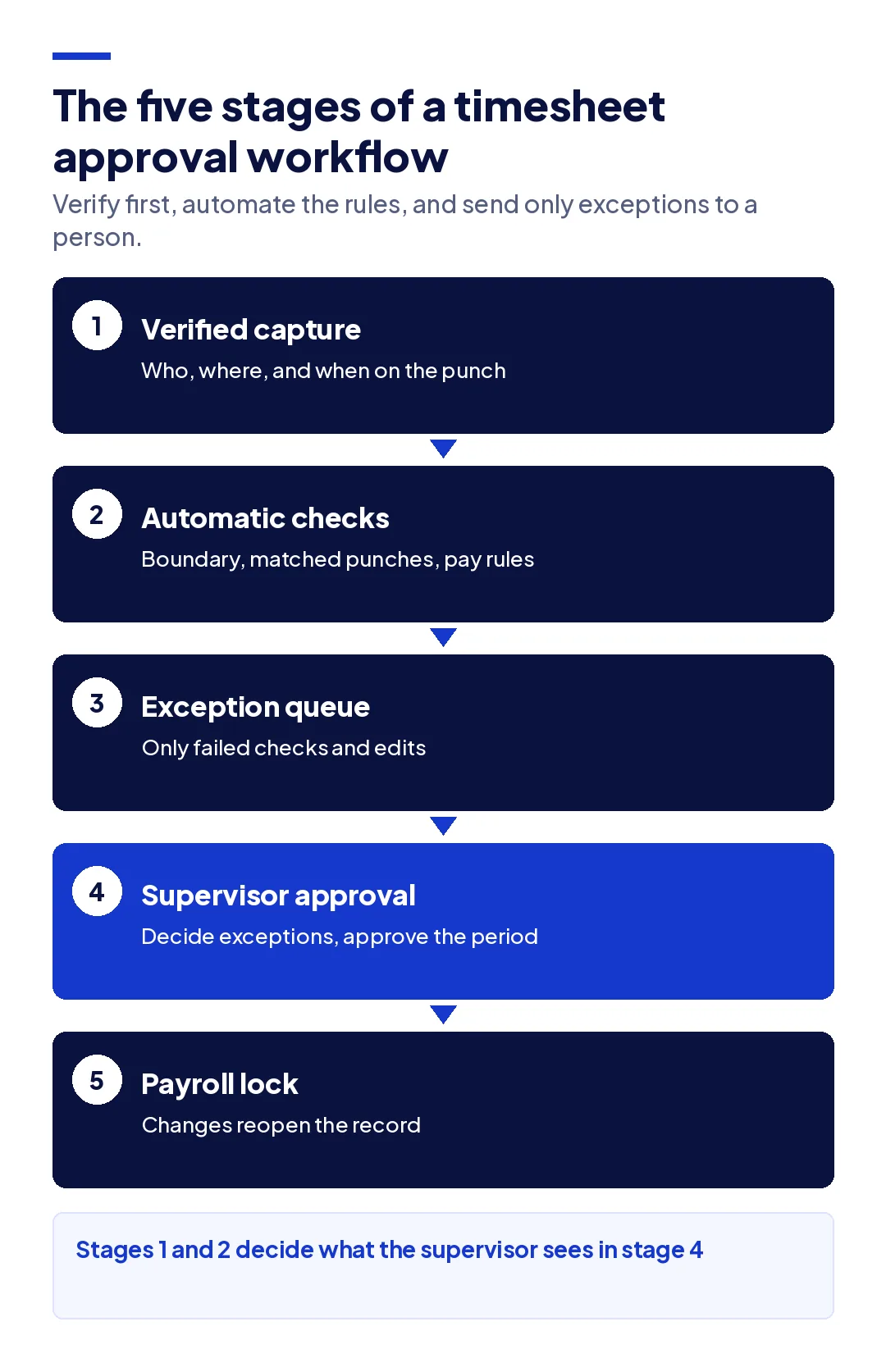
A timesheet approval workflow that holds up in an audit has five stages:
- Verified capture. The punch records who, where, and when at the moment of work, not from memory at the end of the week.
- Automatic checks. Rules run on every punch: inside the site boundary, matched in and out, overtime and break rules applied.
- Exception queue. Only the punches that failed a check, or were edited, go to a person.
- Supervisor approval. The supervisor decides each exception and approves the rest of the period in one step.
- Payroll lock. Approved hours are locked. Any later change reopens the record and leaves a trail.
Why do most timesheet approvals fail?
Most timesheet approvals fail because the approver is looking at the wrong thing. A weekly total of 42.5 hours tells a supervisor almost nothing; the problem, if there is one, is in a single punch on a single day. Three patterns explain most of the failures.
Approval happens at the deadline. When the whole crew's timesheets arrive the afternoon before payroll closes, the approver has minutes per worker. Anything that would take a phone call to resolve gets approved instead, because rejecting it means someone is paid late.
The approver cannot see the source. Many systems show the approved total and the edited punches, but not the original punch, who changed it, or why. A supervisor cannot verify what they cannot see, so approval becomes trust.
The approver made the edits. A supervisor who fixes a missing clock-out on Monday and approves the same timesheet on Thursday is checking their own work. That is the setup behind most deliberate timesheet fraud, and it is also how honest mistakes go uncaught.
Late submission is a separate problem with its own fix, covered in our guide to timesheet reminders. Getting timesheets in on time does not make them accurate; it only gives the approver longer to look at the same totals.
What should you check before approving a timesheet?
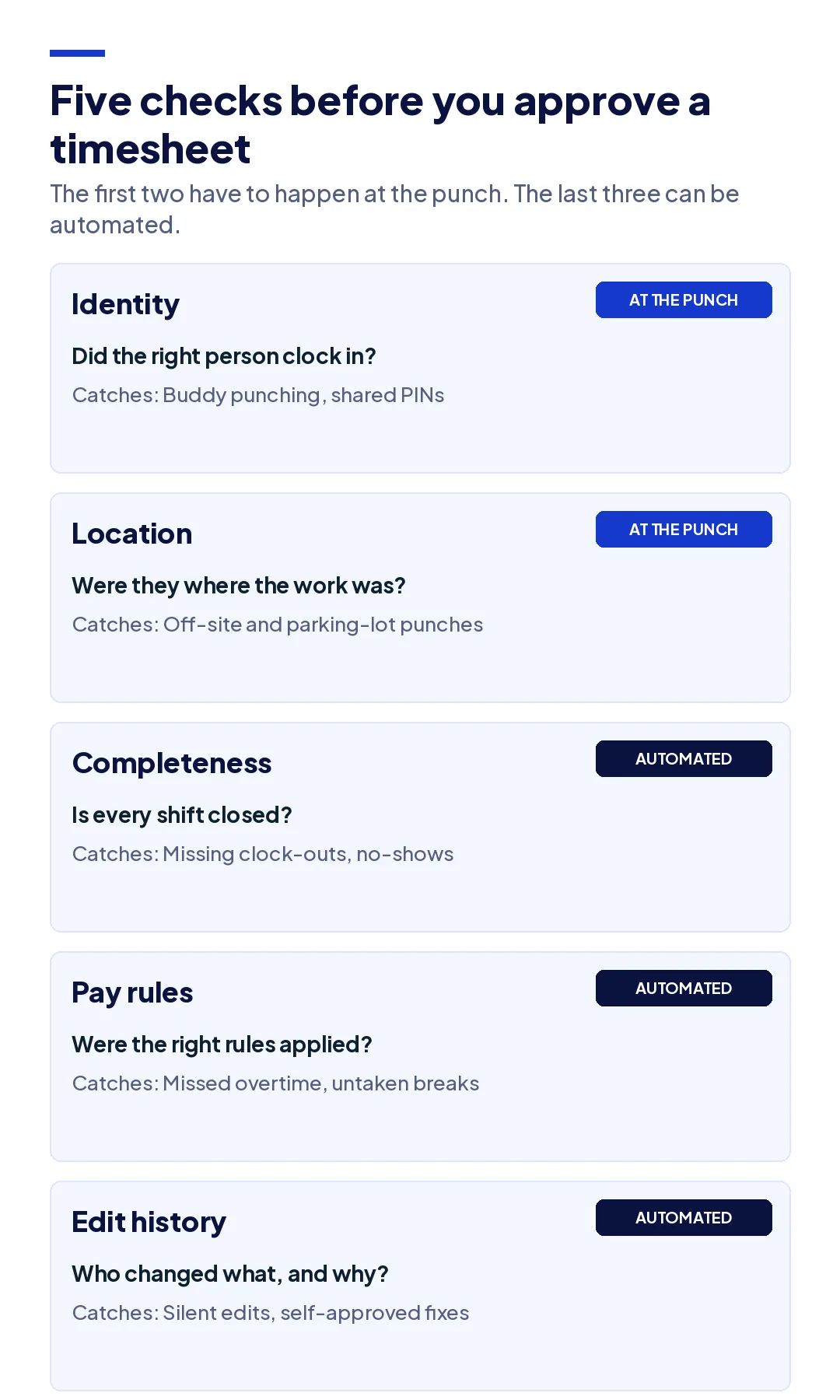
Before approving a timesheet, check five things: identity, location, completeness, pay rules, and edit history. Each one catches a different kind of error, and each one needs different evidence. Checking only the total misses all five.
| Check | Question it answers | What it catches | Evidence needed |
|---|---|---|---|
| Identity | Did the right person clock in? | Buddy punching, shared PINs, a phone handed to a colleague | A verified identity on the punch itself |
| Location | Were they where the work was? | Clock-ins from the parking lot, home, or the previous job | A location inside the site boundary |
| Completeness | Is every shift closed and accounted for? | Missing clock-outs, no-shows marked present, unlogged breaks | Matched in and out punches per day |
| Pay rules | Were the right rules applied? | Missed daily or weekly overtime, break deductions never taken | Rules configured by site and worker category |
| Edit history | Did anyone change the hours, and why? | Silent edits, round-number corrections, changes after approval | The original punch, editor, reason, and approver |
The first two checks are the ones a supervisor cannot do by looking at a timesheet. A clean punch from the right site at 7:00 looks identical whether the worker made it or a colleague made it for them. Those checks have to happen at capture, which is why the identity on the punch matters more than the approval at the end. The same pattern sits behind the five errors behind inaccurate labor hours.
The last three checks can be automated. Missing clock-outs, overtime thresholds, and unpaid breaks are rules, and rules are what software is for. What a supervisor adds is judgment on the exceptions those rules produce: whether a missing clock-out was a dead phone or an early departure, and whether an overtime spike was planned.
How do you approve timesheets by exception?
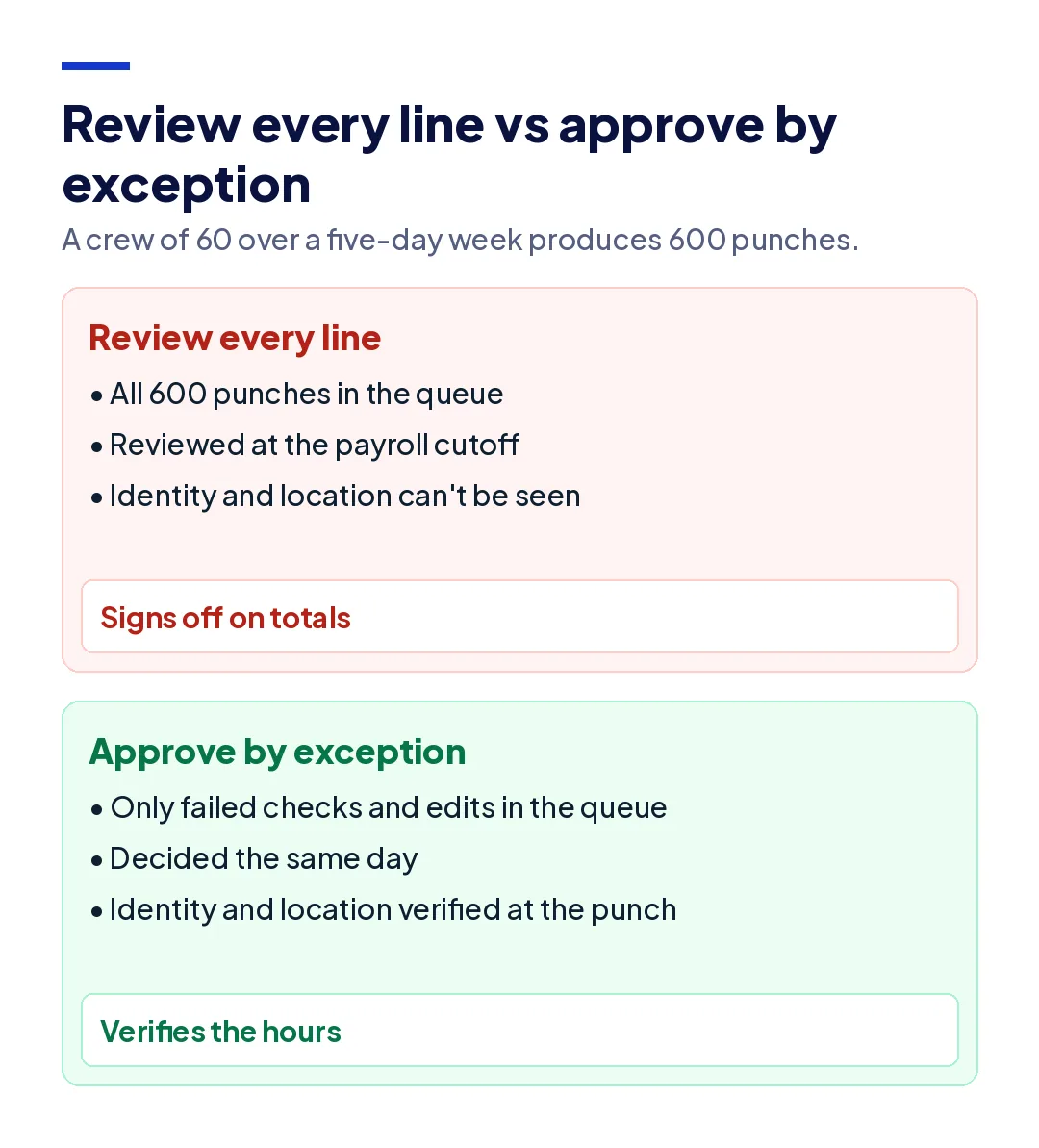
Approving by exception means the supervisor reviews only the punches that failed a check, and approves everything else in one step. For a crew of 60 working a five-day week, that is 600 punches. If capture is verified and the rules run automatically, the exception queue is usually a small fraction of that: the missing clock-outs, the out-of-boundary punches, the overtime that crossed a threshold, and the edits.
Three rules make it work:
- Review daily, not at the cutoff. An exception reviewed the same day is a two-minute conversation with a worker who still remembers the shift. The same exception reviewed nine days later is a dispute.
- Every exception gets a decision and a reason. Approve, correct, or reject, with a note. A correction without a reason is the record an auditor asks about first.
- Clean punches stay clean. The supervisor approves the period, not each line, and spends the time saved on the exceptions.
The test of whether approval by exception is working is the correction rate close to payroll. If most corrections still happen in the 48 hours before the cutoff, the exceptions are being reviewed too late, and the timesheet approval workflow has become the old one with a new screen.
Who approves what in a timesheet approval workflow?
The person closest to the work approves the exceptions, and a different person approves any change that person made. That separation is the single most important design decision in the whole process, because it turns a signature into a control.
| Role | Approves | Should not |
|---|---|---|
| Worker | Their own hours, by confirming or flagging them | Edit punches without a reason |
| Site supervisor | Exceptions for their own crew, daily | Approve edits they made themselves |
| Project or operations manager | Overtime, cross-site moves, and supervisor edits | Review every line for every site |
| Payroll | The locked period, after all exceptions close | Change approved hours without reopening the record |
Two more settings matter in practice. Set a delegate for every approver, so a supervisor on leave does not freeze a crew's pay. And set an escalation: exceptions not decided within a set window go to the next level automatically, so nothing waits silently for the cutoff. Every approver should also see the original punch next to any edited one, or the separation means little.
For crews supplied by subcontractors or staffing agencies, the agency's supervisor approves their own workers' exceptions, and the host company reviews the invoice against verified hours rather than against the agency's total. The subcontractor time tracking guide covers that reconciliation.
What does the FLSA say about approving hours?
The FLSA does not require any particular approval process, but two of its rules shape every approval process in the US.
Unapproved hours are still owed. Under 29 CFR 785.11 to 785.13, work the employer suffers or permits is work time, whether or not it was requested or approved, and it is management's duty to stop work it does not want done. A worker who stays 30 minutes past the end of a shift without approval has worked those 30 minutes, and they have to be paid. The employer can enforce its policy through discipline. It cannot enforce it by rejecting the hours.
The record has to reflect hours actually worked. The FLSA recordkeeping rules require hours worked each day and each workweek for non-exempt employees, and payroll records kept for at least three years. Rounding is allowed under 29 CFR 785.48 only if it is neutral over time, so a rule that always rounds clock-ins forward and clock-outs back fails. An approved timesheet that differs from the punches, with no reason recorded, is the weakest record a company can hand to an investigator.
State law adds to both, from daily overtime to meal break rules, and the wider set of payroll compliance rules depends on the same approved record. One practical consequence: a rejection in your approval process should always mean "send back for correction," never "do not pay."
How do you measure whether your approval workflow works?
Four numbers tell you whether approvals are verifying hours or just signing them:
- Correction rate. Edited punches as a share of all punches. It should fall after rollout and never spike before payroll.
- Time to decision. Hours from an exception being raised to a supervisor deciding it. Same day is the target.
- Edits after approval. Changes made to locked periods. Every one should have a reason and a second approver.
- Self-approved edits. Edits approved by the person who made them. The target is zero.
When these numbers drift, the cost shows up as payroll leakage: small amounts paid for hours nobody can prove, repeated every pay period. The same drift is why many companies end up running attendance regularization in an HRMS as a second, messier record beside the punches.
The same workflow applies across industries. A facility management company approving cleaning crews across 40 client buildings, a contractor approving crews on six job sites, and a manufacturer approving three shifts on one floor all need the same thing: verified punches, automatic rules, and a person deciding only what the rules cannot.
How do you roll out a new approval process?
Changing how approvals work changes what supervisors do every day, so roll it out the way you would any operational change: measure first, start small, and compare before you expand.
- Measure the current process. Pull two pay periods of raw punches and approved hours. Count edits, edits made in the last 48 hours before the cutoff, and edits approved by the person who made them. Those three numbers are your baseline.
- Write the approval policy. Name who approves what, the daily deadline for exceptions, the reasons a correction can carry, and what a rejection means. Make it explicit that rejected hours are sent back for correction, not left unpaid.
- Configure the checks on one site. Set the site boundary, the overtime and break rules, and the exception types. Start with a site that has a supervisor willing to give honest feedback.
- Train supervisors on decisions, not screens. Walk through real examples: a missing clock-out from a dead phone, an overtime spike from a late delivery, a punch from the wrong site. Agree on the reason each one should carry.
- Run old and new side by side for one pay period. Compare what each process approved. The differences are the errors the old process was passing to payroll.
- Expand in waves and review monthly. Add sites in groups small enough to support, and review the four metrics every month. Exception types that never fire can be removed; ones that fire constantly usually point to a rule that needs fixing.
Expect the exception queue to be larger in the first two weeks than it will be later. Most of the early exceptions are habits, such as workers forgetting to clock out for lunch, and they fall away once the crew sees that every exception gets a question the same day.
How does Truein support timesheet approval?
Truein is a face recognition and GPS-based time and attendance platform for contract and multi-site workforces, used by 500+ customers across 10,000+ locations and 500,000+ workers. In a timesheet approval workflow it handles the stages before the supervisor: verified capture and automatic checks, so the approval queue holds exceptions instead of everything.
Workers clock in with a live face match inside a GPS geofence on their own Android or iOS phone or a shared tablet kiosk, with no dedicated hardware, so identity and location are verified on the punch itself. Smart Capture Rules flag late, off-site, duplicate, and missing punches as they are captured, and Activity Punch tags time to a job, task, or cost code.
More than 70 configurable policies apply overtime, break, holiday, and shift rules by location, worker category, and shift. Every edit keeps the original punch with the editor and reason attached for approval, and AI TimeGuard reviews the record across sites before payroll, surfacing repeated corrections, overtime spikes, identical clock-in timing, and impossible travel for a manager to check. Supervisor views can be scoped by site or subcontractor, and approved hours export to payroll systems including ADP, QuickBooks, Sage, Paychex, Xero, and Trimble.
Two honest limits. Truein is not payroll software and does not decide your approval policy: who approves what, and how fast, is a design choice your payroll and operations teams need to make. And verified capture does not replace a supervisor's judgment on an exception; it makes sure that judgment is spent on the right punches. The time and attendance system page shows the full setup.
This guide is general information, not legal advice. Wage and hour rules vary by state; confirm your approval and rounding policies with employment counsel.
Conclusion
A timesheet approval workflow is only as good as what the approver can see. A supervisor approving totals at the deadline is signing for numbers, not verifying hours. Verify identity and location at the punch, let rules check completeness and pay rules automatically, send only the exceptions to a person, and keep the original record behind every change.
Do that, and the Thursday click becomes the last step of a verified timesheet approval workflow rather than the only one, and payroll runs on hours someone can actually prove.
Frequently Asked Questions
How long should timesheet approval take?
With approval by exception, the supervisor's work should take minutes a day rather than hours at the cutoff. Exceptions are best decided the same day they are raised, while the worker still remembers the shift, and the period is then approved in one step before payroll closes.
What happens if a timesheet is not approved?
Under the FLSA, the employer still owes pay for hours actually worked, approved or not. An unapproved timesheet should be sent back for correction and decided quickly, not held. Delaying pay for worked hours because an approval is missing creates wage claims rather than preventing them.
Can a manager edit an employee's timesheet?
Yes, to correct a genuine error such as a missed clock-out, but the edit should keep the original punch, record who made the change and why, and be approved by someone other than the person who made it. Edits that reduce hours actually worked are not allowed.
Can an employer refuse to pay unapproved overtime?
No. Overtime that the employer suffered or permitted is hours worked and must be paid at the overtime rate. The employer can discipline a worker for breaking an overtime approval policy, but it cannot withhold pay for the hours already worked.
Who should approve timesheets?
The supervisor closest to the work should decide exceptions for their own crew, a manager should approve overtime and any edits that supervisor made, and payroll should lock the period. No one should approve their own edits.
What is the difference between timesheet approval and timesheet verification?
Approval is a sign-off on a period's hours. Verification is checking that each punch belongs to the right person, at the right place, under the right rules. A sound workflow verifies first, automatically where possible, so that approval is a decision on exceptions rather than a signature on totals.
