



A supervisor pulls up Monday's timesheet and finds three names clocked in from the same job site within the same minute. GPS says all three were on location. However, nobody on-site actually saw two of them until after lunch.
That is the blind spot most explanations of geofencing skip. Geofencing is a virtual GPS boundary drawn around a real-world location, and a device has to be physically inside that boundary before a clock-in is allowed.
What almost nobody covers is the sentence that actually matters to a company running hourly crews across multiple sites: a geofence proves a phone crossed a boundary. It does not prove which person was holding it.
This article covers what geofencing actually is, the mechanics behind it, where its accuracy limits sit, and what closes the identity gap that GPS alone leaves open.
TL;DR
- The boundary: A virtual perimeter, usually a radius or a custom polygon shape, drawn around a job site using GPS, Wi-Fi, cellular, or Bluetooth data.
- The check: A crew member’s device is compared against that boundary the moment they attempt to clock in.
- Inside the boundary: The clock-in goes through.
- Outside the boundary: The system can block the clock-in, flag it, or route it for supervisor approval.
- Accuracy: Depends on the positioning method and the physical environment, not on a single fixed number.
- The gap: Location data alone confirms a device was present. It cannot confirm which person was holding it.
What Is Geofencing?
Geofencing is a location-based technology that creates a virtual perimeter around a physical location and triggers an action when a device enters, exits, or stays inside that perimeter. In employee time tracking, the triggered action is usually a clock-in, a clock-out, or an alert.
The boundary itself has no physical form. It is a set of coordinates, either a center point plus a radius or a custom polygon, compared against a device's live location. The fence exists entirely in the app, not at the site.
For a company running crews across job sites, this turns a phone into a location-aware clock-in terminal.
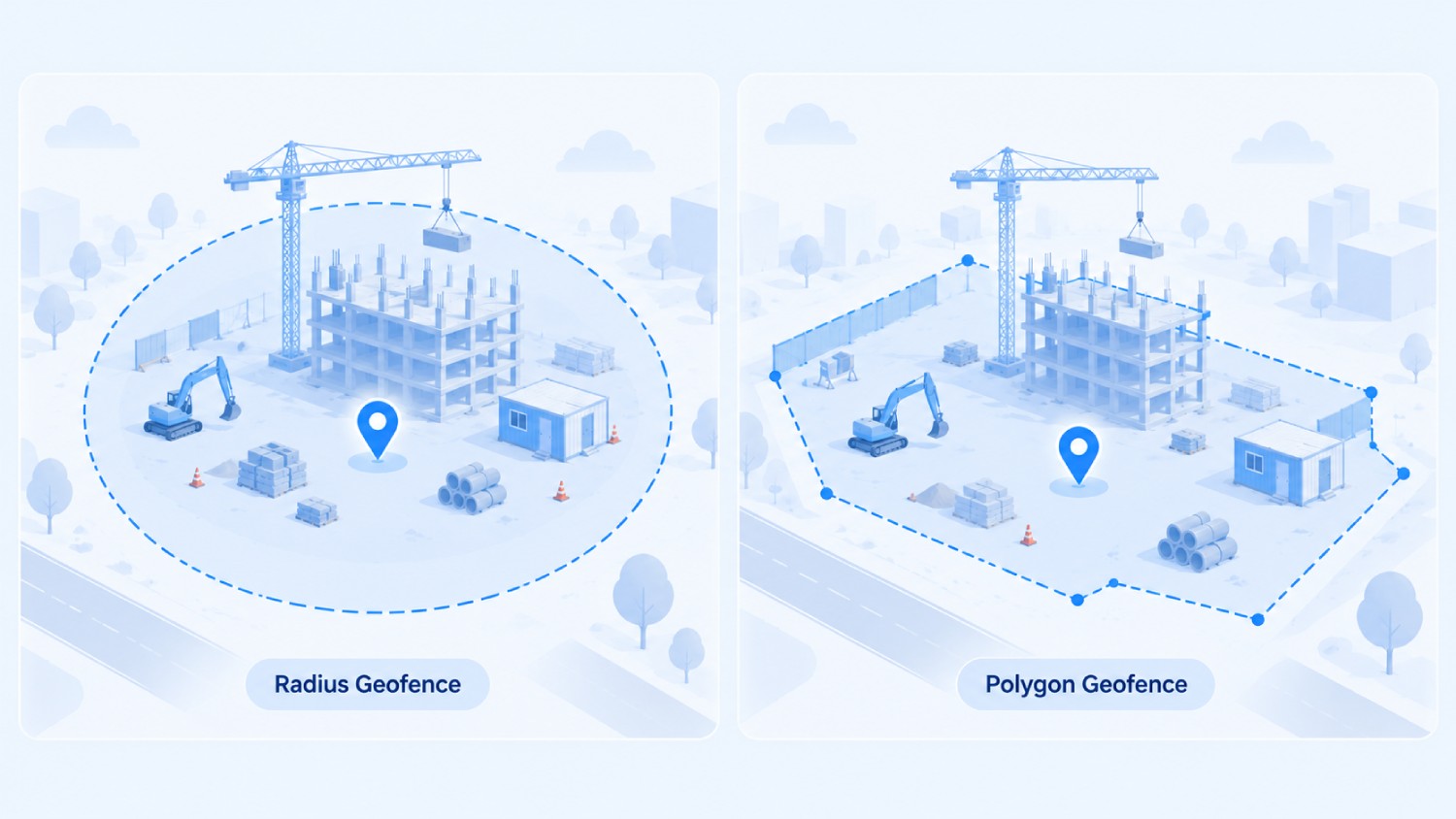
Most geofences take one of two shapes:
- A radius geofence is a simple circle drawn around a center point, fast to set up but imprecise at the edges.
- A polygon geofence traces the actual outline of a site, a parking lot, a building footprint, a property line, which matters when two job sites sit close together or a site has an irregular shape.
Truein specializes in radius geofencing, providing a straightforward approach for facility management or campus deployments where defining precise circular zones around specific entry points is the primary objective.
How Does Geofencing Work?
Geofencing runs through five steps every time, whether the use case is time tracking, marketing, or a delivery notification.
- Define the boundary: An administrator sets a location and defines a radius or custom shape around it.
- Detecting device location: The device reports its position using GPS, Wi-Fi, cellular data, or a combination.
- Compare location against the boundary: The system checks whether that position falls inside or outside the defined perimeter.
- Identify the event type: The system classifies what happened: an entry, an exit, or a dwell, meaning the device stayed inside the boundary for a set period.
- Trigger the configured action: This could be an automatic clock-in, a push notification, a supervisor alert, or a block on the action entirely.
That sequence runs in under a second on a modern smartphone. Where it gets more interesting for time tracking is what happens next.
A Real Example: A Crew Member Arriving at a Job Site
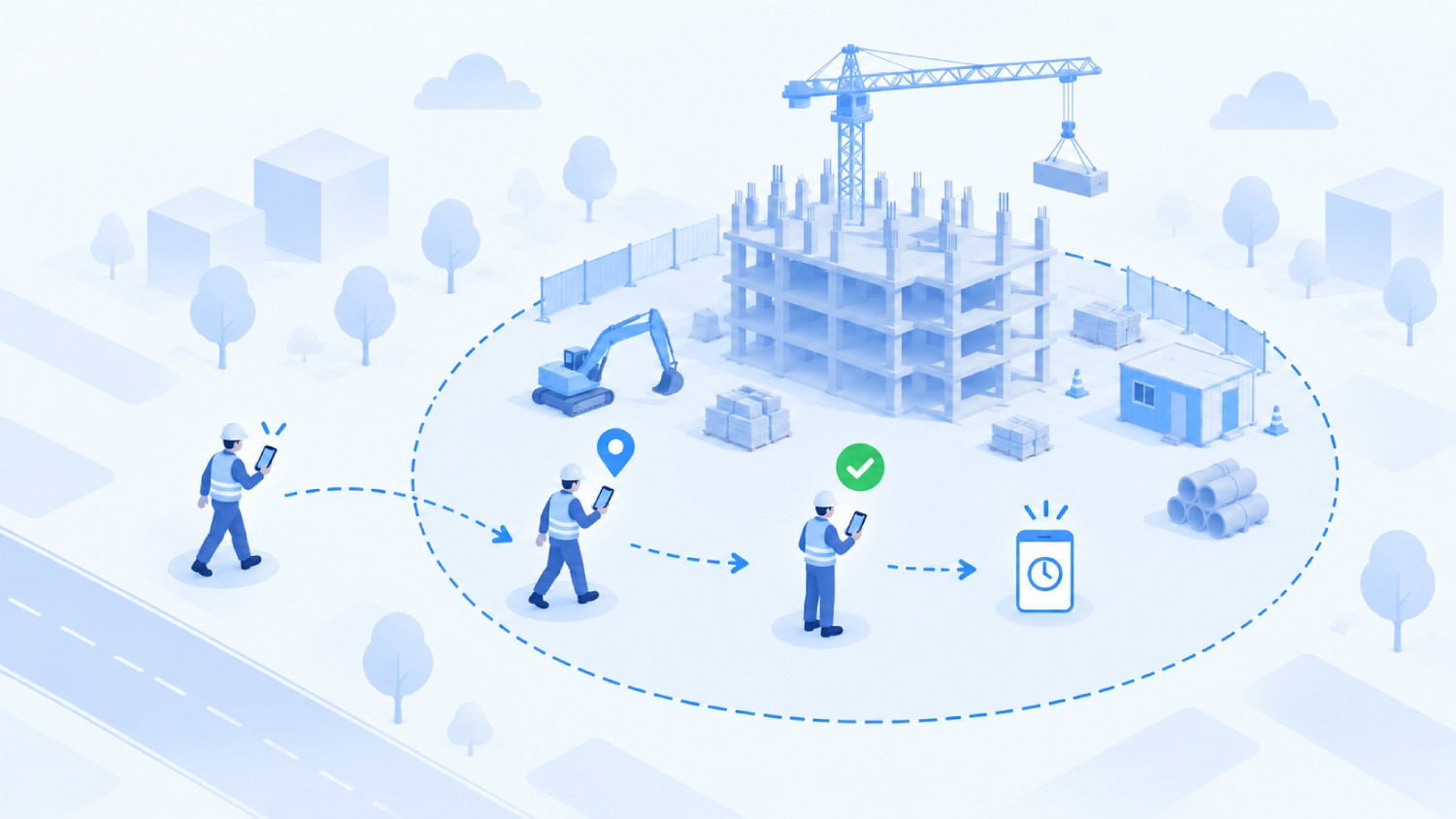
A facility management company sets a 200-meter boundary around a client site using its time tracking software. A janitorial worker arrives at 7:58 AM and opens the time tracking app. GPS reports a position inside the radius, the system confirms the device is inside the boundary, and the app prompts a clock-in. The timestamp and location land on the timesheet.
That is the mechanism working correctly. It says nothing yet about whether the person holding the phone is actually the employee assigned to that shift, which is the gap the rest of this article deals with directly.
GPS Isn't the Only Way to Build a Geofence
Most explanations treat geofencing and GPS as interchangeable. They are not. Geofencing is the concept of a boundary triggering an action. GPS is one of several positioning methods that can define and check that boundary.
So does geofencing require GPS? No. GPS is the most common method for outdoor sites because it needs no extra infrastructure, but Wi-Fi positioning, cellular triangulation, Bluetooth beacons, and RFID can all define and check a boundary.
Truein's employee location tracking reflects a crew member’s position on a supervisor's dashboard roughly every 50 meters of movement rather than on a fixed timer, which is one reason battery drain stays manageable across a full shift.
A construction site with open sky is a natural fit for GPS. A multi-floor office building is not, which is covered further down.
Geofencing is also worth separating from beaconing, a related but distinct approach. Beaconing uses physical Bluetooth hardware installed at fixed points and typically covers a few centimeters to about 50 meters, which suits precise indoor micro-location like a specific aisle or counter.
Geofencing needs no installed hardware beyond the device's own GPS or Wi-Fi radio and is built for outdoor boundaries or larger areas.
For time tracking at a job site, geofencing is almost always the right layer; Bluetooth beacons become relevant only for floor- or zone-level precision inside a single large building.
Entry, Exit, and Dwell: The Three Trigger Types
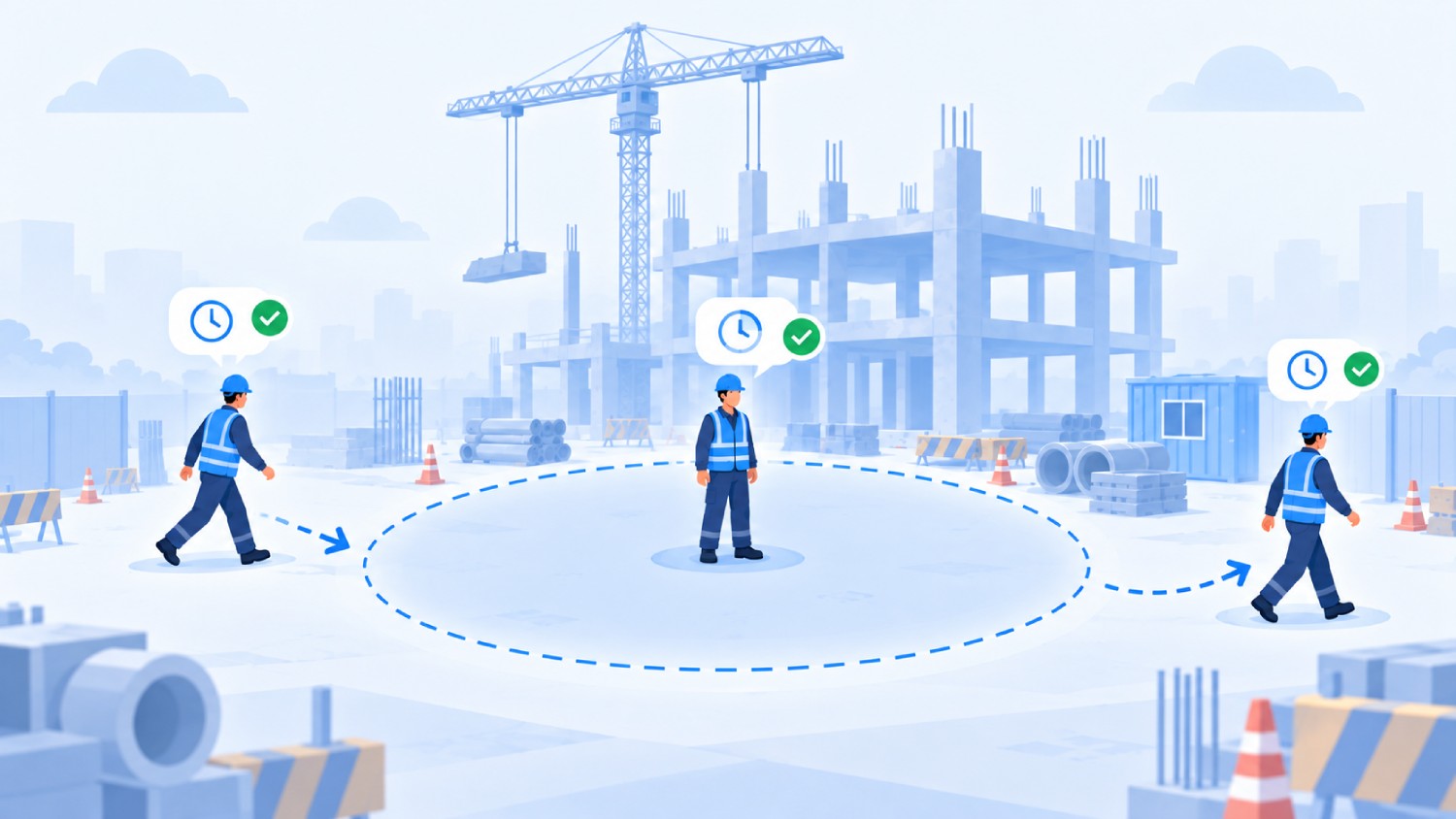
A geofence supports three distinct trigger types, and confusing them is a common source of false alerts.
Dwell exists specifically to cut down false positives. A crew member’s phone might clip the edge of a boundary while parking or waiting for a shift to start, and none of that should count as a valid presence event.
A dwell requirement of even two or three minutes filters out most edge-boundary noise, which is why serious time tracking software uses dwell logic rather than a raw entry trigger for clock-in confirmation.
A Geofence Proves the Phone Was There. It Doesn't Prove Who Was Holding It.
GPS confirms a device's location. It does not confirm the identity of the person carrying that device.
A phone inside a valid geofence can be clocked in by the assigned crew member, or handed to a coworker running late, and the geofence cannot tell the difference. Buddy punching survives a geofence-only system completely intact as long as a phone physically crosses the boundary.
Modern payroll research highlights the steep financial toll of tracking inaccuracies. Business.com's 2025 Workplace Theft study found that roughly 24% of workers admit to overreporting hours. This practice adds an average of 4.5 hours per week of unworked time to employee timesheets, draining significant business revenue.
Additionally, operational data from the 2025 Asure HR Benchmark Report indicates that 46% of small and mid-sized U.S. businesses caught time theft or timesheet falsification over the previous 12 months.
A geofence confirms a phone crossed a boundary. It takes a face match at that same moment to confirm which person was holding it.
This is where identity verification enters as a separate layer, not a replacement for location checking. Truein is an AI-powered GPS-based geofencing tracking software built for hourly and multi-site workforces that pairs GPS geofencing with face recognition at the moment of clock-in, so a clock-in has to match both a location and a person before it counts.
Face recognition on Truein runs at around 95 to 100% accuracy, including with facial hair, hard hats, and masks, on any Android or iOS phone or tablet, with no dedicated hardware to install.
It is worth being precise about what that face match does, since two distinct safeguards are involved. A face-match failure blocks the clock-in immediately and prompts a retry, on-site, in real-time.
No geofencing or face-recognition-based time clock vendor should be understood as blocking every fraudulent clock-in instantly at the point of capture.
For a single-site business with salaried staff, this gap matters less. For a company running hourly or subcontractor crews across multiple sites, it is usually the exact gap that shows up as unexplained payroll inflation every cycle.
How Accurate is a Geofencing Time Clock, and How Big Should the Radius Be?
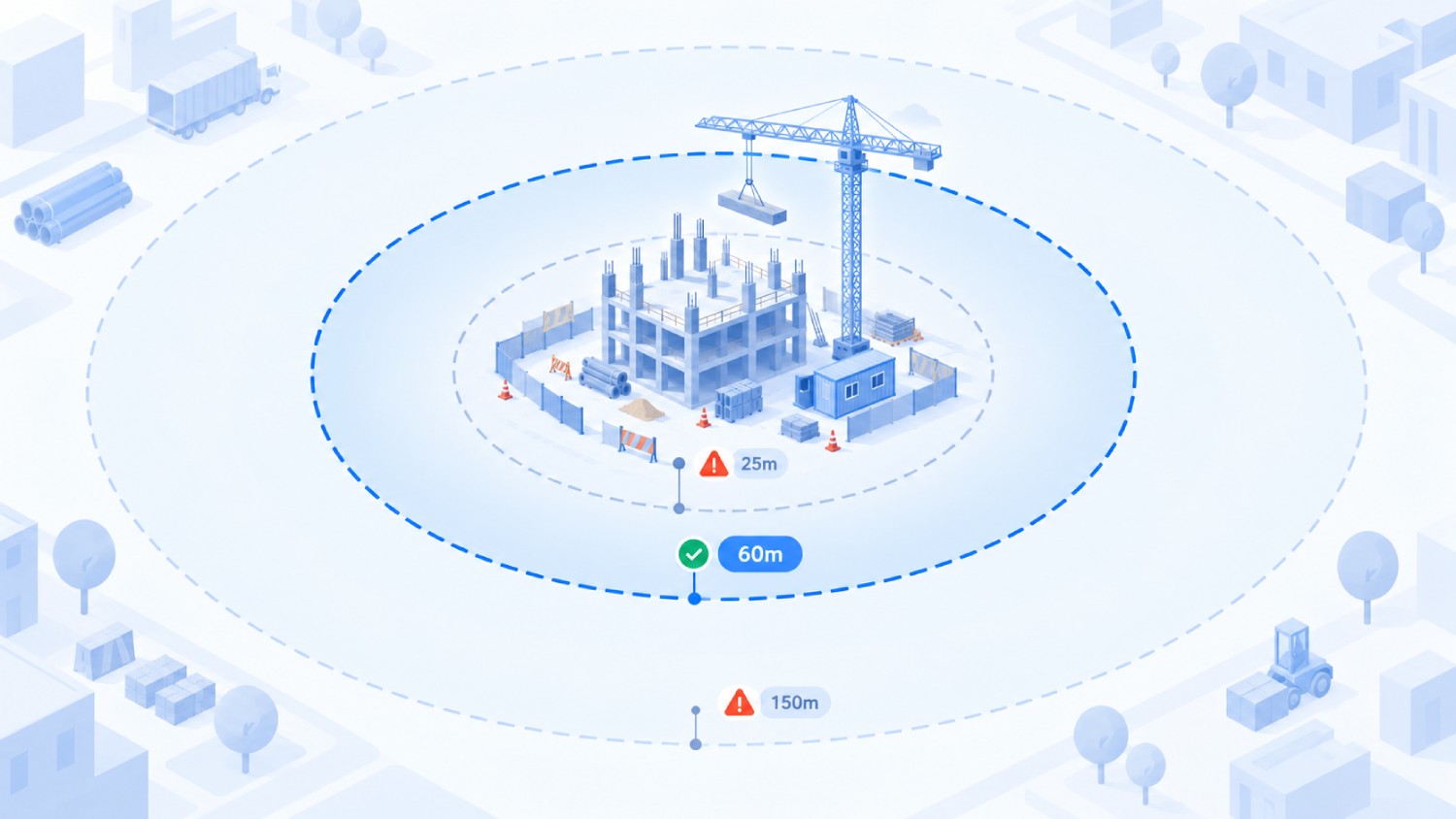
There is no single accuracy number that applies across every setup. Accuracy depends on the positioning method, the device, the physical environment, and how tightly the boundary is drawn.
Outdoor GPS in open sky typically lands within 5 to 20 meters of true position, a range that widens near tall buildings, dense urban cores, or heavy tree cover.
Truein's minimum configurable geofence radius is 20 meters, or roughly 65 feet. Setting a boundary tighter than the underlying positioning accuracy just creates false rejections at the edge, not better security.
The right radius otherwise depends on the site itself. A small office or retail location usually needs only 20 to 50 meters. A construction site or industrial yard commonly runs 100 to 300 meters, since crews and equipment spread across a larger footprint.
A large campus or warehouse complex may need 300 meters or more, often broken into several smaller geofences rather than one blanket boundary. Set the boundary larger than the expected location error margin, not smaller.
A radius drawn tight against a building's exact perimeter generates false rejections from ordinary GPS drift, and a crew that cannot clock in from the actual job site is a bigger operational problem than a slightly generous boundary.
No geofencing vendor should claim sub-meter or pinpoint GPS precision for a phone-based clock-in. For sites with more than one building or a restricted zone within a larger perimeter, a single geofence is not always the right tool either.
Truein, for example, supports geofencing at the level of a floor, wing, or zone individually, so a campus or multi-tenant building can carry nested boundaries rather than one blunt radius covering everything.
Does Geofencing Work Indoors or on Multiple Floors?
Standard GPS-based geofencing struggles indoors, and this is worth stating plainly. GPS signals need a clear line of sight to satellites, and concrete, steel framing, and multiple floors between the device and the sky all degrade that signal significantly.
That is exactly where the technology comparison from earlier matters. Wi-Fi positioning and Bluetooth beacons handle indoor accuracy far better than GPS alone, since they rely on fixed access points at known locations rather than satellite signal.
Standard consumer GPS generally cannot reliably distinguish which floor of a building a device is on. Getting floor-level precision typically requires Bluetooth beacons, Wi-Fi-based indoor positioning, or ultra-wideband systems installed at the site, a materially different infrastructure commitment than outdoor GPS geofencing.
For most multi-site time tracking use cases, that level of indoor precision is not necessary. A hospital, a large distribution center, or a shopping center with multiple tenants is the more likely case where floor-level or zone-level geofencing earns its complexity.
Does Geofencing Work Without Internet Access?
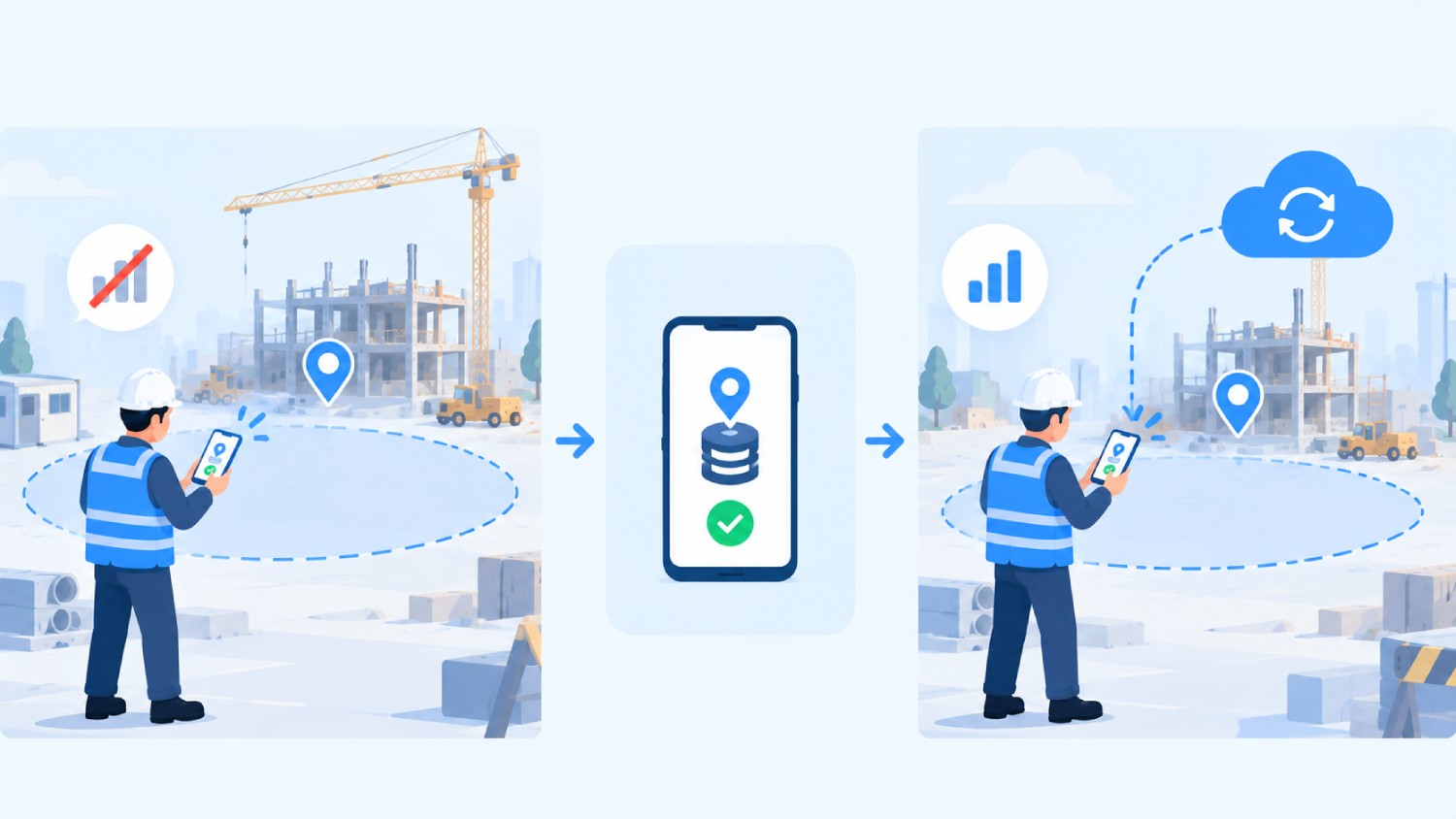
A device can detect its own GPS position without an active internet connection, since GPS is a satellite signal, not a data connection.
What requires connectivity is everything after that: syncing the event to a server, validating it against account rules, and making it visible on a manager's dashboard.
Offline clock-in captures the punch, the timestamp, and the location on the device itself, and syncs it automatically once the connection returns. That is different from the clock-in being visible in real-time, and it is worth being exact about the difference.
Truein's offline clock-in works this way, storing clock-ins on-device with zero connectivity and syncing on reconnect, including across multiple days offline if needed, with records flagged as 'captured offline' for easy review once they land. They never appear before that sync completes, so offline clock-in should never be described as real-time visibility.
For urban construction sites with generally reliable signal, offline capture functions as a safety net for the occasional dead zone. For rural, remote, or basement-heavy sites, it tends to be the deciding feature rather than a backup one.
Does Geofencing Drain Phone Battery?
This is a fair question, and the answer depends on how the geofencing is implemented. Continuous GPS polling, where an app checks location every few seconds regardless of movement, drains a battery fast.
Modern mobile operating systems support geofencing through OS-level location APIs that monitor boundaries far more efficiently than an app running its own constant GPS loop, which is the approach most well-built time clock software uses today.
Battery impact climbs when an app requests high-accuracy location constantly or is poorly optimized, regardless of vendor. Location-tracking features that run through a shift, as opposed to the geofence check at clock-in itself, are the bigger battery factor, and design choices such as pausing pings while a crew member is stationary make a measurable difference there.
Is Geofencing a Privacy Risk for Employees?
Location data collected at work is a legitimate concern, and the honest way to address it is directly, not by minimizing it or treating biometric data as legally risky by default.
As of 2026, five U.S. states have biometric consent laws that can apply to workplace time tracking, and treating this as settled is a mistake for any company with a presence in more than one state.
California matters most broadly: since January 1, 2023, the employee exemption under the CCPA and its amendment, the CPRA, has expired, so California employees now hold full rights, including notice, access, and deletion rights, over biometric data collected at work.
Illinois carries the most legal exposure because its Biometric Information Privacy Act, known as BIPA, requires written consent and allows individuals to sue directly.
Texas and Washington have their own biometric statutes, both enforced solely by the state Attorney General with no private right of action.
Colorado joined this list in 2025: HB 24-1130 requires employee consent before biometric identifiers are collected for employment use, plus a written retention and deletion policy, and is enforced by the state Attorney General rather than through private lawsuits.
None of this makes face recognition or geofencing legally risky by nature. Consent-first enrollment, where employees are informed and asked to consent before any biometric data is captured, is the standard that keeps a company on the right side of every state law on this list. Location data collected during a shift is governed separately, so treat the location-consent question on its own rather than folding it into the face-capture consent.
This is also worth stating plainly rather than burying it in fine print: geofencing time clocks, done correctly, tracks a device only during an active clocked-in session, never continuously and never all day.
Truein's employee location tracking, for instance, begins only after a face-verified clock-in from inside a geofenced site and stops automatically at clock-out. It is not employee monitoring or surveillance in the way that phrase usually implies.
Disclaimer: This section is for general informational purposes only and does not constitute legal advice. Biometric privacy laws vary by state and change over time. The information above reflects publicly available sources as of this article's publish date and may not reflect subsequent legal developments in your jurisdiction. Before deploying biometric time tracking technology, consult a licensed attorney familiar with the applicable state and local requirements.
What Are Geofencing's Limitations?
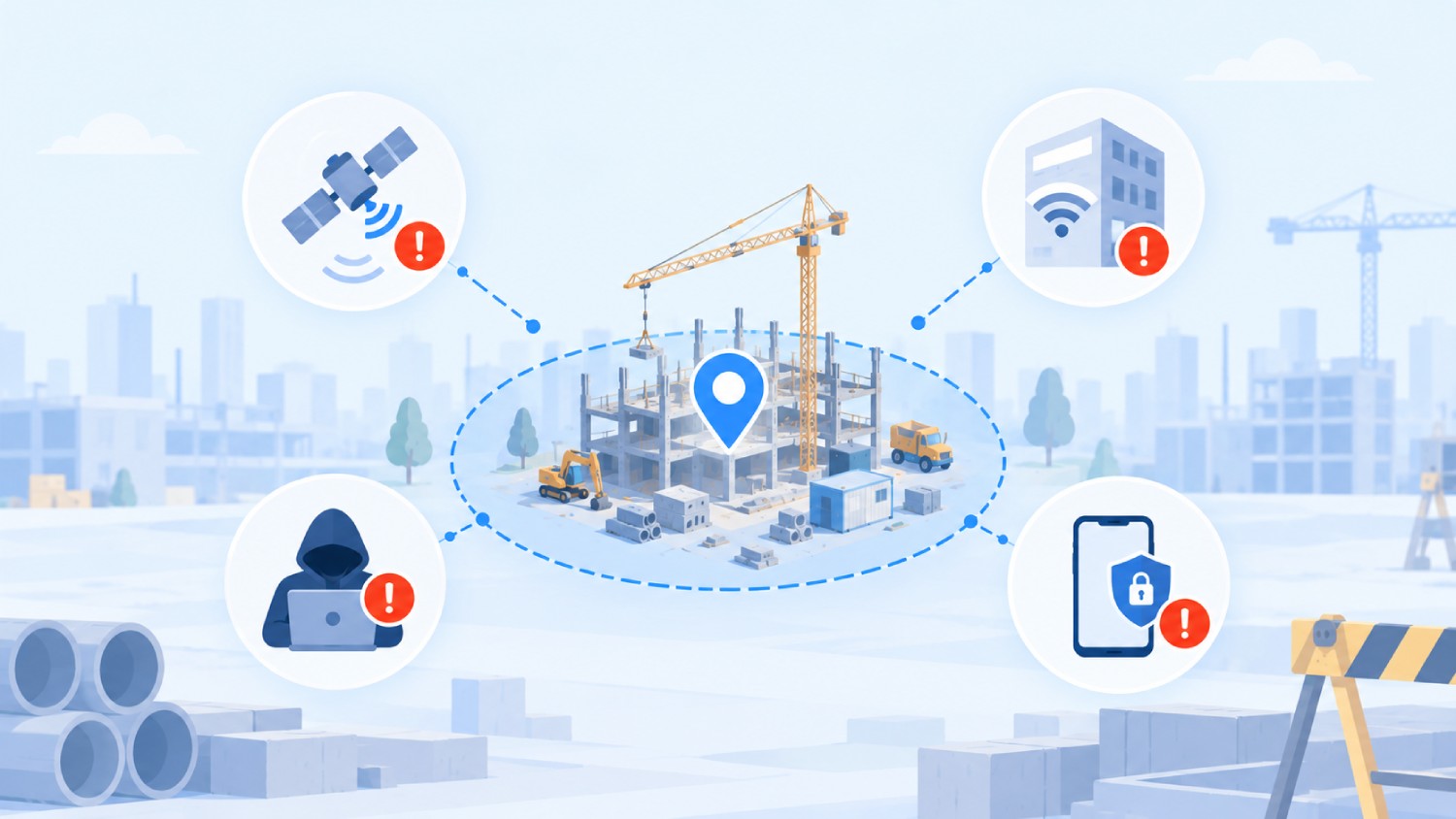
No geofencing system, regardless of vendor, is without real limitations. A useful evaluation starts by naming them honestly.
- Location drift: GPS error near a boundary edge can put a device just outside a geofence when the person is standing at the gate. Draw the boundary larger than the expected error margin.
- Indoor accuracy problems: GPS degrades significantly indoors and cannot reliably determine floor level. Use Wi-Fi positioning or Bluetooth beacons for indoor or multi-floor zones instead.
- Battery and background restrictions: Aggressive OS-level battery optimization can delay background location checks on some devices. Rely on OS-native geofencing APIs rather than constant app-level polling.
- Spoofed locations: Mock-location tools, GPS spoofing apps, and rooted or jailbroken devices can falsify a reported position, a real and well-documented limitation of geofencing on its own. Pair location verification with identity verification, since a spoofed coordinate cannot produce a live face match at the same moment.
- Dependence on device permissions: A geofence cannot function if a crew member denies location permission or disables it mid-shift. Pair enrollment with a clear consent policy at onboarding.
Pretending location spoofing is not possible does a disservice to anyone evaluating this technology seriously, which is exactly why identity verification functions as a second, independent layer.
Geofencing vs. GPS Tracking vs. Geotargeting vs. Geolocation
These four terms get used almost interchangeably online, which is a real source of confusion when evaluating software.
Geolocation is simply figuring out where a device is right now. Geofencing checks that location against a defined boundary to trigger something specific. GPS tracking uses the same underlying capability but continuously, building a movement history rather than checking discrete events. Geotargeting is a marketing application with no fixed boundary at all.
So when should a business use geofencing instead of continuous GPS tracking? Use geofencing when the actual need is knowing whether a device crossed into or stayed within a defined location, which covers most time tracking use cases.
Reach for continuous GPS tracking only when the requirement genuinely involves routes, live dispatching, or ongoing vehicle positioning, since that is a materially more invasive capability than time tracking verification needs.
What is Geofencing Used For?
Geofencing has broad applications beyond time tracking. In retail, it triggers location-based offers when a shopper's device enters a radius around a store. In home automation, it can trigger a smart lock or thermostat action based on a resident's location.
For a company running hourly or multi-site crews, time tracking is where geofencing earns its keep operationally:
- Employee time clock: Clock-ins restricted to a defined job site, tying payroll hours to an actual location.
- Fleet and delivery tracking: Automatic arrival and departure logging at stops without manual driver input.
- Field workforce management: Verifying technicians or reps actually visited assigned client locations.
- Retail marketing: Location-triggered offers near a store or venue.
- Asset monitoring: Alerts when tagged equipment leaves an authorized zone.
For businesses managing hourly or multi-site workforces, time tracking and field workforce management are the two use cases that translate directly into payroll accuracy, the problem this article has been building toward.
If you are further along and comparing systems rather than learning the mechanics, a practical geofencing time clock rollout walks through setup, common pitfalls, and a pilot checklist for testing one on a real site.
Truein's Approach to Geofencing and Identity Verification
Beyond geofencing and the face match at clock-in, Truein's AI TimeGuard runs continuously in the background across every connected site, watching for location-based risk signals such as unusual punch clustering near a geofence edge, alongside time-pattern anomalies like impossible travel between two sites in a short window.
Flagged patterns surface for a manager to review before payroll runs, rather than after a discrepancy is discovered in an audit. AI TimeGuard does not catch every fraudulent entry and should never be described as guaranteeing fraud-proof payroll; it narrows what a manager has to review manually.
For companies managing multiple contractor agencies at the same site, Truein maps agencies to specific locations, applies per-agency headcount caps, and scopes each agency's supervisor to their own staff only, which gives visibility into overlapping headcount and overbilling risk without claiming to catch every overlap automatically.
Truein currently serves more than 500 clients across 25 countries, spanning over 10,000 locations, with U.S. clients including Walker Engineering, Hallmark Housekeeping Services, and Unispice. Review scores sit at 4.8 out of 5 on both G2 and Capterra as of this writing.
Frequently Asked Questions
1. Does geofencing require GPS?
No, geofencing does not always require GPS. GPS is the most common method for outdoor sites because it needs no extra infrastructure, but a geofence can also be built using Wi-Fi positioning, cellular data, Bluetooth beacons, or RFID. Indoor or multi-floor sites typically get better accuracy from Wi-Fi or Bluetooth beacons than from GPS alone. The right method depends on whether the site is outdoor and open, or indoor and enclosed.
2. What's the difference between geofencing and GPS tracking?
Geofencing checks a device's location against a fixed boundary and triggers an action, like a clock-in, only when the device enters, exits, or dwells inside that boundary.
GPS tracking continuously monitors a device's position over time, building a movement history rather than checking discrete events.
Geofencing answers whether a device was at a location, while GPS tracking answers where it has been all day. Time tracking use cases generally need only the former.
3. Can employees fake or spoof their location to beat a geofence?
Yes, mock-location apps, GPS spoofing tools, and rooted or jailbroken devices can all falsify a reported position to a location-only system. This is a real, well-documented limitation of geofencing on its own.
Pairing geofencing with identity verification, such as a face match required at the same moment as the clock-in, closes this gap, since a spoofed coordinate cannot produce a live face match to go with it.
4. Does geofencing work if a job site has no signal all day?
A device can determine its own GPS position without an internet connection, since GPS is a satellite signal rather than a data connection. What requires connectivity is syncing that captured event to a server and making it visible on a dashboard.
Offline clock-in stores the punch, timestamp, and location on the device and syncs automatically once the connection returns, but it should never be treated as visible in real time until that sync happens.
5. Is geofencing legal, and can employees push back on being tracked?
Geofencing itself is legal across the U.S., but pairing it with biometric data like face recognition brings state-specific consent requirements into play.
As of 2026, five states, including Illinois, California, Texas, Washington, and Colorado, have biometric consent laws that can touch workplace time tracking, with Illinois carrying the most legal exposure due to its private right of action under BIPA.
Consent-first enrollment, where employees are informed and asked to consent before capture, is the standard approach that keeps a deployment compliant across all five.
6. Can one job site have more than one geofence?
Yes, a single property can carry several nested geofences rather than one boundary covering everything.
A large campus might have one geofence around the full property line and a second, tighter geofence around a restricted zone or a specific building within it, each triggering a different rule.
This is common for facility management sites with multiple buildings, or industrial sites with a general access area and a separate high-security zone.
7. Does geofencing work if the time tracking app is closed?
Supported mobile operating systems can deliver certain geofence events even when an app is not actively open, using OS-level location APIs rather than the app polling location constantly in the foreground.
Whether this works in a given case depends on device permission settings, background app restrictions, and battery optimization settings, which vary by manufacturer and OS version.
8. Does a geofencing time clock drain phone battery?
Not much, when it is built on the phone's OS-level location APIs rather than a constant GPS loop. The bigger battery factor is location tracking that runs through the whole shift, not the single geofence check at clock-in, and pausing location pings while a worker is stationary keeps the drain manageable across a full day.
9. How is Android geofencing different from iPhone geofencing?
Both platforms support geofencing through OS-level location services rather than requiring an app to run continuous GPS checks, but they differ in how aggressively each manages background location permissions and battery optimization. iOS tends to apply stricter background execution limits, while Android's behavior varies more by device manufacturer.
These details shift with each OS update, so specific behavior should be verified against the current OS version.
10. What's the difference between a radius geofence and a polygon geofence?
A radius geofence is a simple circle around a center point. It is fast to set up but can miss the actual shape of a site, which matters when a boundary needs to hug a building or property line closely.
A polygon geofence traces the real outline of a location instead of approximating it with a circle. It takes slightly more setup time but performs better when two sites sit close together or a site has an irregular footprint, both common on multi-tenant campuses and dense industrial parks.
Most time tracking use cases start with a radius geofence and move to a polygon only when edge precision becomes a real problem, not a hypothetical one.
11. How big should a geofence radius be for a construction site?
A small office or retail location usually needs only 20 to 50 meters. A construction site or industrial yard commonly runs 100 to 300 meters, since crews and equipment spread across a larger footprint. Set the boundary larger than the expected location error margin, not tighter, since a crew that cannot clock in from the actual site is a bigger problem than a slightly generous boundary.
The Bottom Line
Geofencing solves the location half of time tracking accuracy. It confirms a device was physically inside a defined boundary at the moment of a clock-in, and for a wide range of use cases, that is genuinely enough.
For companies running hourly or subcontracted crews across multiple sites, location is usually not the half that actually costs money.
A phone inside a valid geofence tells you where the device was. It does not tell you who was holding it, and that is the gap that lets buddy punching survive a GPS-only system completely intact.
Closing that gap means pairing location verification with identity verification at the same moment, not treating the two as interchangeable.
If buddy punching or off-site clock-ins are still turning up in payroll even with a geofence already in place, a walkthrough of how Truein pairs GPS geofencing with face recognition at the moment of clock-in is a reasonable next step. You can schedule a demo to see how it applies to your own sites.
