



Can GPS time clocks reliably monitor job site attendance?
GPS time clocks verify where a clock-in happened, not who made it. They stop most off-site punches on open, well-connected sites. They do not stop a worker handing a phone to a colleague, and the geofence check cannot run while the device is offline. For multi-site crews, pair GPS with identity verification on the same punch.
- How a GPS time clock captures, checks, and records a job site punch
- The six failure points that let bad punches reach payroll
- Why crews moving between sites expose GPS-only attendance fastest
- Which verification layers to add, and how Truein combines them on one clock-in
If you run crews across job sites, you have probably already replaced paper timesheets with a GPS time clock app and still found payroll disputes landing on your desk. That is not a setup problem. Monitoring job site attendance with GPS time clocks solves one question, location, and leaves two others open: who actually punched, and whether the record survived a dead zone.
This guide is for ops heads and HR managers in construction, facility management, and field services who need attendance data they can hand to payroll without a second review. It covers how GPS time clocks work, where they fail, and what to layer on top.
What is a GPS time clock for job site attendance?
A GPS time clock is a time clock app that records the device's coordinates at the moment a worker clocks in or out and compares that position against an approved job site boundary. The output is a timestamp with a location attached, which is why it is often sold as a time clock with GPS tracking even when it captures one point per punch.
Three things worth separating before you evaluate one:
- GPS stamp. Latitude and longitude saved with the punch. Every app in the category does this. Which apps go beyond the stamp into tracking during the shift is covered in our employee location tracking apps comparison.
- Geofence. A boundary drawn around the site. The punch is compared against it and recorded, flagged, or blocked.
- Live tracking. Position logged continuously while clocked in. A separate feature with separate privacy obligations, and one most job site attendance programs do not need. When the question is whether the crew stayed after clock-in, tracking bound to the shift is what construction worker location tracking covers.
A facility management company running cleaning crews across 30 client buildings needs the first two to prove a shift started at the right building. It rarely needs the third. For a vendor-by-vendor look at the geofence layer, see the geofencing time clock apps comparison.
How do GPS time clocks monitor job site attendance?
Every GPS time clock follows the same four-step chain: the worker taps clock in, the phone captures coordinates, the system checks them against the site geofence, and the result lands on a dashboard and timesheet. The differences between tools sit inside step three.
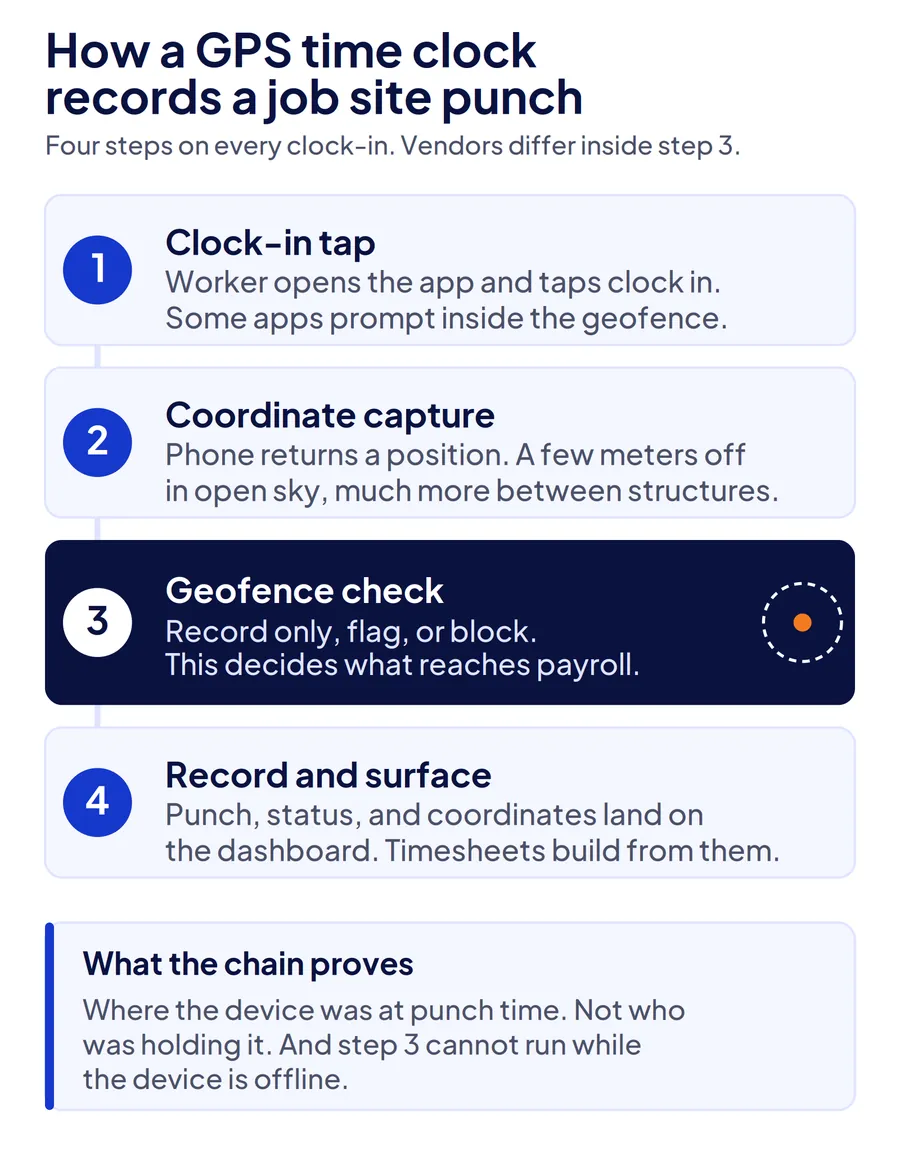
Step 1. Clock-in tap. The worker opens the app and taps clock in. Some apps prompt automatically when the phone enters the geofence.
Step 2. Coordinate capture. Location services return a position. Under open sky this is accurate to a few meters. Between steel structures or on a parking level, it is not.
Step 3. Geofence check. The position is compared with the boundary assigned to that job. This is where vendors diverge.
Step 4. Record and surface. Punch, status, and coordinates appear on the dashboard, and timesheets build from them.
Step three runs in one of three modes, and the mode matters more than the accuracy of the GPS chip:
| Mode | What happens to an off-site punch | What reaches payroll |
|---|---|---|
| Record only | Saved with coordinates, no status | Everything, including off-site punches |
| Flag | Saved and marked for review | Everything unless a supervisor rejects it |
| Block | Rejected at the device | Only in-boundary punches |
A construction superintendent running three active sites in flag mode receives a review queue every pay period. When the queue is long and payroll is due Thursday, flagged punches get approved in bulk, and the geofence has protected nothing. Block mode fixes that on connected sites and creates a different problem on sites with no signal, covered below.
Where do GPS time clocks fail on real job sites?
GPS time clocks fail at six points, and only one of them is about satellite accuracy. The rest come from the gap between what a location stamp proves and what payroll actually needs to know.
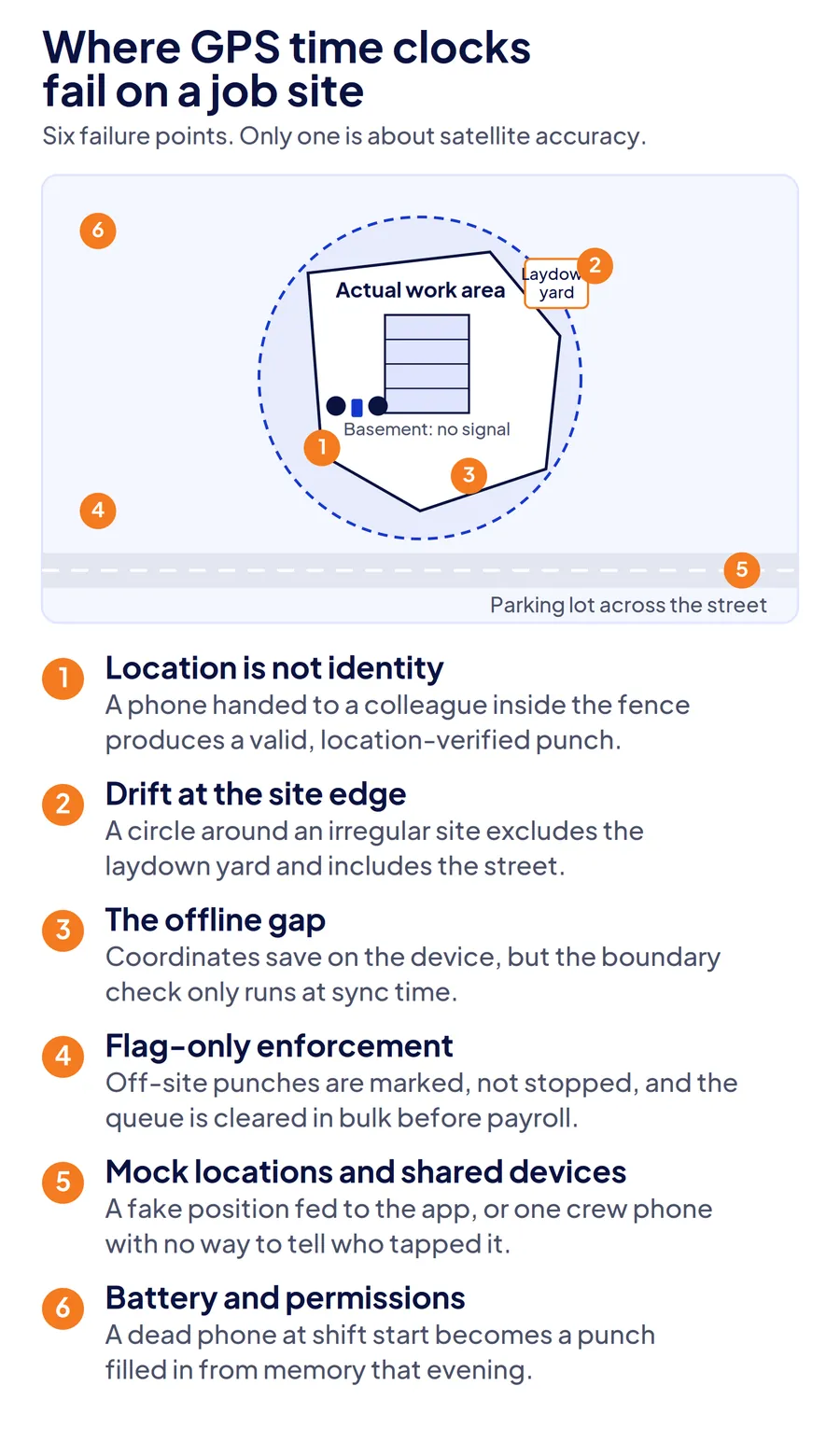
Location is not identity
A GPS stamp proves a phone was inside the geofence. It does not prove whose hand was holding it. A worker who passes a phone to a colleague before leaving site produces a valid, location-verified punch for a shift they did not work. That is buddy punching with a GPS receipt attached, and GPS-only programs never detect it because every record looks clean. It is one of the five errors that make construction labor hours inaccurate, and the only one that looks correct on paper.
Geofence drift at the site edge
Real-world GPS accuracy depends on sky visibility, atmospheric conditions, and receiver quality, factors the U.S. government's GPS accuracy page describes as outside its control. On a job site, a worker at the laydown yard can read as outside a tight radius while a worker in the parking lot across the street reads as inside a loose one. A circle drawn around an irregular site always includes ground that is not yours or excludes ground that is.
No-signal sites and the offline gap
Most apps now store a punch when the network is down. Fewer are clear about what happens next. The device saves coordinates offline, but checking them against the site boundary is a server-side step, so it happens at sync time, not clock-in time. A punch accepted on the device at 6 a.m. may only be evaluated at 2 p.m. when the worker drives into coverage. The offline attendance guide for construction sites covers what a trustworthy offline record requires.
Flag-only enforcement
Flags work when someone reviews them. A facility management shift supervisor covering 40 buildings cannot clear 40 exception queues before every payroll run, so the flag becomes a formality. If a tool cannot block an off-site punch at the device, treat its geofence as a report, not a control.
Mock locations and shared devices
Android exposes a developer setting that lets a separate app feed a fake position to every other app on the phone. Some time clocks detect it, some do not. Shared crew phones compound the problem: one device, one location, and no way to tell which of six workers tapped the screen.
Battery, permissions, and the 6 a.m. problem
The whole chain depends on the worker's phone having charge, location permission set correctly, and the app allowed to run. A dead phone at shift start produces a missing punch that a supervisor fills in from memory that evening. The least verified punch on most sites is the first one of the morning.
Why do multi-site crews expose GPS-only attendance the fastest?
Multi-site crews break GPS-only attendance because they hit every failure point above in a single day: workers moving between boundaries, supervisors who are never at every site, and subcontractor or temporary labor the system has never seen. A single-location workforce can tolerate a weak geofence because someone is physically present to notice who is there. Multi-site operations cannot.
Take a construction crew split across three active sites. A worker clocks in at Site A, drives to Site B at 10 a.m., and finishes at Site C. Three geofences, three sets of coordinates, and no supervisor who saw all three arrivals. If the Site B punch came from a colleague's phone, nothing in the location data reveals it. If Site C is a basement level with no signal, that punch was never checked against its boundary at all.
Payroll inherits whatever the attendance layer accepted. Under the FLSA, employers must record hours worked each day and total hours each workweek for every non-exempt worker, and the record must reflect hours actually worked. A location-verified record that misidentifies the worker is still an inaccurate record.
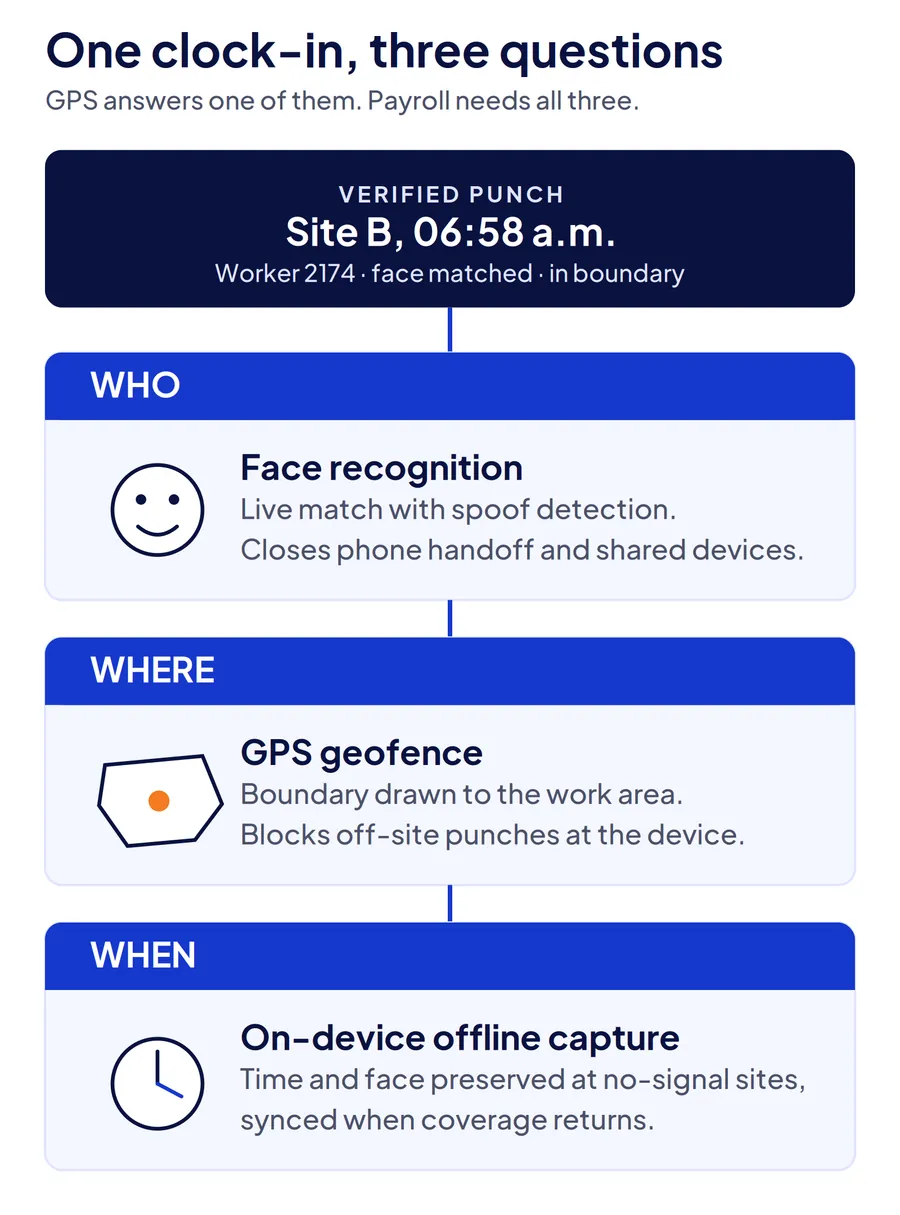
The way out is not a better geofence. Each verification layer answers a different question, and GPS answers only one:
| Layer | Question it answers | What it cannot prove |
|---|---|---|
| GPS geofence | Where the device was | Who held the device |
| Face recognition with liveness check | Who clocked in | Where they were, on its own |
| On-device offline capture | That the punch time is preserved | That the location was valid at punch time |
| Supervisor-assisted clock-in | A manager witnessed the arrival | Anything at sites the manager did not visit |
| Fixed kiosk or NFC tag | Physical presence at one point | Presence anywhere else on site |
Companies managing contract and field crews need at least two of these layers on every punch. Which two depends on the site.
What should you use instead of a GPS-only time clock?
Keep the GPS layer, add an identity check to the same punch, and match the clock-in method to the site instead of forcing one method everywhere. GPS-only fails because it stands alone, not because location data is useless.
Face recognition plus GPS on one punch
The worker's live face is matched against their enrolled template at the moment the coordinates are captured. Phone handoff stops working because the face has to be the right one. This fits crews on personal devices moving between sites, which describes most construction and field service operations.
Site kiosk with a face check
A shared tablet at the gate where every worker clocks in by face. Best for fenced sites with one entrance and high headcount. It does nothing for a worker who starts the day somewhere else. For the hardware side of that decision, see the rugged clocks and tablet kiosks compared for construction sites.
Supervisor-assisted clock-in
The foreman clocks the crew in from one device, with each worker's face captured individually. Right for linear work, remote plots, and sites with no fixed entrance, where the alternative is no record at all.
NFC or QR tag at a fixed checkpoint
A physical tag the worker taps or scans. Useful indoors where GPS is weak, such as basements and mechanical floors in facility management work. It proves presence at that point and nothing beyond it.
| Site type | Recommended method | Why |
|---|---|---|
| Crews moving between open sites daily | Face recognition plus GPS geofence on personal phones | Proves who and where on every punch without site hardware |
| Fenced site, single entrance, large headcount | Face recognition kiosk at the gate | Fast throughput, no personal device dependency |
| Linear or remote work, no entrance | Supervisor-assisted face clock-in | Captures a verified record where nothing else would |
| Indoor, low-GPS buildings | Face recognition plus NFC or QR checkpoint | Compensates for weak satellite signal |
A landscaping company rotating four crews across 20 commercial properties in a week needs the first row. A general contractor with a gated high-rise needs the second. Many companies need both, and every method has to write into one record.
How does Truein verify who and where on a single clock-in?
Truein runs a live face match and a GPS geofence check on the same clock-in, from any Android or iOS phone or shared tablet, with no dedicated hardware at the site. The face match runs on the device, so a colleague's face fails the punch on the spot, and AI fraud detection flags spoofing attempts such as a photo held up to the camera.
The geofence is configurable per site from a 20-meter radius, roughly 65 feet, and can be set separately per floor, wing, or zone so one loose circle around the address is not the only option. Clock-ins at no-signal sites are captured on the device, face match included, and sync when coverage returns, flagged as captured offline.
Supervisor-assisted clock-in and kiosk mode cover sites where personal phones do not fit, and every method writes into one record per worker. AI TimeGuard then reviews that record across sites before payroll, surfacing impossible travel sequences and identical clock-in timing for manager review.
Truein is used by 500+ customers across 10,000+ locations and 500,000+ workers. Walker Engineering, a U.S. electrical contractor, runs it across 4,000 staff and 100+ sites. The construction time tracking software page shows the site-level setup, and this breakdown of how face verification stops buddy punching on construction sites covers the identity layer in detail.
Conclusion
GPS time clocks are the right place to start monitoring job site attendance and the wrong place to stop. They prove where a punch happened, and for crews moving between sites that leaves the questions payroll actually depends on, who and when, unanswered. Add identity verification to the same punch and choose the clock-in method by site, and the exception queue stops being where your attendance controls go to die.
Frequently Asked Questions
How accurate is a GPS time clock at a job site?
Accurate to a few meters under open sky, and considerably less so near tall structures, under cover, or indoors, where reflected signals push the position off. For attendance, the geofence radius matters more than the chip: a boundary set too tight rejects workers at the site edge, and one set too loose accepts the parking lot across the street. Draw the boundary to the actual work area where the tool allows it.
Can employees fake GPS on a time clock app?
Yes, on some apps. Android includes a developer option that lets a mock-location app feed a false position to other apps on the phone, and not every time clock detects it. The more common workaround needs no software at all: handing the phone to a colleague inside the geofence. Both are closed by requiring a live face match on the same punch, because the location becomes irrelevant if the identity does not match.
Do GPS time clocks work without internet on remote job sites?
Most store the punch and its coordinates on the device and upload when the network returns. What they cannot do offline is confirm the coordinates against the site boundary, because that comparison runs on the server. Treat an offline punch as time-preserved but location-unverified until it syncs, and check whether your tool marks pending records so supervisors can tell the difference.
What is the difference between GPS tracking and geofencing for time clocks?
GPS tracking records where the phone is, either once per punch or continuously while clocked in. Geofencing is the rule applied to that position: a boundary around the site that decides whether the punch is accepted, flagged, or blocked. You can have GPS tracking with no geofence, which gives you coordinates and no control. Geofencing without enforcement is the more common gap.
Is it legal to use GPS time clocks to monitor employee attendance in the US?
Generally, yes, when location is captured during working hours for a work-related purpose and employees are informed. Requirements vary by state, and several states have notice or consent rules for electronic monitoring. Capturing a single location at clock-in carries fewer obligations than continuous tracking during the shift. Confirm your policy with employment counsel and put it in writing before rollout.
What is the best way to monitor job site attendance for crews that move between sites daily?
Face recognition combined with a GPS geofence on the worker's own phone, with every site's boundary configured and offline capture enabled. The face proves who, the geofence proves where, and the record moves with the worker from site to site. For sites that do not suit personal phones, supervisor-assisted clock-in with individual face capture fills the gap without breaking the single record.
