



How do you verify construction crews stayed on site after clock-in?
A clock-in stamp proves a worker was at the site at one moment. To verify they stayed, location tracking has to run between clock-in and clock-out, check position against the site geofence, alert a supervisor on exit, and keep a movement history. That is a narrower tool than all-day GPS and a stronger one than a punch stamp.
- The three levels of construction worker location tracking and what each one can prove
- Why a GPS-stamped clock-in cannot tell you whether the crew stayed
- The setup that verifies presence after the punch: geofence, session tracking, exit alerts, movement history
- How to handle privacy, battery, and crew acceptance, and what changes for subcontracted crews
Every superintendent has done the 10 a.m. drive-by: the timesheet says 14 clocked in at 7, the site shows nine hard hats, and nobody can say when the other five left. Construction worker location tracking exists to answer that, but most of what is sold under the name answers a different question. A clock-in stamp proves arrival. All-day GPS proves everything and alienates the crew. The useful answer sits between them.
This guide is for ops and project managers running crews across job sites. It covers what each tracking level can prove, how to set up tracking that confirms presence after the punch, and how to roll it out without a revolt.
What does construction worker location tracking actually tell you?
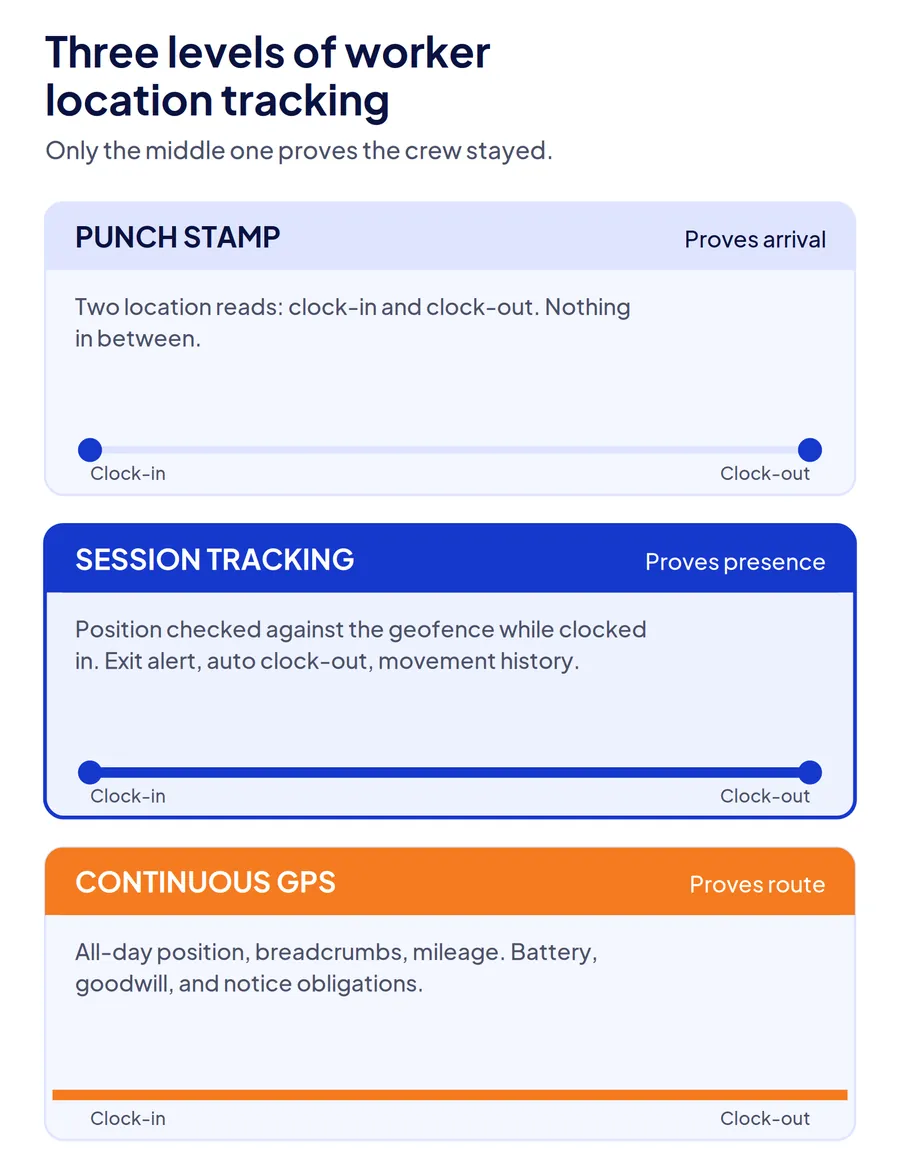
Construction worker location tracking covers three different things, and vendors selling construction workforce tracking rarely say which one they mean. A punch stamp records where the device was at clock-in. Session tracking records whether the worker stayed inside the site boundary between clock-in and clock-out. Continuous GPS records everywhere the phone went, all day, including between sites and off the clock.
| Level | What it proves | What it cannot prove | Cost to the crew |
|---|---|---|---|
| Punch stamp | The device was inside the geofence at clock-in and clock-out | Anything between the two punches | Low: two location reads a day |
| Session tracking | The worker stayed on site, left, or moved sites while clocked in | Where they were before clock-in or after clock-out | Moderate: location reads during the shift, none outside it |
| Continuous GPS | Routes, mileage, and position at any time | Nothing more about on-site presence than session tracking | High: all-day battery use and all-day visibility |
The question in this article's title is answered by the second level. The first cannot answer it at all. The third answers it and a great deal you did not ask, which is why crews resist it and why several states expect notice before you use it.
Punch stamp: proof of arrival
The worker taps clock in, the phone records coordinates, the system checks them against the site boundary. If the punch is inside, it is accepted. This is what most time clock apps mean by GPS, and it closes one problem well: a clock-in from the truck stop two exits away. The GPS time clocks guide for job site attendance covers where that single stamp fails.
Session tracking: proof of presence
Tracking starts when the clock-in is accepted and stops when the worker clocks out. In between, the phone reports position at intervals or when it moves a set distance, the system compares each report to the geofence, and a departure triggers an alert, an automatic clock-out, or both. The record shows how long the worker stayed, when they left, and whether they came back.
Continuous GPS: proof of route
Position is logged all day, with breadcrumbs between sites and mileage totals. It earns its cost where you bill travel time or reimburse mileage. Per diem is different, because it rests on which days a worker was at a remote site, the subject of our guide to tracking per diem eligibility. For the stayed-on-site question it adds nothing over session tracking, and it costs battery, goodwill, and in some states a written notice obligation.
Why does a clock-in stamp fail to prove the crew stayed?
A clock-in stamp fails because the gap it leaves is exactly where the money goes. A worker who punches in at 7:00 inside the fence and punches out at 3:30 inside the fence has produced two perfect records, and nothing in them says whether they were on site at 11:00.
Take a crew of 30 on a commercial build. If a third of them leave 45 minutes early on average and return to clock out, that is 7.5 paid hours a day the site did not receive, with every punch location-verified. Over a 20-day month it is 150 hours, and the superintendent's drive-by catches it only on the days it happens to coincide.
The second failure is silent. A worker who clocks in, works two hours, leaves, and never returns produces a missing clock-out that a supervisor fills in that evening from memory. The record ends up showing a full shift. The stamp verifies the two moments the worker is paying attention to and nothing in between.
Under the FLSA, employers are responsible for keeping accurate records of hours worked each day for non-exempt workers. A record built on two stamps and a supervisor's estimate meets the format but not the accuracy, which is one of the five timekeeping errors behind inaccurate labor hours.
How do you verify crews stayed on site after clock-in?
Verify presence with four controls that run only while the worker is clocked in: a geofence drawn to the actual work area, location tracking bound to the clocked-in session, an exit alert with an automatic clock-out, and a movement history a supervisor can review later.
Draw the geofence to the work area, not the address
A circle around the site address includes the parking lot across the street and excludes the laydown yard. Set the boundary to the ground the crew actually works, and set separate zones where one project has several work fronts. Tracking is only as useful as the boundary it checks against; a loose fence never fires an alert, and a tight one fires on every worker at the gate. Who is allowed through that gate in the first place is a separate decision, covered in our guide to controlling who enters a construction site.
Bind tracking to the clocked-in session
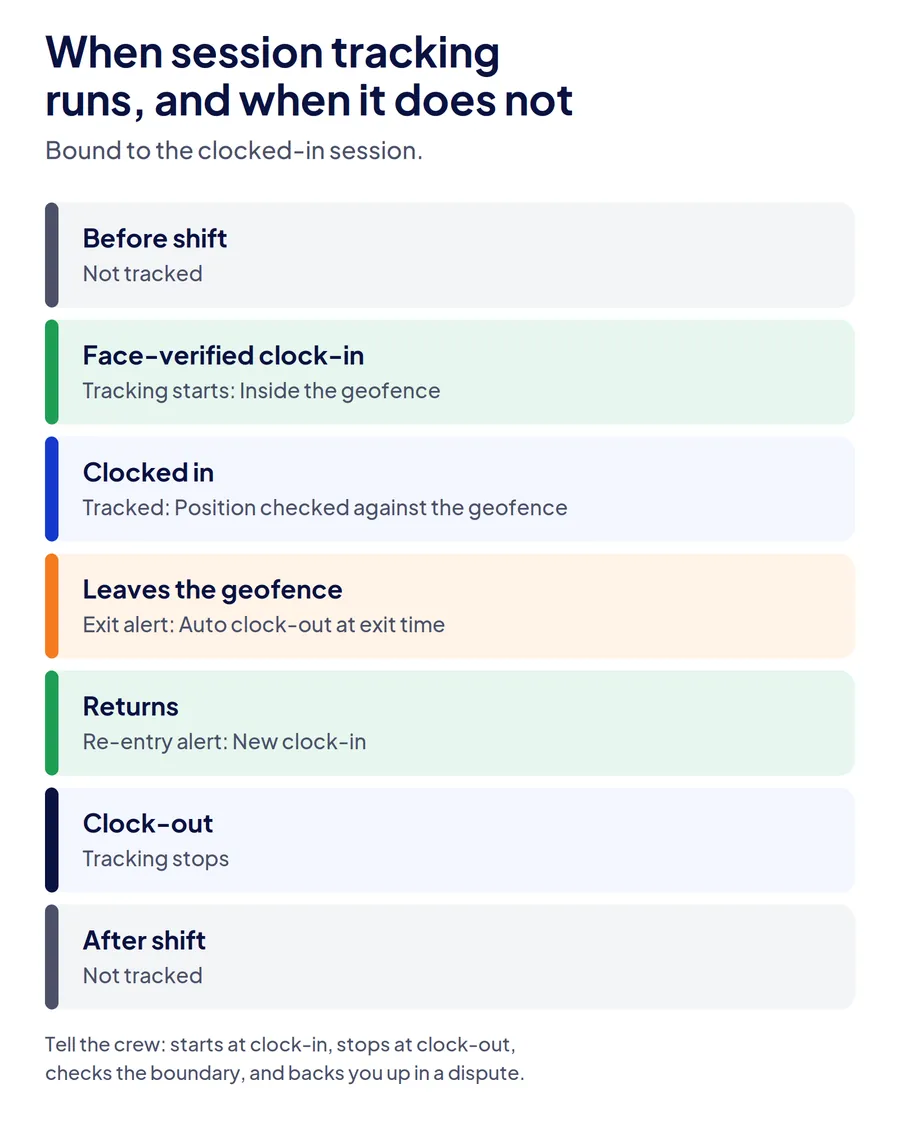
Tracking should start the moment a verified clock-in is accepted and stop the moment the worker clocks out, with nothing recorded outside that window. This is the setting that separates presence verification from surveillance, and the one to confirm first with any vendor. If tracking can run while clocked out, the crew will assume it does.
Alert on exit and clock out automatically
When a worker's position leaves the geofence during the shift, the supervisor gets an alert and the system clocks the worker out at the exit time. A return triggers a second alert and a new clock-in. The payroll effect is that the record now reflects the hours on site rather than the hours between two punches, and the supervisor hears about a departure at 11:00 instead of discovering it on Friday.
Keep a movement history with halt duration
A supervisor reviewing a dispute needs to see where the worker was and how long they stayed there, not a live dot that was accurate ten seconds ago. Movement history with halt duration answers "how long were they at the east block" without anyone having watched a map.
| What you want to know | What answers it |
|---|---|
| Did they arrive on site? | Geofenced clock-in |
| Did they leave early? | Exit alert and auto clock-out time |
| Did they come back? | Re-entry alert and second clock-in |
| How long were they at a work front? | Halt duration in movement history |
| Were they on site at 11:00? | Session tracking record for that time |
| Where did they go after clock-out? | Nothing, by design |
What about privacy, battery, and crew acceptance?
Session tracking survives rollout when three things are true: it stops at clock-out, it does not drain phones, and the crew heard the terms before the first alert fired. Each one has a technical setting and a conversation attached.
Privacy. Tracking that runs only between clock-in and clock-out gives you a plain answer to the question every worker asks: no, we cannot see your phone after you leave. Several states, including New York under Civil Rights Law section 52-c, require employers to give written notice of electronic monitoring and post it where workers can see it; whether app-based location tracking falls inside a given statute is a question for your employment counsel, but a written policy and an acknowledged notice are the right starting point in every state.
Battery. Continuous GPS is what gave location tracking its battery reputation. Session tracking that reports on movement and pauses when the worker is stationary draws a fraction of that, because a mason on a wall for two hours generates almost no pings. Ask a vendor what the phone does when the worker is not moving.
Acceptance. Tell the crew four things, in this order: tracking starts when you clock in and stops when you clock out; it checks whether you are inside the site boundary, not what you are doing; if you leave during the shift the system clocks you out and your foreman gets a message; the record is also what backs you up when a client disputes hours. Crews accept the third point far more readily once they have heard the fourth.
A facility management company rotating cleaning crews across 25 client buildings rolled out session tracking after two clients disputed invoices in the same month. The crew pushback lasted one toolbox talk, because the alternative on the table was a supervisor at every building.
How does this change for multi-site and subcontracted crews?
Construction worker tracking across multiple sites turns one geofence into several, and subcontracted crews add a supervisor who was never going to drive by. Session tracking handles both, with two settings worth getting right.
For crews moving between sites, the record should carry the site change: clock out of Site A on exit, clock in at Site B on entry, with the drive between them untracked or tracked only if you bill travel. Whether that drive has to be paid is a separate question, covered in our guide to paying construction workers for travel between sites. A crew that starts at a warehouse fit-out and finishes at a retail build should produce two site records, not one eight-hour block attributed to the first fence.
For subcontractors, the general contractor is usually verifying an invoice total rather than a record. Enrolling sub crews on the same tracking, with each sub's supervisor seeing only their own workers, turns "40 workers, 8 hours each" into a per-worker presence record the sub's own foreman can see before the invoice is sent. Disputes drop because both sides are looking at the same halt durations.
| Site scenario | Setting |
|---|---|
| Fenced site, one gate, long project | One geofence, exit alert on, auto clock-out on |
| Large site with several work fronts | Zones per work front, halt duration per zone |
| Crews moving between sites daily | Auto clock-out on exit, auto clock-in on entry at the next site |
| Subcontractor crews on a GC's site | Same tracking, scoped supervisor view per sub |
| Linear work with no fence | Supervisor-assisted clock-in, corridor geofence, exit alert off |
Where sites have no signal, position reads should be stored on the device and synced later, with the original timestamps intact. The offline attendance guide for construction sites covers what that record has to preserve.
How does Truein verify crews stayed on site?
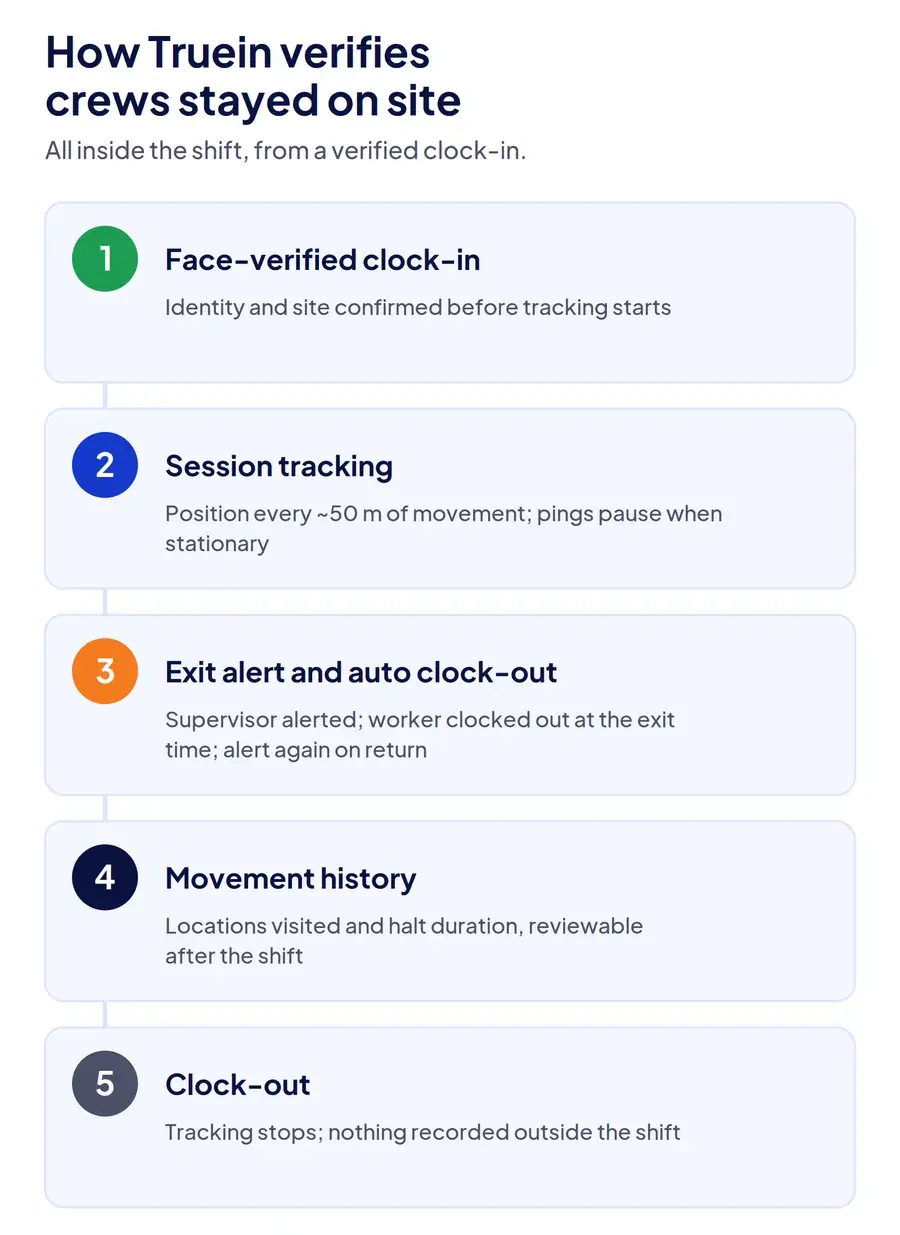
Truein's live location tracking starts only after a face-verified clock-in inside the site geofence and stops at clock-out, so the record begins with a confirmed identity and a confirmed site and covers nothing outside the shift. Position updates roughly every 50 meters of movement, depending on device and connectivity, and pings pause while the worker is stationary to protect battery.
When a worker leaves the assigned geofence during the shift, Truein clocks them out automatically and alerts the supervisor, with a second alert when they return. Supervisors see every site on one live dashboard, on web or mobile, and can open a worker's movement history to check which locations they visited and how long they stayed at each. Location data captured with no signal is stored on the device and synced once connectivity returns.
Because tracking begins only after a face match, the presence record belongs to a verified worker rather than to a phone, which closes the handoff problem a GPS-only app leaves open. Subcontractor crews run under the same account with scoped supervisor views, and verified hours export payroll-ready.
Two honest limits. Session tracking follows a phone, so workers who clock in on a shared kiosk and carry no device are verified at the punch but not tracked after it; cover them with supervisor headcounts or a clock-out at the gate. And Truein does not track vehicles, equipment, or mileage. Contractors who bill travel pair it with a fleet tool. The employee location tracking software page shows the dashboard and alert setup, and the construction time tracking software page covers the clock-in side.
Conclusion
A clock-in stamp answers whether the crew arrived. The question that costs money is whether they stayed, and it is answered by tracking that runs only while the worker is clocked in, checks position against a boundary drawn to the real work area, clocks out on exit, and keeps a history a supervisor can read later. Set it up that way, tell the crew the terms before the first alert fires, and the 10 a.m. drive-by becomes a notification you read from the office.
Frequently Asked Questions
Is it legal to track construction workers' location in the US?
Generally yes, when tracking happens during working hours for a work-related purpose on a device the worker has agreed to use, and the worker has been told. Requirements vary by state; New York, Connecticut, and Delaware require written notice of electronic monitoring, and other states have consent rules for tracking personal devices. Limit tracking to clocked-in hours, put the policy in writing, collect an acknowledgment, and confirm the setup with employment counsel before rollout.
Can I track workers after they clock out?
You can, and you should not. Tracking that continues after clock-out turns a presence check into surveillance, is harder to justify under state notice laws, and is the single feature most likely to make a crew leave phones in the truck. Session tracking that stops at clock-out answers every on-site question without it.
Does worker location tracking drain phone batteries?
Continuous GPS does. Session tracking that reports on movement and pauses when the worker is stationary draws far less, because most of a construction shift is spent within a few meters of one spot. Ask a vendor what the app does while the worker is not moving, and test it on one crew's phones for a week before rollout. For a side-by-side look at seven options, including how each one handles stationary pings, see our guide to apps for tracking employee location.
What happens when a worker leaves the geofence during a shift?
In a system set up for presence verification, the worker is clocked out at the exit time and the supervisor gets an alert. If the worker returns, a second alert fires and a new clock-in starts. Payroll then reflects time on site rather than time between two punches, and the supervisor can act on the departure the same hour.
How is this different from GPS time tracking?
GPS time tracking records the worker's location at the moment of clock-in and clock-out and checks it against the site boundary. Location tracking during the shift adds what happens between those punches: whether the worker stayed, left, or moved sites. The first proves arrival; the second proves presence.
Can subcontractor crews be tracked the same way?
Yes, if they are enrolled on the same system with their own supervisor's access scoped to their crew. The general contractor sees presence by site and contractor, the sub's foreman sees only their workers, and both reconcile the invoice against the same record instead of against a total.
