



What are payroll accuracy metrics?
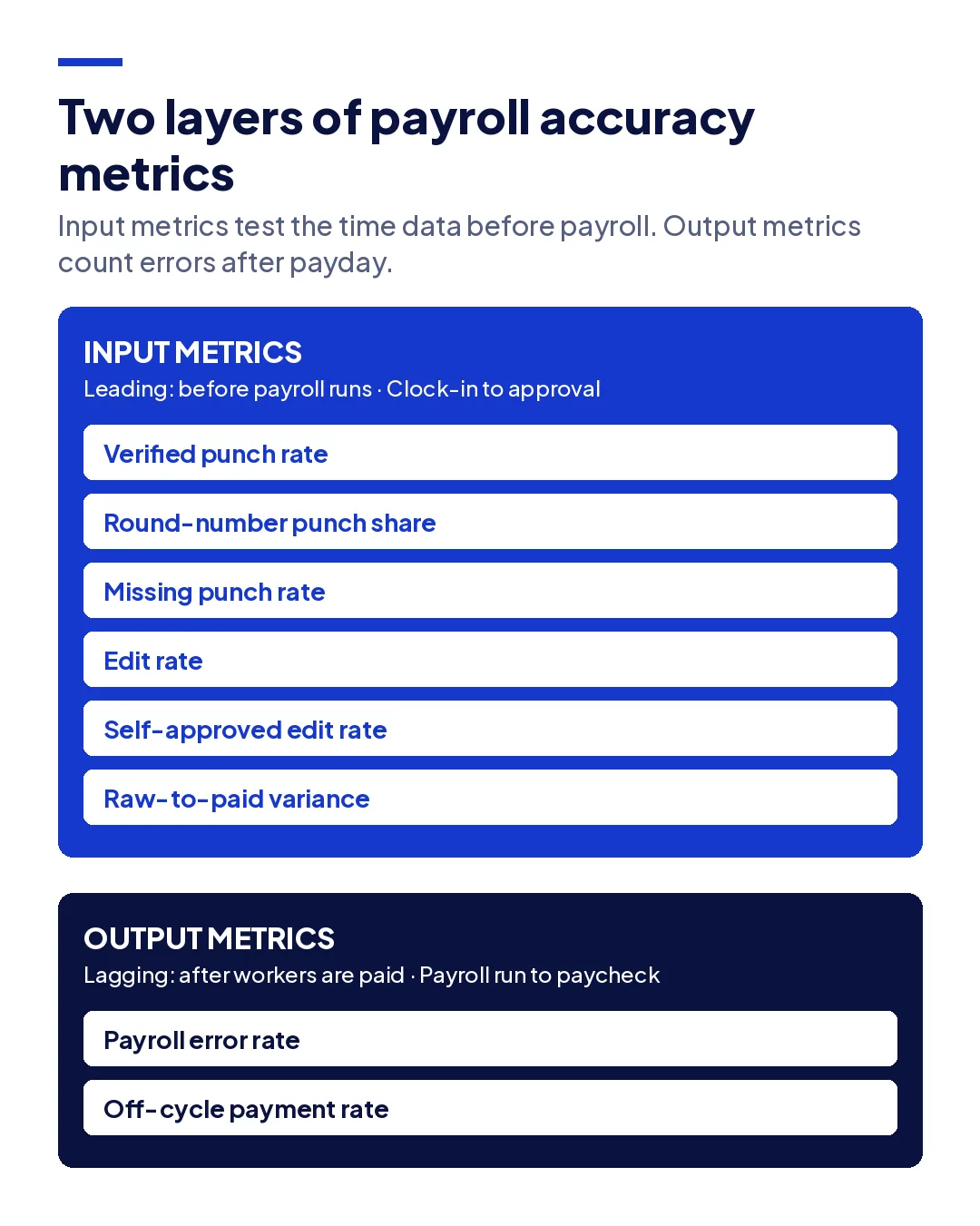
Payroll accuracy metrics measure how often workers are paid the right amount and whether the hours behind each paycheck can be proven. The useful set has two layers: output metrics, such as payroll error rate, that count mistakes after payday, and input metrics that test the time data before payroll runs.
- Why the usual payroll KPIs catch errors only after workers are paid
- Six input metrics that test whether time data can be trusted, with formulas
- The round-number test that exposes hours written from memory
- How to turn raw-to-paid variance into a dollar figure
- A monthly scorecard, who should own it, and what to do when a number moves
Ask a payroll team how accurate their payroll is and most will quote a number close to 99%. Ask how they know, and the answer is usually that few workers complained. That measures how many errors were noticed, not how many were made. A worker paid for 15 minutes they did not work never complains.
This guide is for payroll managers, controllers, and operations heads running hourly workforces across sites. It sets out payroll accuracy metrics in two layers: the output metrics most teams already track, and the input metrics that test whether the time data behind payroll can be trusted at all.
What are payroll accuracy metrics?
Payroll accuracy metrics are the numbers that tell you whether workers are paid correctly and whether you could prove it. Most published lists focus on the paycheck: error rate, corrections, late payments. Those are real, but they are lagging measures. By the time one moves, the money has already gone out.
Payroll is a calculation, and a calculation is only as good as its inputs. Rates, tax tables, and overtime rules are set once and checked rarely. Hours change every shift and are touched by workers, supervisors, and payroll before they are paid. For an hourly workforce, most payroll errors are time data errors that payroll then calculates perfectly.
That is why useful payroll accuracy metrics come in two layers:
- Output metrics count errors that reached a paycheck. They tell you how often you were wrong.
- Input metrics test the time record before payroll runs. They tell you how often you are likely to be wrong, and where.
Why do standard payroll KPIs miss most errors?
Standard payroll KPIs miss most errors because they only see errors someone reports. An underpayment usually gets reported, because the worker notices. An overpayment almost never does. A missed overtime premium gets reported only if the worker counts their own hours. So the measured error rate is a floor, not an estimate.
There is a second blind spot. A payroll error rate treats a paycheck as correct if it matches the approved timesheet. If the approved timesheet was wrong, because a foreman wrote 7:00 for a crew that arrived at 7:20, the paycheck is "correct" and the error is invisible. Most of the five errors behind inaccurate labor hours never show up in payroll KPIs at all.
The cost of those invisible errors is payroll leakage: small amounts paid for hours nobody can prove, repeated every pay period. Output metrics cannot see it. Input metrics can.
The eight payroll accuracy metrics worth tracking
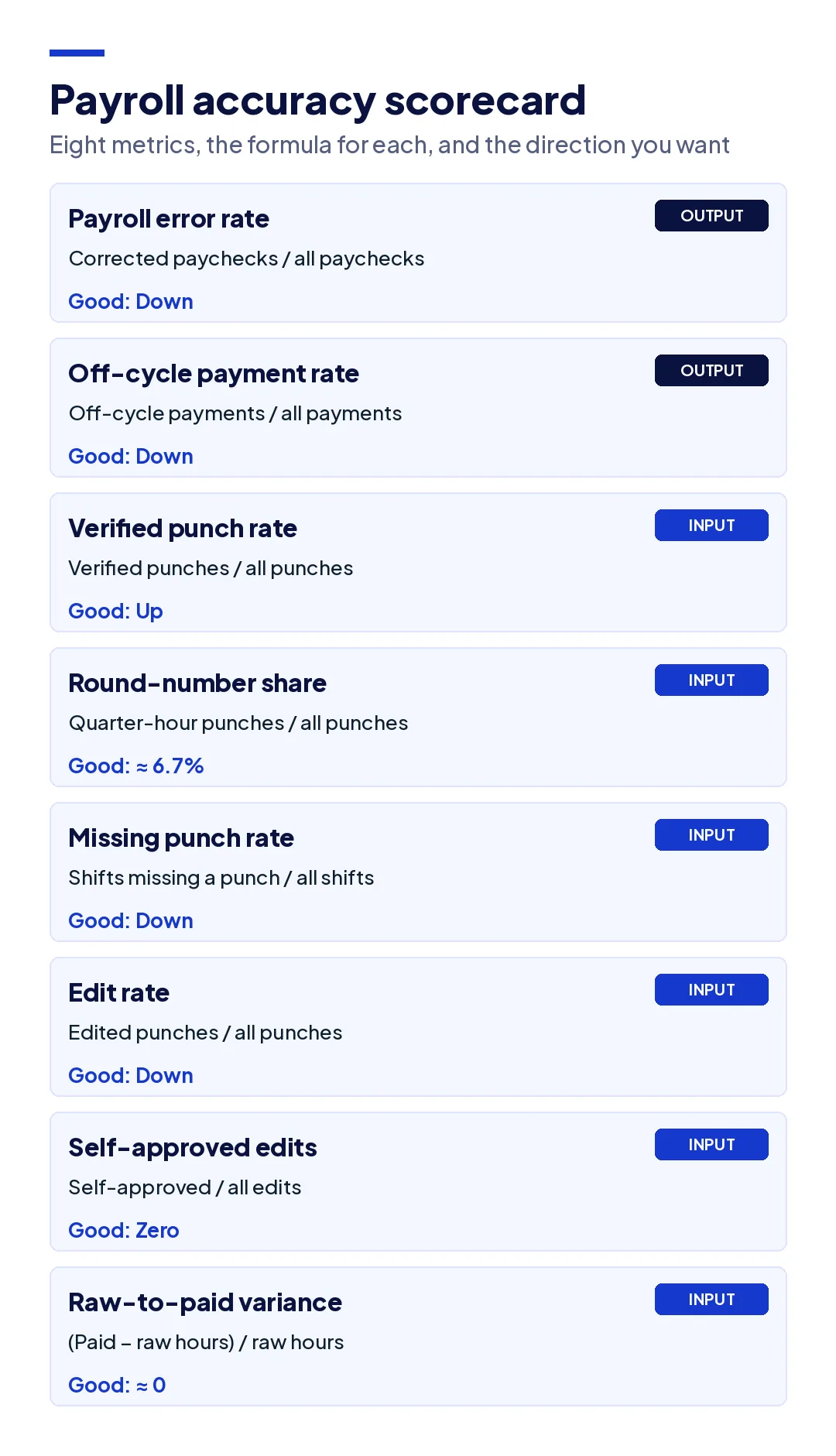
These eight metrics cover both layers. The first two are output metrics. The other six test the time data, and are the ones most payroll teams do not track yet.
| Metric | Formula | What it reveals | Good direction |
|---|---|---|---|
| Payroll error rate | Paychecks corrected after payday / total paychecks | How often errors reach workers | Down |
| Off-cycle payment rate | Manual or off-cycle payments / total payments | The cost of fixing errors late | Down |
| Verified punch rate | Punches with verified identity and location / total punches | How much of the record can be proven | Up |
| Round-number punch share | Punches on :00, :15, :30, or :45 / total punches | Hours written from memory | Near 6.7% |
| Missing punch rate | Shifts with a missing clock-in or clock-out / total shifts | Gaps someone will fill by guessing | Down |
| Edit rate | Edited punches / total punches | How often the record is changed | Down, and flat before cutoff |
| Self-approved edit rate | Edits approved by the person who made them / total edits | Whether edits are controlled | Zero |
| Raw-to-paid variance | (Paid hours minus raw punched hours) / raw punched hours | Hours paid that the punches do not support | Near zero |
1. Payroll error rate
Count paychecks that needed a correction after payday, for any reason, and divide by total paychecks in the period. Track it by site and by cause: hours, rate, deduction, or tax. A single company-wide figure hides the one site producing most of the corrections.
2. Off-cycle payment rate
Manual checks and off-cycle runs are what errors cost to fix. Each one takes payroll time, and some carry bank or provider fees. A rising off-cycle rate with a flat error rate usually means errors are being found later, not that there are fewer of them.
3. Verified punch rate
This is the share of punches where the system confirmed both who clocked in and where they were. A PIN, a badge, or a paper sheet proves neither. A GPS stamp proves where a phone was, not who held it, which is how buddy punching survives on GPS-only apps. This metric sets the ceiling for every other one: hours you cannot verify are hours you cannot defend.
4. Round-number punch share
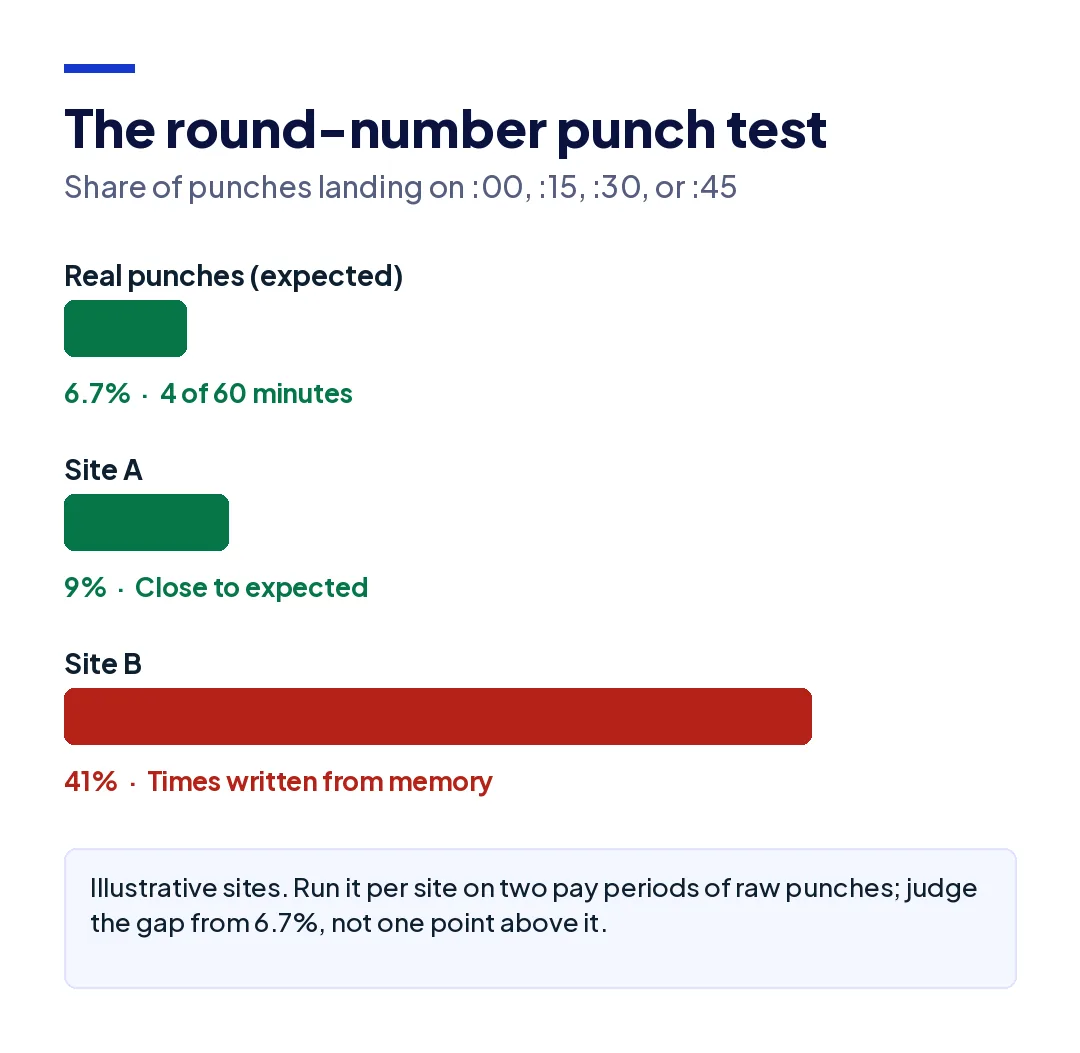
This is the simplest test of whether time data is real, and almost nobody runs it. A worker who clocks in when they arrive lands on any minute of the hour with roughly equal likelihood. Four of the 60 minutes are :00, :15, :30, and :45, so in real punch data about 6.7% of punches fall on a quarter hour.
If 40% of your punches land there, those times were not captured at the moment of work. They were written down later, usually by a supervisor filling in a crew sheet from memory. Run this per site. A site at 7% and a site at 60% are using two different processes, whatever the policy says. Scheduled kiosk lines can push the share up a little at shift start, so judge the gap, not a single point above 6.7%.
5. Missing punch rate
Count shifts with a clock-in but no clock-out, or the reverse, and divide by total shifts. Every missing punch is filled by someone guessing, and the guess is rarely in the company's favor. A missing punch rate that is high on one site and low on another usually points to a device, connectivity, or habit problem at that site, not a company-wide one. Where signal is the cause, offline attendance that keeps the original time when it syncs closes the gap.
6. Edit rate
Edited punches divided by total punches. Edits are not wrong in themselves; phones die and workers forget. What matters is the trend and the timing. A falling edit rate means capture is improving. A spike in edits in the 48 hours before the payroll cutoff means exceptions are being cleared in a hurry rather than reviewed, which is the pattern a sound timesheet approval workflow is designed to prevent.
7. Self-approved edit rate
The share of edits approved by the same person who made them. The target is zero. A supervisor who adjusts a punch and then approves that timesheet has checked their own work, and that is both how honest mistakes go uncaught and how deliberate ones go unnoticed. If your system cannot report this number, it cannot enforce the control either.
8. Raw-to-paid variance
Compare total hours paid to total hours in the raw punches for the same period. The difference is hours that were added, removed, or rounded between the clock and the paycheck. Some variance is legitimate, such as approved corrections for a missed punch. Unexplained variance is the most direct measure of leakage you have.
Put a dollar figure on it. Take a workforce of 200 hourly workers paid $25 an hour, working 40 hours a week: 8,000 hours. A raw-to-paid variance of 1.5% is 120 hours a week, or $3,000. Over 52 weeks that is $156,000 in hours the punches do not support, before payroll taxes. Nobody filed a complaint about any of it.
How do you set up a payroll accuracy scorecard?
Start with what you can pull today, measure for two pay periods before changing anything, and give each metric an owner. A scorecard that nobody owns is a report that nobody reads.
- Pull raw punches, not approved timesheets. Every input metric depends on seeing the record before anyone edited it. If your system only keeps approved totals, that is the first finding.
- Calculate each metric by site. Company-wide averages hide the sites that drive the problem.
- Set a baseline over two pay periods. Judge each number against your own starting point, not an industry figure.
- Assign owners. Input metrics belong to operations, because they are set at the site. Output metrics belong to payroll and finance.
- Review weekly, report monthly. Input metrics move fast and need a weekly look. Output metrics move slowly and suit a monthly report.
| Metric group | Owner | Review |
|---|---|---|
| Verified punch rate, round-number share, missing punch rate | Operations, by site | Weekly |
| Edit rate, self-approved edits | Operations and payroll together | Weekly, and before every cutoff |
| Raw-to-paid variance | Payroll | Every pay period |
| Payroll error rate, off-cycle payments | Payroll and finance | Monthly |
These metrics sit alongside, not inside, the broader workforce numbers in the HR metrics guide. Turnover and absenteeism tell you about the workforce. Payroll accuracy metrics tell you whether the record of that workforce can be believed.
What mistakes make payroll accuracy metrics misleading?
A scorecard can look healthy and still be wrong. Five mistakes account for most of the misleading numbers.
- Measuring approved hours instead of raw punches. Once a timesheet is approved, the evidence of what changed is gone. Every input metric has to start from the record before anyone touched it.
- Reporting one company-wide figure. A 3% edit rate across 20 sites can be 1% on 18 of them and 20% on two. The average tells you nothing about where to act.
- Counting only reported errors. If the payroll error rate comes from worker complaints, it measures underpayments and misses overpayments. Pair it with raw-to-paid variance, which catches both.
- Setting a hard target on edit rate. Tell supervisors edits must fall below a number and some will stop recording corrections in the system, fixing hours in a side spreadsheet instead. Watch the trend and the timing, not a quota.
- Changing the process and the measure at once. If you roll out a new clock-in method in the same month you start tracking, you cannot tell which change moved the number. Take the baseline first.
The common thread is that payroll accuracy metrics only work when they are measured from data that nobody had a reason to change. That is also why the input layer has to come from the punch itself, not from a report someone prepared for the meeting.
What should you do when a payroll accuracy metric moves?
Read the input metrics together, because the combination tells you the cause:
- High round-number share and low edit rate: hours are being written up later and entered as if they were punches. The fix is capture at the moment of work.
- High missing punch rate on one site: a device, signal, or habit problem at that site. Check connectivity and how workers clock in there before retraining anyone.
- Edit rate spikes before cutoff: exceptions are not being reviewed daily. Move the review earlier rather than adding reviewers.
- Self-approved edits above zero: a control gap. Route edits to a second approver.
- Raw-to-paid variance up, everything else flat: changes are happening after approval, often in payroll itself. Check who can edit locked periods.
- Low verified punch rate: every other number is resting on trust. Fix identity and location at the punch first.
Subcontracted and agency labor needs its own line on the scorecard. When a sub's hours arrive as an invoice total, you have no punches to measure at all, which is the gap subcontractor time tracking is meant to close. Under the FLSA recordkeeping rules, your own records must show hours worked each day and each workweek; a record you cannot test is one you cannot defend. On regulated work, the wider set of payroll compliance rules for contractors depends on the same record.
How does Truein improve payroll accuracy metrics?
Truein is a face recognition and GPS-based time and attendance platform for contract and multi-site workforces, used by 500+ customers across 10,000+ locations and 500,000+ workers. It works on the input layer: it raises the share of hours that can be verified before they ever reach payroll.
Workers clock in with a live face match inside a GPS geofence on their own Android or iOS phone or a shared tablet kiosk, with no dedicated hardware, so each punch carries a verified identity, a site, and the time it happened. That moves verified punch rate toward every clock-in and brings round-number share back toward what real punches look like. Offline punches are captured on the device and keep their original time when they sync. Smart Capture Rules flag late, off-site, duplicate, and missing punches as they happen.
Every edit keeps the original punch with the editor and reason attached for approval, so edit rate, self-approved edits, and raw-to-paid variance can all be measured from the record. AI TimeGuard reviews attendance across sites before payroll, surfacing repeated corrections, overtime spikes, identical clock-in timing, and impossible travel. Verified hours export to payroll systems including ADP, QuickBooks, Sage, Paychex, Xero, and Trimble.
Two honest limits. Truein is not payroll software, so rate, deduction, and tax errors stay with your payroll system and team. And it reports the record; deciding which metrics go on your scorecard, and what counts as acceptable for your business, is your call. The time and attendance system page shows the full setup.
Conclusion
A low complaint count is not proof of accurate payroll. It is proof that the errors you make are the ones workers do not notice. Output metrics tell you how often you were wrong after the money left. Input metrics tell you, before payroll runs, whether the hours are real.
Start with three payroll accuracy metrics this week: round-number punch share, edit rate before cutoff, and raw-to-paid variance. Run them by site on two pay periods of raw punches. The sites that stand out will tell you where to start, and the scorecard will tell you whether it is working.
Frequently Asked Questions
How do you calculate payroll accuracy?
The usual formula is paychecks paid correctly divided by total paychecks, times 100. That measures output only. To test whether payroll can be trusted, also calculate raw-to-paid variance: paid hours minus raw punched hours, divided by raw punched hours. A high accuracy rate with a large unexplained variance means errors are being paid, not caught.
What is a good payroll accuracy rate?
Most payroll teams aim for an error rate well under 1% of paychecks, but the reported figure only counts errors someone noticed. Judge it alongside input metrics such as verified punch rate and raw-to-paid variance, measured against your own two-period baseline rather than a published benchmark.
What are the most important payroll KPIs?
For hourly workforces, the most useful payroll KPIs are payroll error rate and off-cycle payment rate on the output side, and verified punch rate, missing punch rate, edit rate, and raw-to-paid variance on the input side. The input metrics matter most because they find errors before payday.
What causes most payroll errors?
For hourly and shift-based workforces, most payroll errors start in time data: hours written from memory, punches made for someone else, missing clock-outs, and edits with no trail. Rate and tax errors also happen, but they are set once and repeat predictably, while time errors change every shift.
How often should payroll accuracy metrics be reviewed?
Review input metrics, such as missing punches and edits, weekly and before each payroll cutoff, because they move quickly and are cheapest to fix the same week. Review output metrics, such as payroll error rate, monthly with finance.
What is the round-number punch test?
It checks what share of clock-in and clock-out times fall on :00, :15, :30, or :45. Real punches spread across the hour, so about 6.7% should land on those four minutes. A much higher share shows times were written down after the fact rather than captured when work started.